Running a One-Person Video Operation for Multiple Clients
AI tools let solo operators scale to 6-10 clients by slashing production costs and time.
A one-person video operation used to hit a ceiling fast. Time-per-video was fixed, so client count was fixed too. That ceiling is gone, and the math behind it is worth walking through slowly.
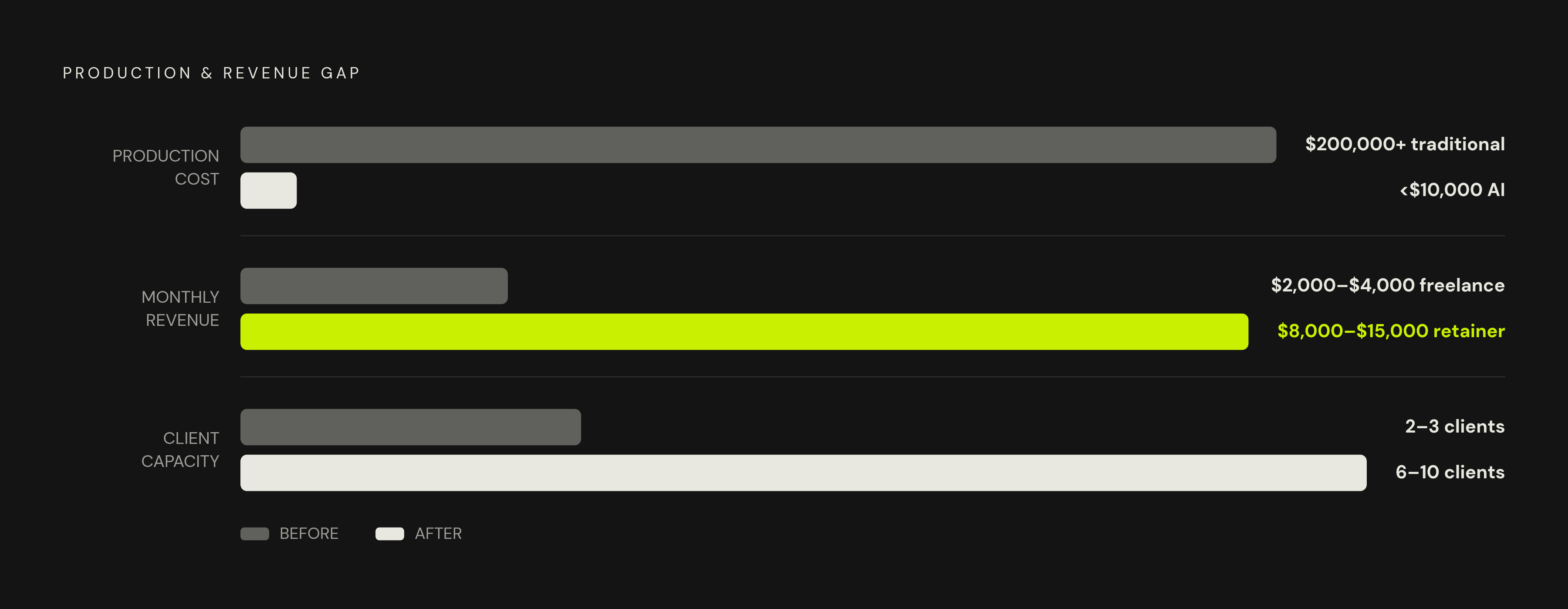
Documented AI productions run well under ten thousand dollars all-in. A traditionally shot commercial, the kind with a crew, a rented space, and a color house, runs well into the hundreds of thousands. That gap broke the old link between cost and output. Here's the part that actually matters for anyone working solo: client-facing prices haven't fallen anywhere near that same rate. Clients still pay close to what they always paid for a good video. So the gap between what it costs to make and what a client pays for it, that gap is the operator's margin now, and it's wider than it's ever been.
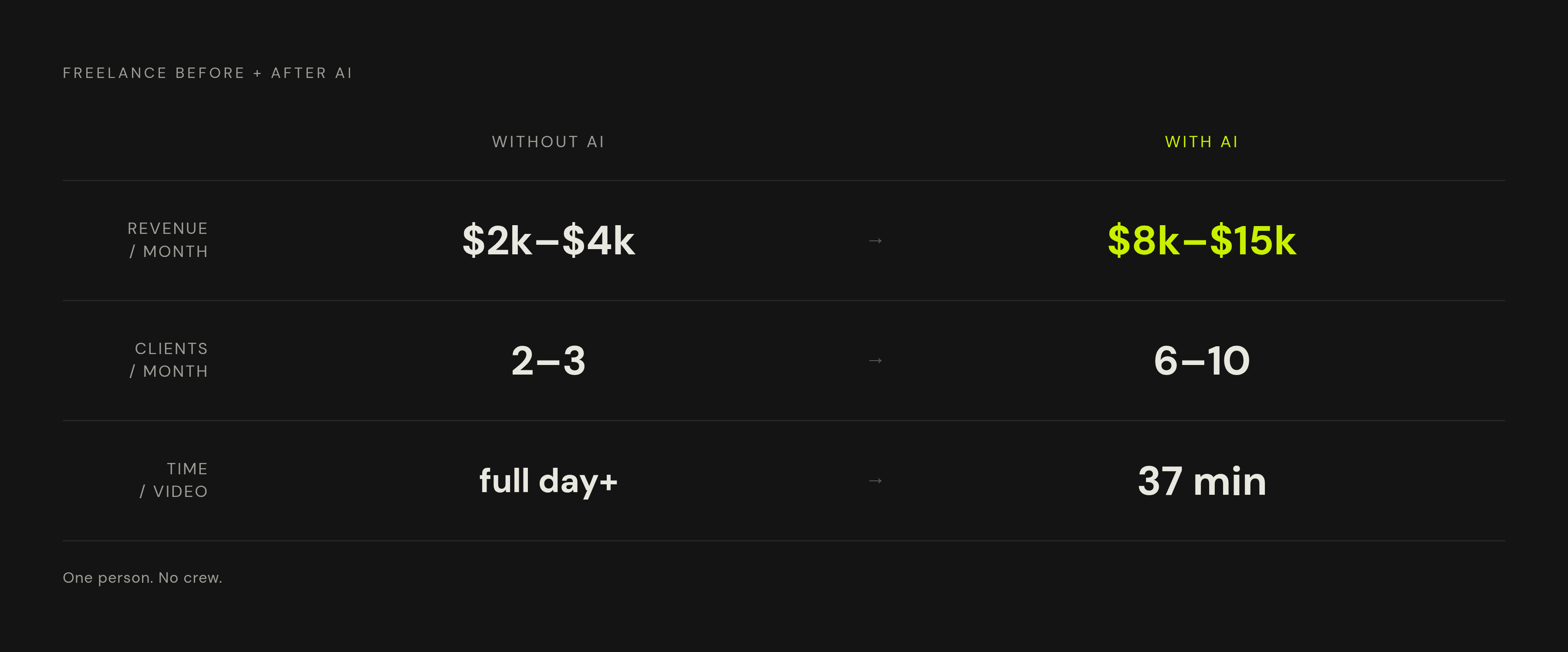
Teams that adopted AI tools report producing five to ten times more content in the same hours. Put a number on that for someone working solo: 80 to 120 hours a month, 3 to 4 hours per video with an AI-driven workflow, turns into 20 to 40 finished videos in that window. Compare that to the ceiling most freelance editors hit doing things the old way: $2,000 to $4,000 a month, maybe 2 or 3 clients, because every video still eats a full day or more of hands-on cutting.
Package that into productized retainers at $1,200 to $3,000 per client, and one person can carry 6 to 10 clients at once. That's an $8,000 to $15,000 monthly business, run alone, with no crew and no agency overhead sitting on top of it.
Production capacity stopped being the bottleneck. Decision-making speed and workflow design took its place instead. Anyone can spit out a video fast now, but fewer people can spit out the right video fast, on the first or second try, without burning an hour deciding which tool or prompt to reach for. That's the skill the rest of this piece is built around.
The productized retainer as the business model that makes scale possible
Per-project pricing punishes solo operators in a way that never shows up on an invoice. Every new project means re-scoping the work, re-pricing it, re-onboarding the client, relearning their brand and their preferences from scratch. That's real labor, and none of it produces a single frame of video.
Retainers flip that. Fixed scope, fixed monthly fee, templates built once and reused every cycle. Subscription-based production cuts per-asset cost by 30 to 40% against project pricing, mostly because the fixed costs, the brand kit setup, the intake, the style presets, get spread across many deliverables instead of paid for fresh each time.
A productized retainer, in practice, looks like this:
- A defined monthly deliverable, say 4 short-form social videos plus 1 explainer, agreed on upfront
- A fixed intake form instead of a custom brief written from scratch for every job
- Pre-built templates per content type, where the client fills in variables and the operator runs the workflow
- One revision round baked into the price, not negotiated after the fact
Pricing usually breaks into tiers: entry-level with a lighter deliverable mix, mid-range for clients needing steadier output, premium bundling in strategy calls or faster turnaround. The tiers matter less than the discipline behind them. Scope stays fixed, price stays fixed, and nothing gets renegotiated line by line every month. That's the whole point.
Skip the retainer model and keep chasing one-off projects, and the sales cycle never stops: re-pitching every few weeks, idle months between jobs, no compounding advantage from having done this client's work before. A retainer kills that cycle outright. Every workflow built for a given client gets a little faster and a little cleaner each round, because it's the same shots, the same brand, the same review process, run again and again. Lock the deliverables in, and the system underneath them gets built once and reused indefinitely. That system is the subject of the next section.
Structuring the intake and briefing process so every client project starts the same way
Here's how a solo operation quietly falls apart: every client project starts differently. One client sends a voice memo. Another sends a Google Doc. A third just says "make something like our last one but better." Each of those kicks off a slightly different process, and a slightly different process means reinventing part of the workflow every single time.
A standardized intake form fixes this at the root. It's the one document that turns a loose idea into something a production pipeline can actually run with. The fields matter: target audience, platform and format, tone and visual references, the key message in one sentence, any brand assets that must appear, the deadline. Making the client answer these before any work starts puts the thinking on them, instead of the operator dragging it out over three rounds of back-and-forth.
From there, a brief template converts intake answers into a production brief with a fixed shape: a script slot, a shot breakdown slot, a reference slot, an audio mood slot. Same structure, every time, no matter the client.
Audio deserves its own callout, because it's where solo workflows quietly break. Message, visual language, and audio mood need planning together at the brief stage, not bolted on in post. Operators who leave audio for later end up running two workflows that don't talk to each other, and that disconnect is exactly what slows approvals down.
Build one more piece just once: a client onboarding kit. Brand guidelines, approved fonts and colors, reference videos, preferred platforms. Collected at the start of the relationship, referenced on every project after that, never rebuilt.
The payoff goes past tidiness. An operator can sit down and brief four or five clients in one sitting, same form, same mental process each time, instead of switching between client "modes" all week. That brief then feeds straight into production, with no translation step and no guessing what the client meant.
The core production workflow: script to delivery in repeatable stages
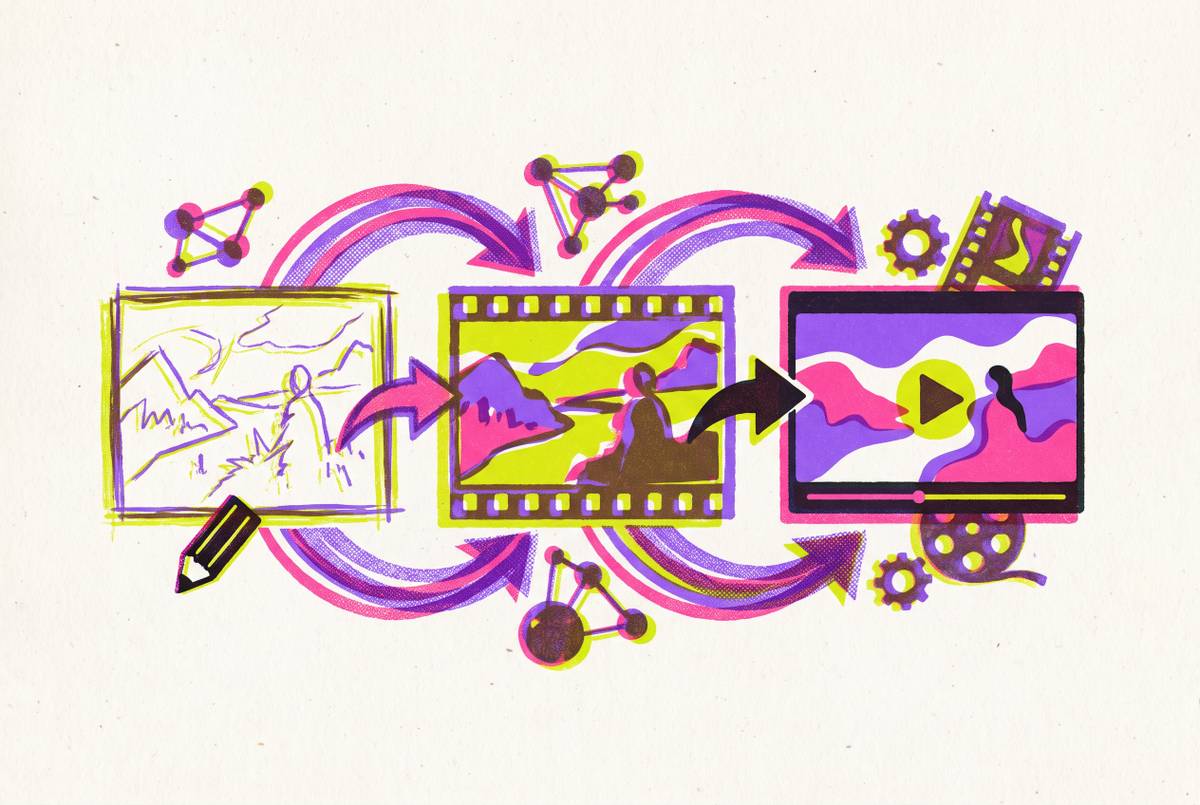
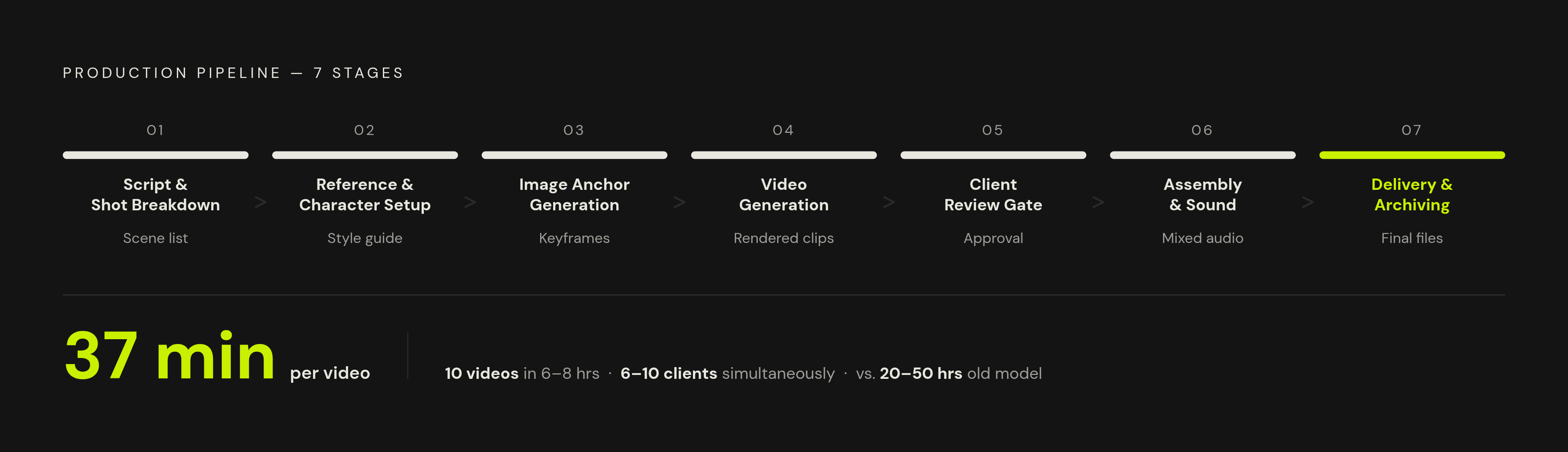
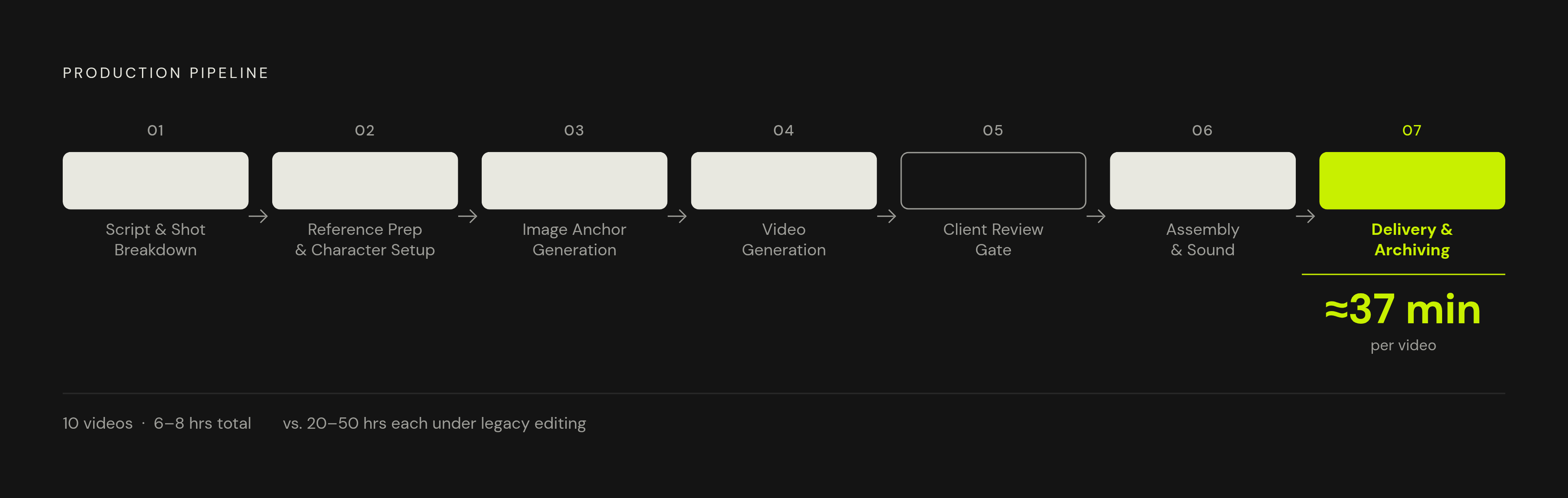
The workflow studios and solo operators both lean on runs in a fixed order: script, shot breakdown, references, generation, review, assembly, delivery. Each stage has a specific tool attached and a specific action to take. Nothing gets improvised halfway through.
Stage 1, script and shot breakdown. Start from the brief. Write or generate a script that fits the platform's format: duration, pacing, hook structure. Break that script into a shot-by-shot list, where every shot gets a visual description, a duration, a camera feel, an audio note. That shot list, not the script, is what actually feeds generation.
Stage 2, reference prep and character setup. Pull visual references for each scene: style, lighting, color mood. If the client needs the same face or the same branded character across multiple videos, build a character sheet or anchor image now. This front-loaded work pays off directly in fewer retakes and fewer wasted generation credits down the line.
Stage 3, image anchor generation. Generate keyframes before touching video generation, since image quality drives image-to-video output almost entirely. FLUX.2 from Black Forest Labs has become the go-to open-weights image model for branded and e-commerce work, largely because Open-source image models run 60 to 90% cheaper per image at scale compared to proprietary APIs.
Stage 4, video generation. Pick the model by shot type, not by habit; that distinction gets its own section below. Run three to five takes per scene, keep the best, cut the rest. Generation jobs slot into a queue, so multiple scenes render while the next brief gets written.
Stage 5, client review gate. Share a rough cut, not a polished one, for directional sign-off before sinking more time into post. One structured feedback round, collected through a fixed form or a timestamped comment tool, keeps revisions bounded instead of open-ended.
Stage 6, assembly and sound. Assemble the approved clips, add narration, music, sound effects, captions. Run an enhancement pass, color, pacing cuts, transitions, pulled from a saved style preset built for that specific client.
Stage 7, delivery and archiving. Export in the right formats for the platform, deliver through a shared folder with consistent file naming. Archive the whole project, brief, references, source files, so the next job for that client starts from an existing folder instead of a blank page.
The throughput is the whole point: 10 videos in 6 to 8 hours of total work, roughly 37 minutes per video, against 20 to 50 hours each under the old editing model.
Keeping the core generation, editing, and export steps inside a unified workflow removes the fragmentation that quietly eats a solo operator's time, the minutes lost moving files between apps.
Choosing the right AI video model for each shot type
No single model does everything well, and treating one like a universal tool costs real time. The professional default by 2026 is multi-model: Seedance for the product close-up, Kling for the character beat, Veo for the wide establishing shot that needs ambient sound baked in.
Native audio changed this more than anything else. As of early 2026, 4 of the 6 major AI video models generate synchronized audio directly, up from zero of them a year earlier. That shift is exactly what decides which model belongs on which shot.
Google Veo 3.1 handles photorealistic, cinematic footage with native audio built in. It's the right call for establishing shots, hero moments in commercial work, anything where ambient sound needs to land in sync with the visual. Veo models video and audio together, so there's no separate audio step tacked on after the fact. It's close to the industry standard now for high-end commercial work that demands strict prompt adherence. The trade-off: it runs slower and pricier per clip than the alternatives, and paying that premium on a shot that doesn't need it is wasted money.
Kling 3.0 is built for volume. Character beats, human motion, stylized or animated looks, bulk generation passes where quantity matters as much as polish. Pricing lands around $0.50 for a finished 10-second clip at the standard tier, generating in roughly 60 to 90 seconds per clip.
Seedance 2.0 targets commercial content where consistency across multiple shots is the priority. It's also become the practical migration path for anyone who used to lean on Sora; OpenAI shut down the Sora app and web product in April 2026, with the API set to fully deprecate in September 2026. Any workflow still built around Sora needs a plan to move off it, and that plan mostly lands on Seedance alongside Veo 3.1.
Wan 2.7 is the open-source option, built for high-volume pipelines where cost control matters more than polish, making it a practical fit for large batch jobs where every clip doesn't need to be a showcase piece.
The rule stays simple: match the model to what the shot needs, not to whichever tool feels familiar that week. Build a one-page cheat sheet, shot type mapped to model, specific to the mix of clients on the books. That sheet is what saves the mental overhead of re-deciding this on every single project.
Managing multiple clients without context-switching killing your throughput
Running 6 to 10 clients solo isn't one job done ten times in a row. It's ten parallel queues, each sitting at a different stage, all demanding attention at slightly different moments. That's the real operational challenge, and it has nothing to do with video production skill.
Client isolation is the fix. Each client gets its own folder structure: brief, brand kit, reference archive, project log, fully self-contained. Done right, switching from one client's work to another's takes under two minutes, not twenty.
A weekly rhythm enforces that structure:
- One day for intake and briefing, across every active client at once
- One or two days for generation, queuing multiple jobs in parallel while prepping the next brief
- One day for assembly and post, across all projects at once
- One day for delivery, feedback responses, and client communication
Batching is what makes this actually work. Brief every client in one sitting, generate every queue in one sitting, assemble every project in one sitting. The moment work gets split up and interleaved between clients mid-task, focus fragments and speed drops with it.
Client feedback is usually the longest wait in the whole system, so design around that directly instead of hoping it resolves itself. Put every client on the same weekly review cadence: feedback due by a fixed day, revisions delivered by a fixed day. No client gets to set their own timeline outside that structure, full stop.
Communication needs the same discipline. Templated status updates, a shared project dashboard, one async channel per client, keeps things from scattering across email, chat, and phone calls. When one client's questions arrive through three different channels, that's three places to check instead of one, and that's how things get missed.
There's a ceiling even a well-run system hits eventually. The fix at that point is a hire: bringing on one virtual assistant or junior editor to handle asset organization and export prep can roughly double effective throughput, from 20 to 40 videos a month up to 40 to 80, without adding any creative decision-making load to the business.
Building templates and SOPs so the work runs without reinventing anything
Every template built once is an asset that pays out on every project after it. That compounding effect is what separates an operator running 10 clients from one stuck at 3.
A script template for each content type, an intake form that never needs rewriting, a shot-breakdown format, a style preset per client, a model cheat sheet, a delivery checklist: none of this is creative work. It's infrastructure, and the point is to build it once and reuse it hundreds of times.
Treating every project like a fresh creative challenge feels right, and it's also exactly what keeps a solo operation capped at a handful of clients. The creative calls that actually matter, tone, message, the story a video tells, deserve full attention every time. The scaffolding around them, how the brief gets collected, how shots get named, how files get delivered, needs documenting once, in enough detail that a tired version of the operator six months from now, or a new hire on day one, can follow it without stopping to remember why any of it works.
The video itself got cheap and fast to make. What separates the operator making $8,000 a month from the one making $80,000 a month comes down to who built the system underneath the work, so the work never starts from zero again.