Storyboard-to-Video Pipeline Using AI Image and Video Models
Human teams maintain creative control by locking storyboards before AI generates video.
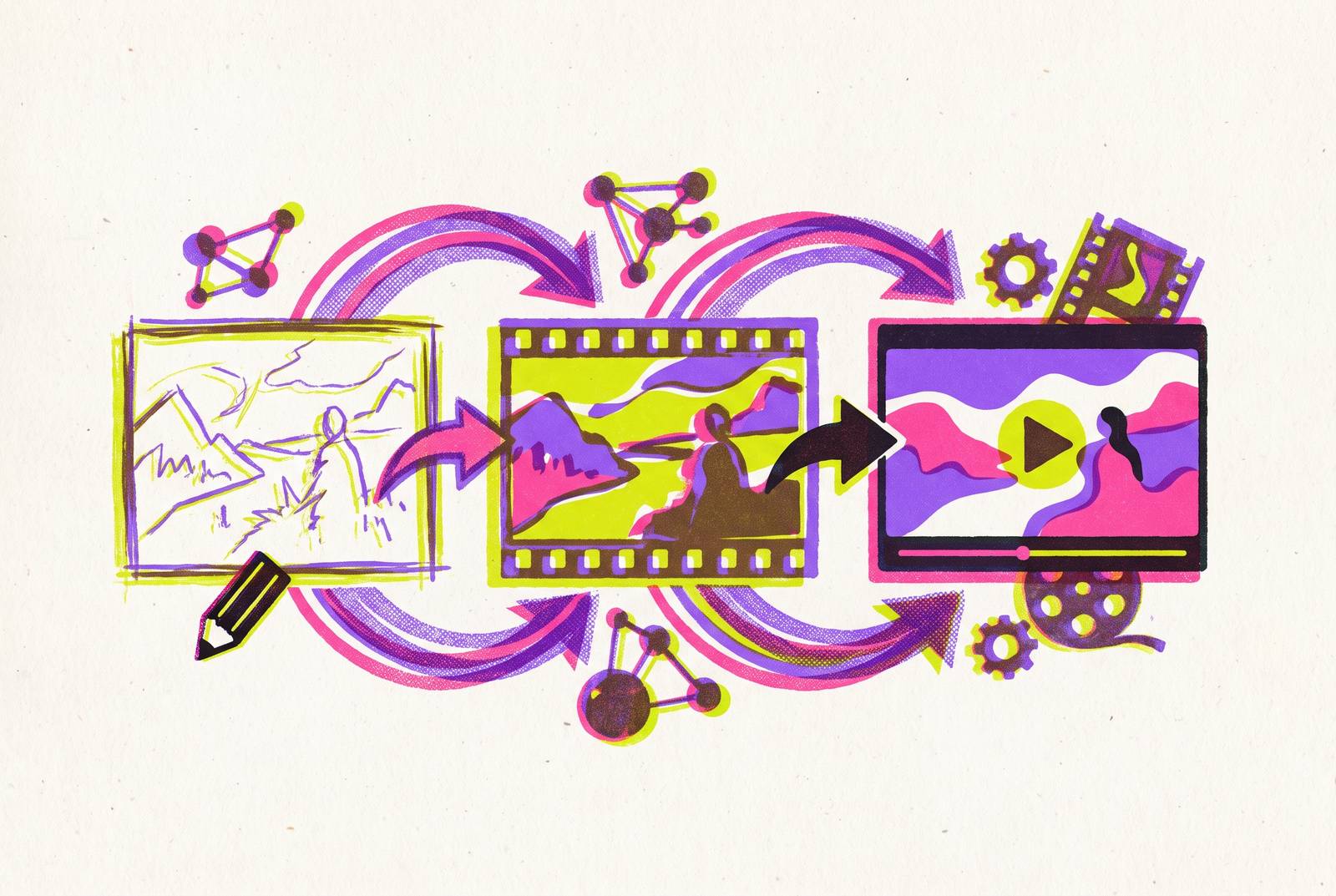
A single-prompt approach hands every creative call to the model: framing, composition, transitions, how a character looks from shot to shot. A storyboard-driven pipeline breaks a film into six stages instead, each one a checkpoint where a person, not the model, decides what happens next. Per Adobe's 2025 Creators' Toolkit Report, 86% of creators already use generative AI somewhere in their workflow, and many of them let the model drive the storyboard instead of the other way around. After digging through enough of these failures, that habit looks like a primary reason AI video projects blow their budgets. This piece covers the pipeline that fixes it, for short and medium-form work; the five-minute single scene, where per-frame continuity across long boards still wobbles, sits outside its scope.
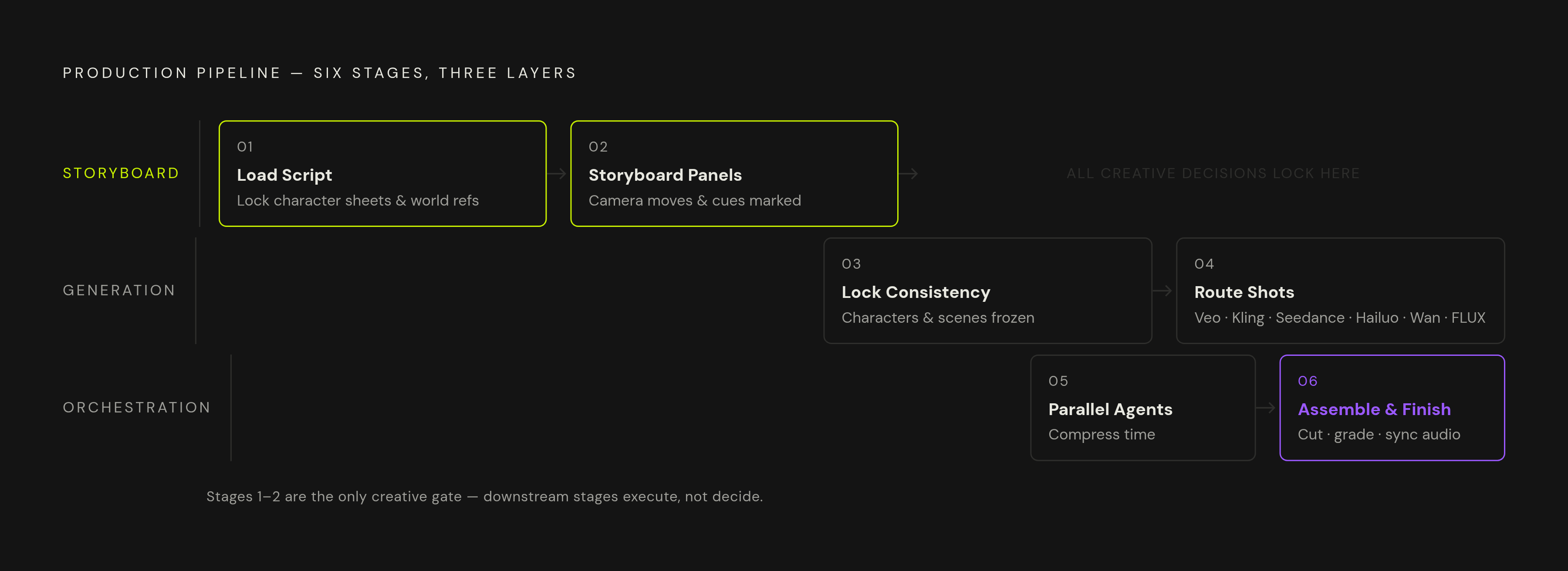
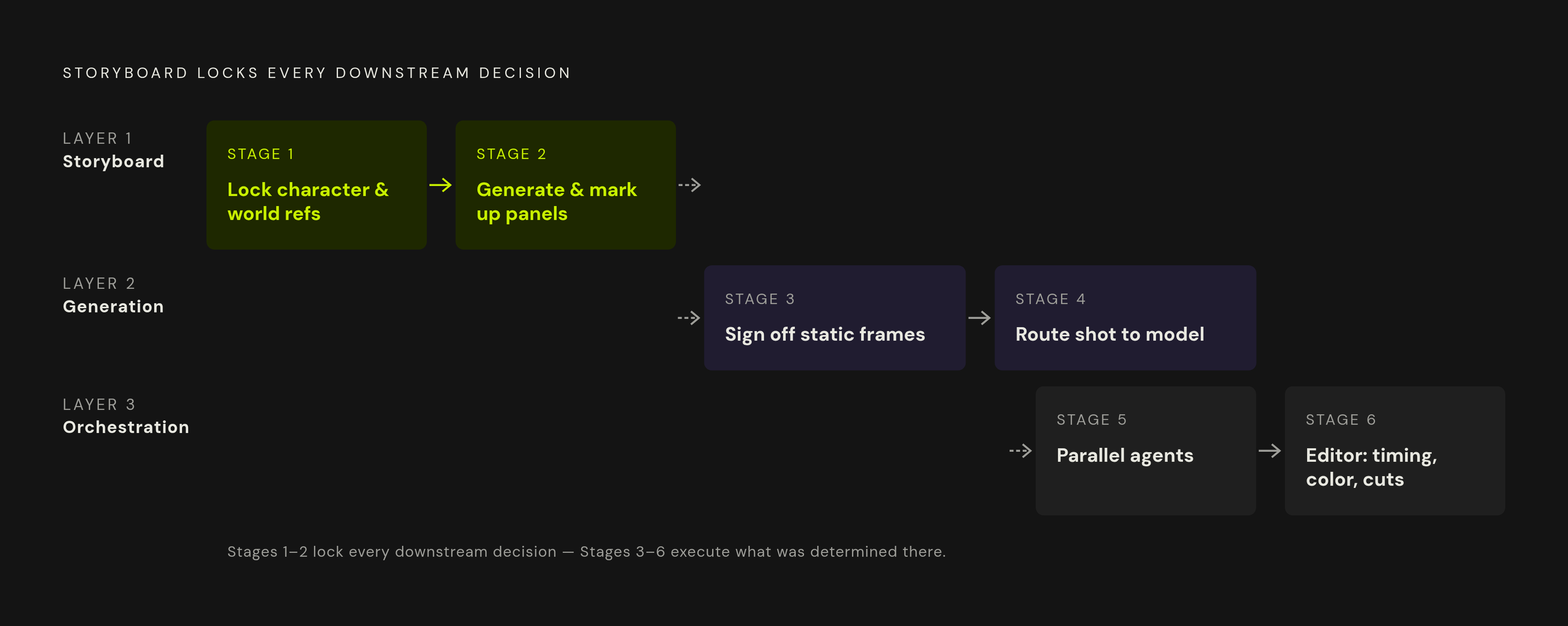
The pipeline breaks production into six sequential stages, each one a checkpoint where a person, not the model, decides what happens next. Stage one locks character sheets and world references before any generation starts; stage two produces storyboard panels and marks them up with camera moves, lens choices, and transition notes that become the prompt language for everything downstream; stage three signs off every static frame to spec before a single second of video renders; stage four routes each shot to whichever model fits it best rather than forcing everything through one favorite; stage five runs parallel agents so scenes generate simultaneously without losing continuity; and stage six hands timing, color grading, and transitions to a human editor. The storyboard drives the film, and every stage after it just carries out decisions that already got made at the board.
Professional teams tend to land on the same three-layer stack, whether they call it that or not.
Layer one is the storyboard itself: static images, locked in before any generation starts. Layer two is the generation model, the diffusion transformer actually producing frames and motion. Layer three is orchestration, the agent layer that chains scenes together, manages reference images, and stitches the final piece into one file.
Six stages sit across those three layers. Stage one loads the script into a creative producer agent and locks character sheets and world references early. Stage two turns storyboard panels into AI-generated images, marked up so they can double as prompts. Stage three locks consistency at the image level, before a single second of video renders. Stage four routes each shot to whichever model fits it best, while stage five runs stages at the same time so total production time drops. Stage six puts the cut together, times it, and grades it in an editor.
The storyboard drives the film. Everything after the board stage just carries out decisions that already got made, and skipping that order ranks as the most common mistake in this workflow. Roughly 73% of major film studios now use AI somewhere in pre-production, according to industry coverage, and teams that skip straight to prompting a video model without locking a board first are the ones redoing footage three times over, burning render credits on shots that were never going to hold together in the first place.
How do you load the script and generate storyboard panels that actually drive generation?
Stage one starts with a creative producer agent that holds context across everything downstream. Load the script and storyboard into it first, and lock character sheets and world references at this point, before ten shots have already generated around a face that hasn't been pinned down yet. Run generation in "Always Ask" mode with a style block attached, so every panel that comes after inherits the same look automatically.
Stage two is where panels get made, and composition matters more than polish here. A board only needs to answer one question: is this the right shot? Request grids instead of single images. One documented workflow ran three different grids per round, picked the strongest grid, then pulled the best individual panels out of it. Those panels replace the original references and become the continuity anchors for everything generated after.
Image generation is the cheapest stage in the whole pipeline. A grid of options here costs a fraction of what it costs to regenerate a video clip because a shot read wrong, so spend the time now, before that cost compounds three stages downstream. The panel is the cheap draft; the clip is the expensive one, which is reason enough to slow down at this stage rather than rush toward video generation.
Mark up each panel with what the image alone can't show: camera movement (push, pull, pan, dolly, follow), lens choice and light source, key dialogue or a sound cue, and how it transitions into the next shot. In an AI pipeline, these notes become the prompt language, so write them with the same detail a crew would expect on set.
For the panels themselves, tooling depends on the job. GPT-Image-2 or Nano Banana work well for character sheets: generate multiple angles plus a close-up so small details, a scar, a stitching pattern, a piece of jewelry, survive across later shots. Recraft handles photoreal portraits where skin texture actually matters. FLUX-Kontext takes both text and reference images as input, which makes style transfer and scene consistency across panels far more reliable than text prompts alone.
Stage 3: Locking character and scene consistency before a single frame of video is generated
The rule here doesn't bend: every static frame gets signed off to spec before motion generation starts. Skip this and the cost doesn't disappear, it just moves downstream and grows bigger. Looking at where pipelines actually break, this is the stage most teams underrate, and it's the one that decides whether the rest of the pipeline holds together or falls apart on shot 12.
The reasoning centers on cost. A wardrobe drift or a lighting mismatch caught at the panel stage costs one regeneration, maybe two. Catch that same drift after video has already generated, and it can cost an entire scene's worth of footage. Fixing an image runs cheap, while fixing footage runs far higher, and no amount of clever prompting in stage 4 fixes a problem that should've gotten caught here.
Character consistency comes down to one habit: always feed the model multiple images, not a text description. Upload three to five reference shots of the subject from different angles rather than describing the character in words. Text gives the model a rough idea; images give it actual visual data to hold onto across shots.
Lock four things before moving on: character appearance (face, wardrobe, distinguishing features), the environment and set design, the lighting rig and color palette, and any prop that shows up more than once. Then keep reusing that master frame as the reference anchor throughout video generation, on every shot where that character or environment comes back, not just at the start.
Here's the honest limit, worth saying plainly instead of glossing over: even with locked references, drift still happens. Wardrobe, lighting, and facial detail can shift between shots generated separately from each other. The reference anchor cuts this down a lot, but it doesn't erase it, especially across a long board with dozens of shots.
Stage 4: Routing each shot to the right AI video model
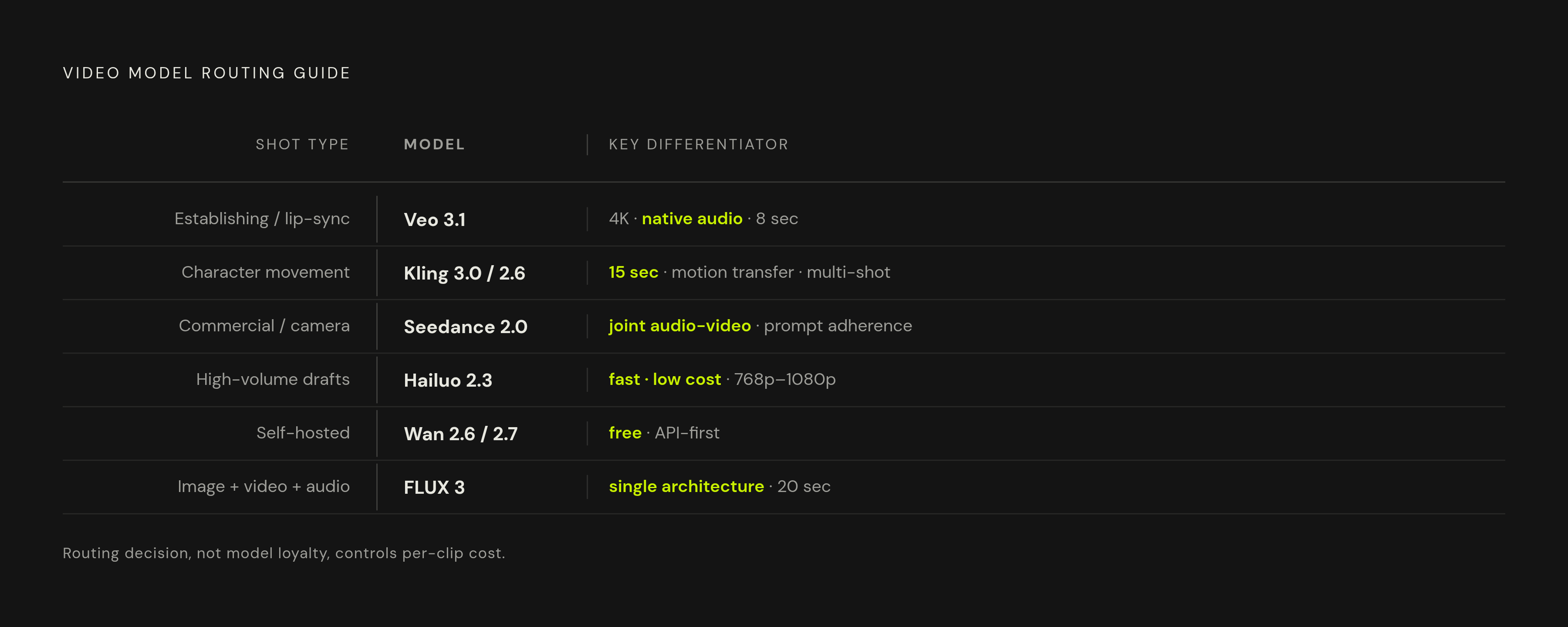
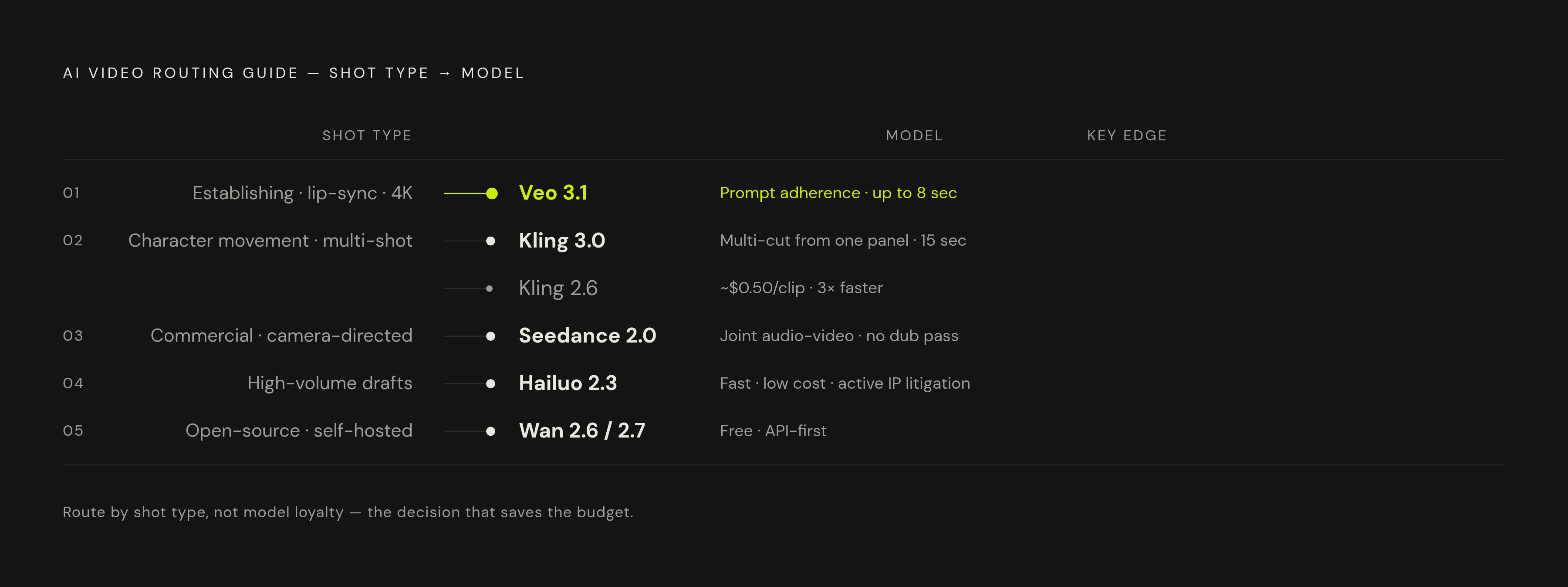
No single model wins every shot, and picking one favorite and forcing every shot through it is the second-most costly mistake in this workflow. Model loyalty loses to shot-by-shot routing every time. Most professional teams run several models inside the same project, picking based on what the shot actually needs.
Multi-shot generation has changed the math on panel count, too. Kling 3.0 can turn a single storyboard frame into a 15-second sequence with multiple camera cuts built in. Teams now board sequences instead of boarding every individual frame, which means fewer panels, fewer credits spent, and the same amount of directorial control.
Here's how the routing tends to shake out by shot type, based on how these models actually perform against each other in production comparisons.
Establishing shots, narrative scenes, lip-sync accuracy: Veo 3.1. It leads on prompt adherence, native audio, and 4K output, and it's become close to the industry standard for commercial work that demands strict prompt adherence. It's also the most expensive per second of the major models, capped at 8 seconds, so it fits short-form premium content where polish matters more than volume. Access runs through the Gemini API.
Character-driven scenes and movement control: Kling 3.0 and 2.6. Kling 3.0 generates up to 15 seconds, and its multi-shot feature splits one generation into several distinct camera cuts while keeping characters consistent, building a longer cinematic sequence out of a single panel. Kling 2.6's Motion Control feature stands on its own: upload a 3 to 30 second reference video, and it transfers those exact movements onto an AI character. At around $0.50 per clip, it's the cheapest option for high-volume work; teams pushing past 100 clips a month save real money compared to Veo 3.1, and generation runs roughly three times faster.
Commercial content and camera-directed shots: Seedance 2.0. Production-tested comparisons rank it as the strongest option for commercial work. It's a joint audio-video model, meaning synchronized video and audio come out of one generation with no separate dubbing pass needed. Prompt adherence for camera instructions, push, pull, pan, dolly, follow, is a genuine standout: describe the move and it usually delivers exactly that. It's also strong for building out shot libraries and testing angles cheaply before committing to a final take.
High-volume drafting and fast iteration: Hailuo 2.3 (MiniMax). Released October 2025, it runs fast queues at low cost per clip, with reliable output between 768p and 1080p. It skips native audio entirely, so use it when speed and volume matter more than cinematic finish. One flag worth noting: the Disney, Universal, and Warner copyright suit against MiniMax survived a motion to dismiss in May 2026 and heads to trial next, so teams with low tolerance for IP risk should weigh that before building a pipeline around it.
Open-source and self-hosted: Wan 2.6 and 2.7 (Alibaba). Free and open-source, it dominates the high-volume, API-first category alongside Kling. It supports multi-shot narratives and works for teams that want to run their own infrastructure instead of depending on a vendor's servers.
Unified image, video, and audio: FLUX 3. Launched in early access on July 23, 2026, it generates images, video up to 20 seconds, synchronized audio, and action predictions from one architecture. For filmmakers, dialogue, sound effects, ambience, and picture all come out of the same generation rather than getting stitched together after the fact. FLUX-Kontext sits upstream at the image stage, handling multimodal input for localized edits and cross-image consistency.
Worth a note on Sora 2, since former users keep asking where to go: OpenAI shut the Sora app down on April 26, 2026, after deprecating the API in March 2026, with final shutdown landing September 24, 2026. Veo 3.1 is the closer match on realism and audio, while Seedance 2.0 offers stronger prompt adherence for commercial work.
Running all of this through separate accounts, separate credentials, and separate billing for each provider adds up fast. Some platforms route access to Veo, Kling, Flux, and other models through one interface, which cuts that overhead without narrowing which model is available for a given shot.
Stage 5: Running orchestration to compress production time without sacrificing continuity
Orchestration is the layer that turns a folder of separately generated clips into an actual film. It chains scenes, extends clips that need more runtime, manages reference images across shots, and puts the final piece together. It's what makes the other five stages add up to something coherent instead of a pile of disconnected clips sitting in a shared drive.
In practice, this means running things at the same time. Shot 4's storyboard can generate while shot 2 renders and shot 3 extends, all at once, instead of the pipeline waiting on one stage to finish before starting the next. One documented case: a 2-minute brand promo running 8 parallel agents came together in 3 days.
The agent carries context the whole way through. Storyboard, style block, character sheets, world references, all of it stays attached, so a new generation inherits earlier decisions instead of starting cold. That has a direct effect on how much footage a project can afford to shoot: a documented horror short needed roughly 400 video generations plus a batch of image generations on top of that, a volume that only makes sense with orchestrated parallel processing running underneath it.
Continuity gets managed at this layer too. Reference images from the locked master frames get passed automatically into each new generation, and the agent can flag a shot where character or environment drift has crossed tolerance, catching it before it ever reaches the cut.
Stage 6: Assembling the cut and what post-production still requires a human decision
The model's job stops at the clip, and frame-accurate timing, audio sync, transitions, and color grading all happen afterward, in an editor, by a person. A fully automated finish with no human touch after generation is a pitch that, in practice, doesn't hold up once you're in the edit bay.
Editor choice depends on the team: Premiere, Final Cut Pro, and DaVinci Resolve all work, or a team can stay inside an AI-native editor if it wants a workflow from generation straight through to final output without switching tools.
Post-production still has to handle three things on its own, and skipping any of them shows up on screen immediately. Pacing and rhythm come first: the pipeline generates clips to spec, not to feel, so a human editor decides where the cut breathes and where it speeds up. Color consistency is next: clips generated independently of each other carry small color temperature differences, and a grading pass unifies them into one look. Transitions close it out: most AI pipelines output hard cuts by default, so any motivated transition, a match cut, a dissolve, gets built by hand in the edit.
The edit is diagnostic, too, and this part gets missed constantly. If clips refuse to cut together cleanly, that rarely points to a post-production problem. Tracing it back usually lands on a reference anchor that drifted three stages earlier, at stage 3, when nobody caught it.
On cost: documented AI productions have landed between $315 and several hundred dollars per finished minute, depending on team size and how ambitious the project runs. A 3-minute animated episode came in around $315 per minute with a 2-person team over 2 days. The 2-minute brand promo mentioned earlier, running at higher parallel-agent volume, landed on the higher end of that range.