Flux Image Model Selection for AI Video Storyboards
Choosing the right Flux model saves budget without sacrificing storyboard consistency.
What the Flux family is and how Black Forest Labs built it
Storyboard image models decide whether an AI video sequence holds together or falls apart. Flux is the family most production teams reach for once they outgrow generic prompting, and picking the wrong model at the wrong stage costs something either way: consistency if you go too cheap too early, or budget if you overspend late. This piece breaks down every model in the lineup, what each one is actually for, and where the whole approach still runs into trouble.
Black Forest Labs was founded by core researchers who architected Stable Diffusion before joining Stability AI. The goal was simple to state and hard to pull off: match the flexibility of open Stable Diffusion against the polish of closed, proprietary systems. Flux is what came out of that.
The architecture combines diffusion transformers with flow matching, built at roughly 12 billion parameters. That number sets a floor: it determines how much context, lighting nuance, and emotional read the model can hold onto in a single generation. It's closer to a floor: it sets how much context, lighting nuance, and emotional read the model can hold onto in a single generation.
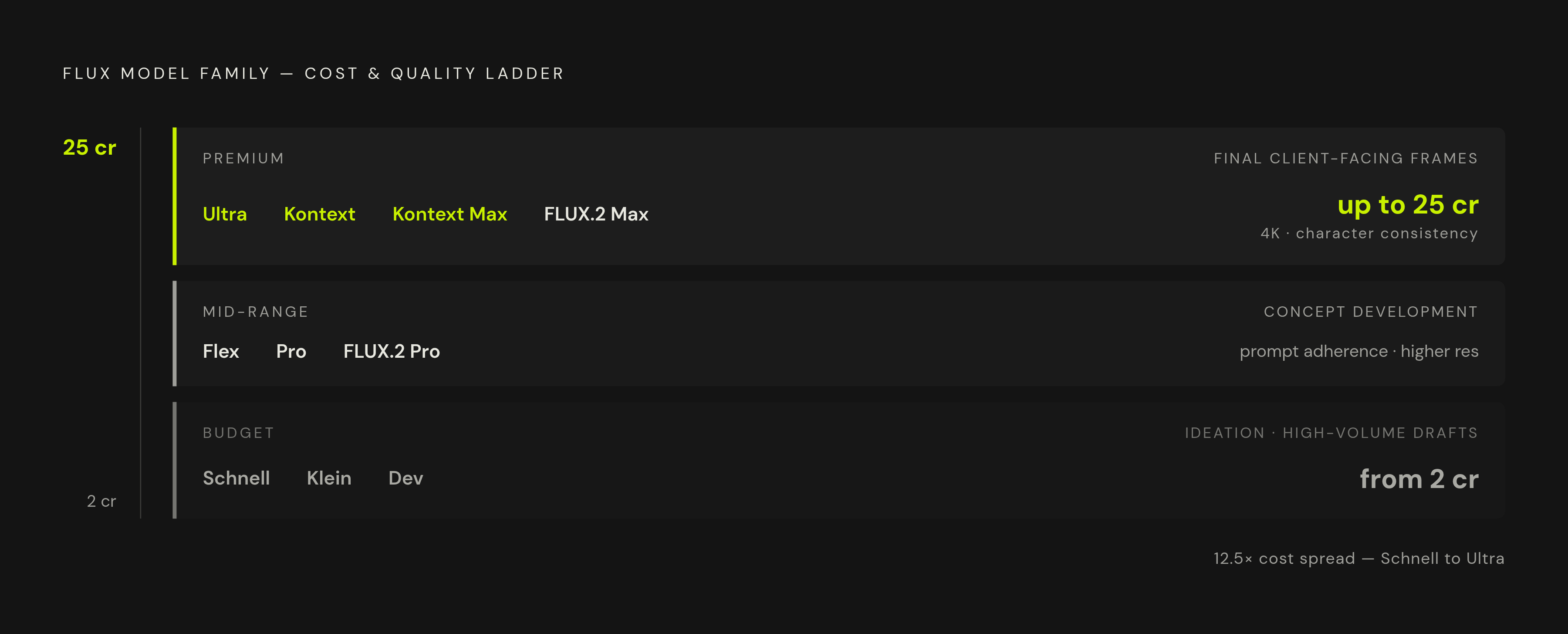
A comparison from Melies.co shows that since August 2024, Black Forest Labs has shipped 11 models, each tuned for a different mix of speed, quality, and cost. That comparison sorts the lineup into three tiers:
Budget (Schnell, Klein, Dev) starts at 2 credits per image for Schnell, built for drafts and high-volume testing. Mid-range (Flex, Pro, FLUX.2 Pro) sits above the budget tier in cost, with better prompt adherence and resolution. Premium (Ultra, Kontext, Kontext Max, FLUX.2 Max) reaches up to 25 credits at the top end, with 4K output, character consistency tools, and advanced editing.
For storyboard teams, open-weight versus closed-source matters just as much as price. Open weights (Schnell, Dev) let a team fine-tune with LoRA or self-host on their own machines. Closed models (Pro, Kontext) mean API access and per-image billing, no way around it. One smaller but real detail: text rendering inside images is a known challenge across the Flux family, so if a board carries UI labels, chyrons, or title cards, it's worth testing whichever tier you plan to use before committing.
FLUX.1 Schnell and Flux.2 Flash: when to use the speed tier for storyboard ideation
Schnell runs on Latent Adversarial Diffusion Distillation (LADD), which skips most of the normal diffusion steps and jumps almost straight from noise to a finished image. That's the whole trick behind it. It averages around 3 seconds per generation (2 seconds best case, 5 worst) and runs on 6 GB of VRAM with the right optimizations. It ships under Apache 2.0, so commercial use is fine, no API lock-in required.
Flux.2 Flash, available through the Artlist AI Toolkit, pushes the same idea further and is, by most accounts, the fastest way to turn text into a visual idea. That claim holds up, though outputs can shift a fair amount between generations even with near-identical prompts.
Speed costs stability, directly and predictably. Generate the same character twice with almost the same prompt, and it can come out as two different people. Benchmark data from Artificial Analysis, cited by MagicHour.ai, puts Schnell 79 points behind Pro on the AI image leaderboard, a real gap rather than a rounding error. But at the ideation stage, when the job is throwing out fifty rough ideas to find three that survive scrutiny, that gap almost never matters.
Use Schnell and Flash to generate volume, cheaply, and find a visual direction. Commit nothing from this stage to the actual board. Treat everything it produces as disposable.
FLUX.1 Dev and Flux.2 Dev: iterative concept development and the LoRA advantage
Dev sits a step up. It's open-weight, guidance-distilled, built for non-commercial use, and gets remarkably close to Pro on image quality. It runs comfortably at 12 GB of VRAM, works at 8 GB if pushed, and averages 10 seconds per generation (6 best case, 15 worst).
FLUX.1 Dev is restricted to non-commercial purposes, full stop. Commercial use requires a paid license direct from Black Forest Labs, so production teams either budget for that license or work through Flux.2 Dev on a licensed platform like the Artlist AI Toolkit, which takes up to 4 reference images and generates up to 6 variations per prompt at 1K to 2K resolution. That's the sweet spot for concept art, moodboards, and early storyboard frames.
The bigger reason Dev matters sits in the LoRA ecosystem built on top of it. A large share of the custom LoRA ecosystem has grown up around Dev's open-weight architecture, given its accessibility for fine-tuning. The open-source community built its tooling around this model specifically, and that's why Dev carries an outsized role in storyboard work despite ranking below Pro on raw benchmarks.
Fine-tune Dev on a set of hand-drawn or stylized storyboard frames, and it picks up a visual shorthand: shading style, perspective habits, line weight. That shorthand carries across an entire board. Define a character once through a fine-tuned LoRA, and that character's face, wardrobe, and proportions hold steady across frames in a way prompt engineering alone can't touch. Dev ranks 37 points behind Pro on the Artificial Analysis leaderboard, a smaller gap than Schnell's, and for most mid-production work that gap is acceptable. Dev earns its keep once the direction is partially locked and the work is exploring variation inside a constrained visual universe, not starting cold.
FLUX.1 Pro, Flux.2 Pro, and Flux Pro Ultra: when to commit to final-quality frames
Pro is the closed-source flagship, reachable only through the official API or third-party platforms. Commercial use runs through the API license. Flux2Max benchmarks put speed at an average of 12 seconds per generation at standard resolution (8 best case, 18 worst), climbing to around 25 seconds average at higher resolution. MagicHour.ai's citation puts Pro at number 2 on the Artificial Analysis image leaderboard after launch.
Flux.2 Pro supports multiple reference images, which makes it noticeably more controlled and predictable than Dev or Turbo. That's the model for assets already past exploration, ones that need to look finished on the first try. Flux Pro Ultra goes further, generating up to 4 images per prompt and supporting cinematic aspect ratios including 21:9, built around detail, lighting, and composition accuracy.
Final-pass frames belong here: client-facing boards, pitch decks, and the actual image inputs handed to video generation models. The cost logic is simple math, not opinion. Pro-tier credits sit at the top of the price scale, so running exploratory volume through Pro burns budget that could fund dozens more iterations at Dev or Schnell instead. Save Pro for the frames that are actually going out the door, nothing earlier. And if the board carries embedded text, labels, or title cards, text-in-image rendering is worth validating at whichever tier you plan to use.
Flux.2 Turbo, Kontext, and Kontext Max: the mid-to-premium models that fill specific storyboard gaps
Flux.2 Turbo, also on the Artlist AI Toolkit, offers stronger consistency than Flash or Dev while keeping enough flexibility for rapid variation. It's built for testing campaign visuals or refining concepts once the direction is mostly, but not fully, settled. In storyboard terms, Turbo is a middle-ground option: useful once a board is partially locked and the priority shifts toward consistency over pure speed.
Kontext and Kontext Max work differently from everything above them. They support in-context generation and editing, so images can be created or revised across multiple editing turns while the model holds onto character and style consistency the whole way through. FluxNote Image Studio describes the workflow this way: image-to-image editing with Kontext lets a team refine one existing storyboard panel instead of regenerating the whole sequence from scratch, adjusting a single frame without breaking continuity around it.
Kontext works mainly as a continuity-repair tool. Teams reach for it after generation, once a frame has already drifted, and use it to fix that one panel rather than rebuild the board from zero. FLUX.2 Max, sold as "Vivid Max" inside FluxNote, is at the top of the detail tier for photorealistic frames, running up to 25 credits per generation.
The most useful trick in this layer is bidirectional synthesis: a director can revise any frame in a sequence while the model maintains coherence with the surrounding frames. That solves one of the more painful parts of storyboard revision, the kind where a single story change used to mean regenerating half the board by hand.
Flux versus Nano Banana Pro and Midjourney for storyboard work in 2026
A head-to-head comparison from ScreenWeaver Blog, published June 2026, put Nano Banana Pro, Midjourney, and Flux against each other specifically for storyboard and concept art work. The results split cleanly along each tool's strengths: this determines which tool fits which part of the storyboard workflow.
Nano Banana Pro, Google's high-end image model, outputs up to 4K and shows the strongest character consistency and prompt obedience across a full sequence. It also renders in-image text reliably, which matters for boards carrying UI elements or labels. ScreenWeaver names it the model for "boards and continuity," meaning it can carry a full sequence that reads like one film instead of a slideshow of unrelated images. The tradeoff: it's less painterly than Midjourney at the top end of art-directed beauty.
Midjourney remains the aesthetic leader for single, art-directed images: mood boards, concept art, hero frames for a pitch deck. But its core storyboard weakness is continuity drift, described in the same piece as producing "fifty beautiful frames that each look like a different movie." It also struggles with in-image text. ScreenWeaver puts Midjourney upstream in the process: find the film's look, lock a reference image, then hand off to a more controllable model for the actual board.
Flux's position differs from both of these. Open weights, structured conditioning tools, and LoRA fine-tuning make it the pick for teams that want to own their visual pipeline outright: self-hosting for data privacy, training on a specific character or style, or building generation directly into custom tooling. Set up correctly, Flux matches the other two on consistency and beats them on configurability. The cost is the setup itself, and that's not a small cost. Flux rewards teams with technical capacity on staff and punishes teams that just want results without touching infrastructure.
ScreenWeaver's recommended approach runs all three at once: Nano Banana Pro for boards and continuity, Midjourney for mood and pitch glamour, Flux when ownership or customization of the pipeline is what matters most. Plenty of productions run a leaner two-model version instead, using Midjourney to find the look and Nano Banana Pro to hold it across the full board. Flux tends to enter the picture specifically when ownership, privacy, or generation volume at scale becomes the deciding factor, not before.
The Flux V3-HLH fine-tune built specifically for sequential storyboard generation
The Storyboard Scene Generation Model Flux V3-HLH sits on Hugging Face under jwywoo/storyboard-scene-generation-model-flux-v3-h. It's built on Black Forest Labs' Flux architecture but fine-tuned specifically for sequential visual narratives, not single images.
The key piece of engineering here is what CrePal describes as Frame-Story Cross Attention Modules: specialized attention mechanisms built to hold visual and narrative coherence across an entire sequence of frames, extending beyond a single image at a time. That's a meaningfully different design goal from base Flux, which was never built with sequence-level coherence as the primary target.
V3-HLH is built around sequence-level coherence: any frame can be generated or edited while the model works to keep it consistent with the frames around it. This version, however, is open-source and purpose-built specifically for storyboards. It also supports Parameter-Efficient Fine-Tuning (PEFT), which allows quick adaptation to a specific storyboard style without retraining the whole model, keeping compute costs manageable for smaller teams. Style flexibility is part of the model's design, allowing teams to target looks beyond photorealism.
According to CrePal, the fit here is animation pre-visualization, comic creation, and film storyboarding specifically. The limitation runs through the whole Flux ecosystem, just more pronounced here: this is an open-source model that needs real technical setup, not something anyone opens and starts clicking. Whether V3-HLH beats base Dev plus a custom LoRA depends on the job at hand. V3-HLH comes pre-optimized for sequence coherence right out of the box. Base Dev with a trained LoRA gives more control over style, but it demands more training data and setup time to get there.
How each Flux model addresses character consistency in storyboarding
Every issue this piece has circled back to comes down to one thing: a character's hair color changes between frame one and frame three, or the face shifts entirely between shots meant to show the same person. This is the single most common complaint leveled at AI storyboard generators, and it's not a cosmetic issue. It breaks the entire point of the exercise.
A storyboard exists to communicate a sequence clearly, not to look pretty. The moment a protagonist's face drifts across panels, the board stops doing its job. Directors, DPs, and investors can't read a film off frames that disagree about who's on screen, and video generation models downstream (Sora, Veo, Kling, and others) will have to work from whatever inconsistency the storyboard carries into them. Feeding a video model two different faces for the same character carries that confusion straight through the output clip.
Each Flux model handles this differently, and the differences map onto the production stages already covered here. Schnell and Flash offer no consistency guarantee at all, by design, since they're built for speed over stability, and nobody should expect otherwise from them. Dev does better on its own but still drifts without help. Fine-tuning Dev with a LoRA trained on one character is what actually locks a face, wardrobe, and proportions in place across a sequence, and this, more than any benchmark score, is the reason Dev matters as much as it does. Pro-tier models improve baseline consistency through better prompt adherence, but that's a smaller fix than a trained LoRA delivers, not a substitute for one. Kontext solves the problem after the fact, as a repair tool for panels that already drifted. V3-HLH tries to build the fix into the architecture itself, through cross-attention across the whole sequence rather than frame by frame.
None of that makes the problem disappear, and no model in this lineup claims a perfect fix, not one. What each one offers instead is a tool suited to a specific point in the process, for a mistake that costs far more to catch late than to prevent early.
Sources
- AI Storyboard Images: Free Generator [Tested]
- Flux AI Image Generator — 5 Models, 1 Workflow | Artlist AI
- Nano Banana Pro vs Midjourney vs Flux: The Best AI Image Model for Storyboards in 2026
- Storyboard-Scene-Generation-Model-Flux-V3-HLH Free Image Generate Online, Click to Use! - CrePal Content Center
- jwywoo/storyboard-scene-generation-model-flux-v3-h · Hugging Face
- melies.co
- bfl.ai
- bfl.ai