Aspect Ratio and Framing Prompts Across AI Video Platforms
Different AI video models support vastly different aspect ratios, forcing careful pipeline choices.

Aspect ratio in AI video generation is a fixed parameter set outside the prompt itself, usually a dropdown or a field value sent to the API, and it changes far more than the crop. Pick 16:9 instead of 9:16 and the model redistributes visual weight across the whole frame: subject placement, background detail, how much space goes to foreground versus negative space. Crop after the fact and you're not adjusting the composition, you're destroying it. The only workflow that holds up is generating at the target ratio from the start, then reframing per destination platform if needed. This principle applies across AI image and video models: the ratio parameter reshapes the composition from the ground up, not just the crop boundary.
How the major AI video models differ in which ratios they actually support
The ratio menu varies a lot from model to model, and the gap between the narrowest and widest options is bigger than most people building a pipeline expect. Figures below come from vendor API documentation as accessed by Prompt Architects on September 2, 2026.
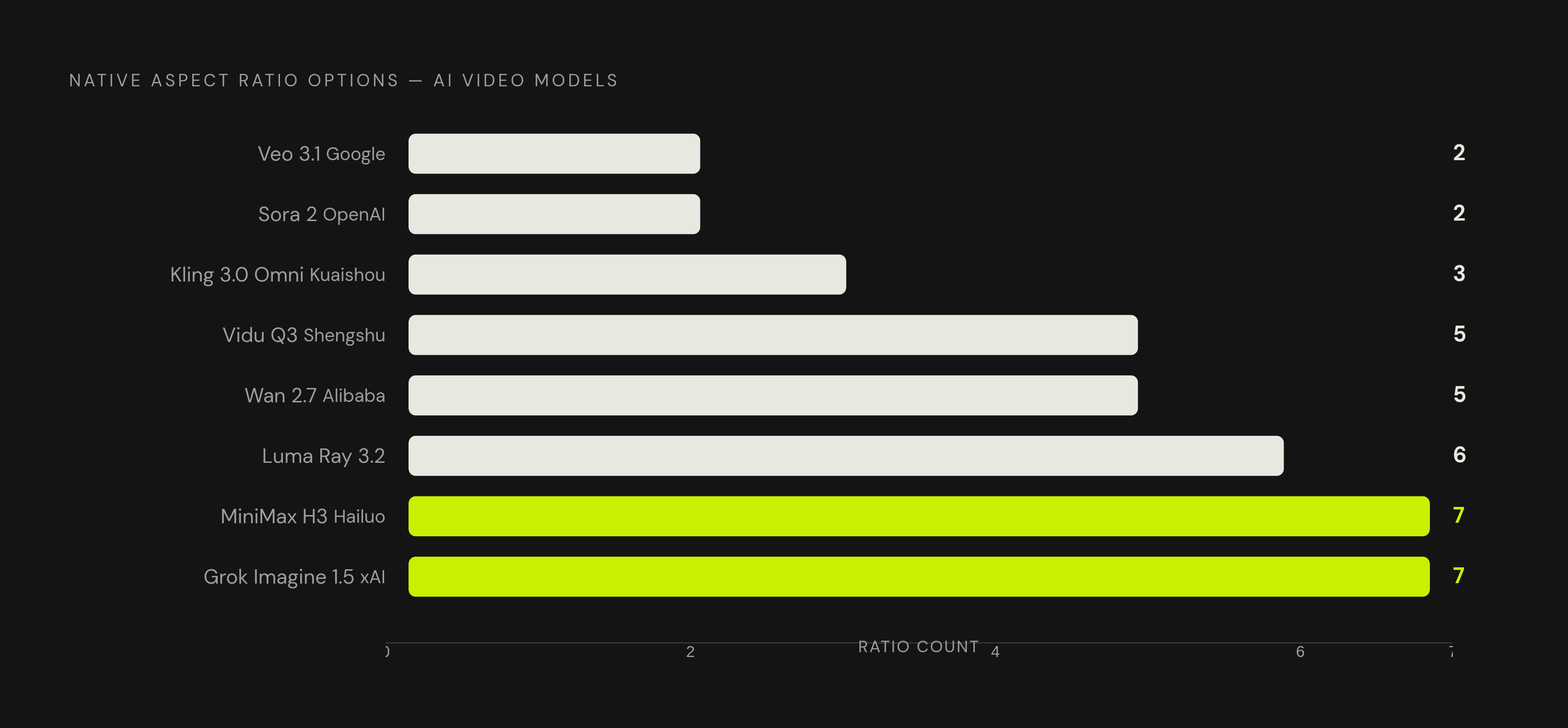
Veo 3.1, run through the Google Gemini API, supports exactly two shapes: 16:9 and 9:16, with 16:9 as default. No square option, no ultrawide. That holds across every Veo variant, including the Lite tier, making it the tightest ratio menu of any model on this list by a wide margin.
Sora 2 and Sora 2 Pro from OpenAI work in pixel dimensions rather than named ratios: 1280×720 and 720×1280 on the base model, with Pro adding 1920×1080 and 1080×1920. Landscape and portrait, nothing else. OpenAI has a sunset date of September 24, 2026 listed on its deprecations page for this API. Anyone building a new production pipeline around Sora's ratio behavior needs a migration plan in place now, not one to write later.
Kling 3.0 Omni, from Kuaishou, offers three: 16:9, 9:16, 1:1, defaulting to 16:9. Seedance 2.5 from BytePlus ModelArk goes wider, with 16:9, 4:3, 1:1, 3:4, 9:16, 21:9, and an adaptive setting as its default. Grok Imagine Video 1.5 from xAI supports seven values total: 1:1, 16:9, 9:16, 4:3, 3:4, 3:2, 2:3, more than any other model here.
Vidu Q3 from Shengshu covers 16:9, 9:16, 3:4, 4:3, and 1:1. Wan 2.7 from Alibaba matches that same five-option spread. Luma Ray 3.2 supports 9:16, 3:4, 1:1, 4:3, 16:9, and 21:9, and unlike most models here, it has no forced default: leave the field blank and it infers a ratio from the prompt itself. MiniMax H3, sold as Hailuo, supports adaptive, 21:9, 16:9, 4:3, 1:1, 3:4, and 9:16, though the default splits by mode: adaptive by default for some modes, and a required explicit value for text-to-video.
Line these up and a pattern falls out fast. Veo and Sora sit at the narrow end with two shapes apiece. Grok Imagine and Seedance 2.5 sit at the wide end with six or seven. Everyone else clusters at three to five options. And this is the part worth being blunt about: if the target platform needs anything but a vertical or horizontal feed, picking Veo or Sora and planning to "fix it later" is a mistake, not a shortcut. A model with two ratios forces every off-spec platform requirement into a post-generation reframe. A model with seven gets you the destination shape on the first pass, no cleanup required.
How image-to-video generation handles ratio inheritance, and where it silently overrides your intent
Feed an image into a video model and the ratio behavior stops being consistent. Some models inherit the source image's shape automatically. Some require an explicit ratio, and setting one stretches whatever you uploaded. Some don't expose a ratio field at all, so the input image is the only lever you get.
Seedance 2.5's first-frame and first-and-last-frame tasks preserve the input image's ratio automatically, according to BytePlus's task-creation reference. A separate reference-image mode lets you set a ratio independently of the source, if that flexibility matters more to you.
Wan 2.7 is a little looser. Alibaba Cloud's documentation says the output ratio "is determined by the input material" but is "not guaranteed to match exactly," because width and height get rounded to multiples of 16 for encoding. That rounding introduces small drift, usually a few pixels, nothing that ruins a composition but enough to matter when compositing multiple clips together.
Kling's image-to-video endpoint doesn't document an aspect_ratio field at all. The only constraint sits on the input image itself, which has to fall between 1:2.5 and 2.5:1, or the upload gets rejected. Vidu's img2video and start-end2video modes work the same way: no ratio field exists, and the frame shape comes entirely from whatever image you feed it.
Grok Imagine's image-to-video defaults to the source image's own ratio. Here's the part that trips people up: setting aspect_ratio explicitly overrides that default and reframes the output to fit the new shape. That's a deliberate override, not a bug, but it's easy to trigger by accident when copying a parameter block over from a text-to-video call.
So the rule: for models with no ratio field on the image-to-video endpoint, cropping the source image to the target ratio before upload is the only control available. For models that inherit automatically, like Seedance and Wan, check the source image's dimensions before generating. A horizontally framed reference image produces a horizontal clip no matter what platform the final video is headed for.
Flux and image model ratio specs, including the cinematic and ultrawide options video models lack
Flux gets used constantly to generate reference frames and storyboard stills that then feed into image-to-video generation, so its ratio spec sits upstream of everything above it, and it deserves more weight than it usually gets.
Native Flux ratio support runs through these pixel dimensions: 1:1 at 1024×1024, 16:9 at either 1344×768 or 1408×768, 9:16 at 768×1344, 3:2 at 1216×832, 2:1 at 1408×704, and a 21:9 cinematic option at 1536×640. Flux supports that extreme 21:9 width as a native pixel dimension option.
Through Adobe Firefly, Flux 1.1 Pro and 1.1 Ultra support Widescreen (16:9), Vertical (9:16), Square (1:1), Portrait (3:4), and Landscape (4:3). FLUX.2 [pro], also through Firefly, adds two more: Ultra wide (21:9) and Wide (5:4).
Word order inside the prompt matters here too. Prompt element ordering matters for composition control in Flux. A commonly recommended priority order runs: main subject, then key action, then critical style, then essential context, then secondary details. Get that order backwards and the model may weight a background detail ahead of the subject that actually matters.
On length, shorter prompts tend to suit quick concepts, medium-length prompts work for most projects, and longer prompts are generally reserved for complex scenes needing detailed specs. For the most granular control, More granular prompt structures that separate subject, attributes, and composition tend to yield more precise results than loose prose. That level of control matters most exactly when a reference frame needs precise framing before it gets handed off to a video model.
Which points to the real workflow rule here: when generating a reference image in Flux to feed into a video model downstream, generate at the ratio the video model will actually use, not a default square. Skip that step and the ratio-inheritance problems from the previous section show up immediately, and by then it's the video model eating the cost of a redo, not the image step.
What each destination platform actually requires, and why it rarely matches the model's output exactly
Model capability and platform requirements are two separate conversations, built by different teams solving different problems, developed independently of each other. It shows.
TikTok wants 9:16 at 1080×1920, up to 10 minutes for recorded video or 60 minutes for uploaded, capped at 2 GB, in MP4 or MOV. Instagram Reels wants the same 9:16 at 1080×1920, but caps runtime at 3 minutes and file size at 4 GB. YouTube Shorts matches that same 9:16, 1080×1920, 3-minute spec. Facebook Reels also runs 9:16 at 1080×1920 with a 4 GB cap, and as of June 2025, the old 90-second limit was removed, so there's no hard length ceiling there anymore.
LinkedIn breaks the pattern with its own distinct ratio and format requirements that differ from the other platforms listed here. X similarly has its own set of ratio, duration, and file-size requirements that vary by account tier.
The 9:16 frame at 1080×1920 is the default shape for mobile video now. TikTok, Instagram Reels, and YouTube Shorts all require it, and as of 2026 it accounts for around 95% of mobile video consumption. LinkedIn's 4:5 feed requirement is the real outlier here: no major video model generates 4:5 natively, so LinkedIn video almost always needs a reframe pass after generation, no matter which model produced the source clip.
The order of operations follows directly from that, and getting it backwards is the single most common planning mistake in this whole pipeline. Map the destination platform's required ratio first. Then check whether the model supports it natively, or whether a reframe step is unavoidable. Picking the model first and hoping the ratio lines up burns generations on footage that has to get cropped and recomposed anyway. Model-first workflows waste render budget on shapes nobody asked for, full stop.
Safe zone constraints that AI framing prompts must account for on vertical platforms
Generating at 9:16 gets the shape right. It doesn't get you a usable frame, because every vertical platform layers UI elements on top of the video that eat into real screen space, and the model has no way of knowing that unless the prompt tells it.
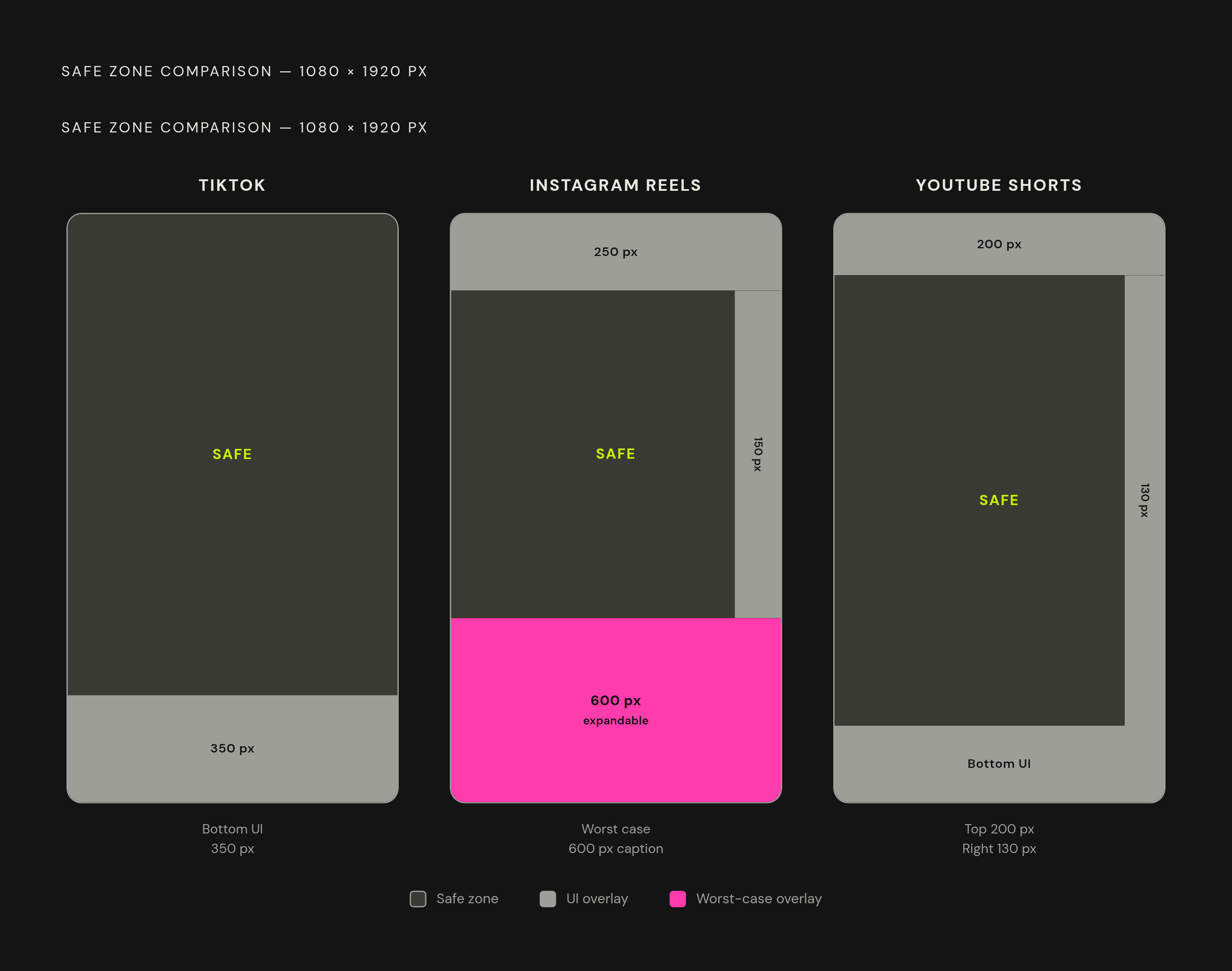
On TikTok, the bottom 350 pixels sit under the UI overlay, so faces, titles, or key action placed there get covered by on-screen controls. Instagram Reels is worse. The bottom 400 pixels and top 250 pixels are both heavily covered, the rightmost roughly 150 pixels hold action buttons, and expanded captions can eat up to 600 pixels from the bottom, the single largest overlay zone on this list. YouTube Shorts covers the top 200 pixels (back button and channel info), and about 130 pixels along the right edge for action buttons, with additional UI elements at the bottom of the frame.
Add that up and the usable composition area on a 1080×1920 canvas shrinks fast, sometimes down to the middle third of the frame. Framing prompts have to compensate directly: push the primary subject into the center-upper portion of the frame, and keep meaningful action out of the bottom third entirely.
That means specific prompt language, not vague direction. Phrases like "subject centered vertically in the upper two-thirds of the frame," "action kept above the lower third," or "no text or key motion in the bottom quarter" map straight onto the pixel numbers above. "Leave room at the bottom" doesn't give the model anything concrete to work with. A precise fraction of the frame does, and that precision is the difference between a usable clip and one that gets its punchline covered by a caption box.
Veo 3.1: prompting for composition within a two-ratio constraint
Veo 3.1 runs the tightest ratio menu of any major model covered here: 16:9 or 9:16, nothing else. No square, no 4:3, no 21:9 cinematic option. Anything outside those two shapes has to happen in post, because there's no workaround inside the model itself.
That narrowness is easier to accept once you look at what Veo 3.1 does well. It leads on prompt adherence, meaning the output actually matches what the prompt describes instead of drifting toward a generic interpretation. It generates native audio, dialogue and ambient sound synced to the visual, in the same generation pass rather than as a separate step bolted on afterward. The audio sync holds up tightly because dialogue and ambient sound are generated in the same pass as the visual, rather than as a separate step bolted on afterward. It also supports 4K upscale output in both landscape and portrait.
Pricing runs around $0.05 per second at the Lite, 720p tier, and $0.09 per second on the full model, with generation time landing around 60 seconds per clip.
Given the two-ratio limit, the ratio has to be the first decision, before a single word of the actual prompt gets written, because that choice locks in the framing language for everything that follows. A 9:16 prompt built for a vertical platform needs the safe-zone language from the section above baked in directly: subject kept in the upper two-thirds, no critical action in the bottom quarter. A 16:9 prompt aimed at a wider destination doesn't carry those same constraints, so the framing instructions change to match. There's no square or ultrawide fallback here, so every Veo 3.1 prompt has to commit to a shape early, and that commitment shapes every line that follows it.