Safe Zone and Caption Placement for Vertical AI Video
Planning content around platform controls keeps captions and calls to action visible on mobile.

Vertical AI video needs more than the right frame size. It needs room for the buttons, labels, and captions that platforms lay over the footage. Plan that space before generating or editing, and the message has a much better chance of staying visible after upload.
Why vertical video safe zones are a production constraint, not a finishing touch
A finished video can have a hidden price, a call to action behind a button, or subtitles covered by the app’s own caption stack. The file can be the right size and still leave the message hidden. TikTok, Instagram Reels, YouTube Shorts, and Facebook Reels all place controls directly over the footage. Those controls determine which parts of the edit remain readable.
All four formats use a 1080×1920 px canvas with a 9:16 aspect ratio, but the parts they leave clear are different. Dimensions give the size of the whole canvas, while a safe zone shows how much of that space can be used. Correct dimensions prevent awkward cropping, but safe placement prevents obstruction. Because AI-generated captions can appear on their own, text can now get blocked even when no one has put it in the wrong place by hand.
TikTok’s safe zone is the most crowded UI footprint of the three major platforms
For TikTok’s organic layout, leave 130 px clear at the top, 484 px at the bottom, and 140 px on each side. These May 2026 measurements are working boundaries. TikTok crowds the frame on several sides, with engagement buttons on the right and the creator description and audio details below. Its effective dead zone is especially demanding because those layers compete for space.
The bottom boundary also changes with the content. A one-line caption blocks roughly 80 px, while a multi-line caption with hashtags can consume 250 px or more. A paid ad CTA adds a further 50 px. These figures describe different parts of the interface, rather than a fixed stack to add blindly to the organic clearance. The practical point is that TikTok’s bottom is a floor that can rise.
The right edge causes a different problem. Text that spans the full 1080 px width can look fine in editing software on a desktop and then disappear behind engagement buttons on TikTok. Keep faces, brand marks, and text between the side margins. Never park a price or CTA against the right edge, and allow for device differences rather than treating the guide as an exact display boundary.
Instagram Reels’ safe zone puts heavy pressure on the bottom strip
Instagram Reels needs 220 px clear at the top, 430 px at the bottom, and 130 px on each side in the May 2026 measurements. Compared with TikTok, the stated bottom clearance is smaller, but the top clearance is larger. Action buttons are on the right, and captions and audio labels take up space at the bottom.
That lower strip becomes more demanding when auto-generated captions are on or a trending sound has a long name. A View Products / Learn More button can push the effective boundary higher still. Paid layouts need more planning because their controls are different from those in the organic layout. Meta provides a dedicated Reels ad safe-zone checker for that reason. Design organic Reels against the ad safe zone from the start if the video may later be boosted.
Instagram Stories shares the 1080×1920 canvas but needs 250 px clear at both the top and bottom, with 60 px at the sides. That leaves more vertical room than Reels, with the profile and close button above and the reply bar below. Facebook Reels, by contrast, uses the same stated clearances as Instagram Reels.
YouTube Shorts’ safe zone changed after the late-2025 subscribe button expansion
YouTube Shorts blocked more of the bottom of the frame in late 2025 when the subscribe button grew. That change invalidated caption templates built around the earlier layout. A template that once cleared the interface could now put text behind it without anything changing in the video file. Saved presets therefore need to show which version of the safe zone they use.
The May 2026 working clearances for Shorts are 110 px at the top, 420 px at the bottom, and 140 px on each side. Titles and controls occupy the lower frame, while like and share buttons sit on the right. When a viewer opens the description, the blocked bottom area expands further. Captions or a CTA just above the nominal boundary can then become hidden.
YouTube recommends vertical 9:16 assets for paid Shorts placements. Organic Shorts can be square or vertical, but 9:16 is the production standard for reuse across platforms. Before a major launch, preview the result on a real phone and re-verify the guide against the current interface. That leaves a practical question for shared assets, namely how much space to reserve when one video must work on all three platforms.
The cross-platform safe zone gives one production area for all three platforms
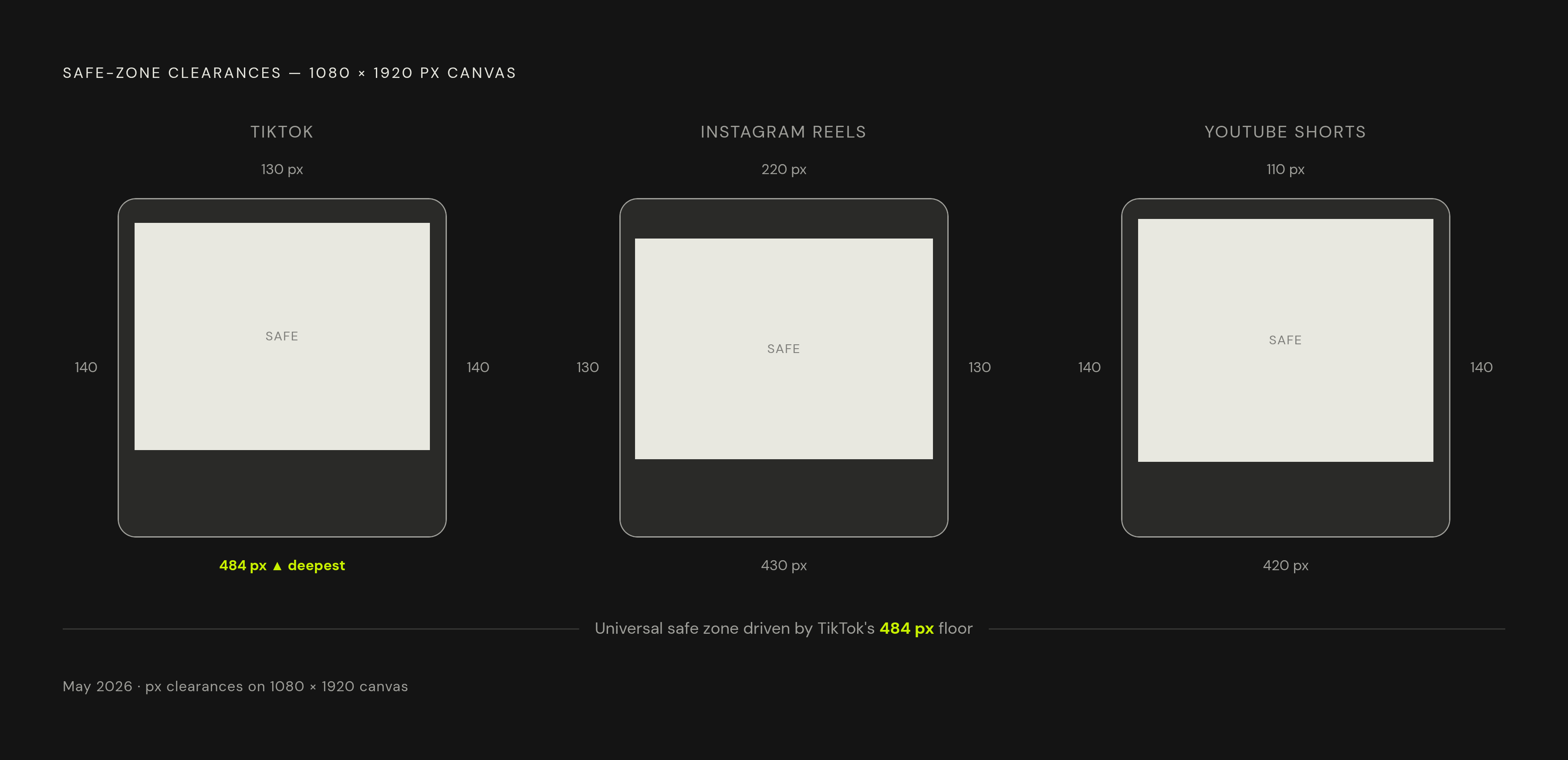
A universal safe zone leaves room for the controls that take up the most space on each side across TikTok, Reels, and Shorts. It clears the right-side button column, the lower caption and audio layers, and the Shorts subscribe area within one working guide. The usable canvas is smaller than a platform-specific layout. That reduction is a risk-management choice.
The objection to it is fair. A creator publishing mainly to one platform gives up space by reserving room for another platform’s controls. A native layout can use that space more precisely, while the universal approach offers speed and flexibility when the same video needs several destinations. It reduces separate edits and renders without asking the editor to remember every interface boundary.
Put a transparent universal safe zone overlay in the timeline and keep the text, faces, logos, and CTAs that matter inside it. Free downloadable PNG guides are available in both universal and platform-specific versions. Use the native guide when the production is platform-first, and remove either guide before export. A universal organic guide still needs paid-placement review if the asset will become an ad.
Where to position captions and what subtitle margin values mean
Put captions in the lower-middle third of the usable safe zone, leaving space above its bottom edge. Text near that boundary is likely to get blocked. Leaving space below the caption block gives it room when descriptions or other interface layers expand. It also separates the subtitles from the platform’s own text.
For subtitle files, use MarginV=250 as the cross-platform starting setting and MarginV=350 for TikTok-first content where the description overlay is a concern. MarginV controls the vertical margin for bottom-positioned subtitles. These are calibration settings to use with the safe zone overlay. They still need a visual check in the actual layout.
People who have measured TikTok’s iOS app put the action button stack at ~165 px and the description text plus button stack at ~340 px. That explains why clearing the buttons alone can leave a subtitle behind the description. It also explains why those measurements should not replace the broader 484 px organic clearance. They measure different obstructions.
Use white text with a dark 2–3 px outline, keep each block to 2–3 lines, and use a font size of at least 60–80 pt so it can be read on a phone. Preview with captions turned on, since AI-generated captions can consume 250–350 px at the bottom. To move one subtitle cue to the top without changing the style default, place {\an8} at the start of that dialogue line’s text field.
Where faces and focal subjects should sit relative to captions
For a talking-head video, place the speaker’s face in the upper portion of the frame, above the midpoint. Keep captions in the lower-middle third beneath it. These are linked decisions because a caption block needs space that the face is not already using. Framing the subject first and squeezing subtitles into what remains is how the two end up competing.
B-roll, cutaways, and fast-cut montages allow more freedom. In those formats, captions work as overlays rather than simply as transcription beneath a speaker, so face overlap may be neutral or irrelevant. Some creators deliberately run captions across a speaker’s chin or lower face to signal high energy, an effect that calls for intentional placement. Moving all captions to the upper third is not a general fix because it competes with platform controls, disrupts reading flow, and can cover the visual hook.
Prompting AI video models to respect safe zone geometry from the first frame
With AI video, teams can leave room for captions before they make the footage. Models that accept directions in plain language about where things should go, including Veo and Sora, can take those composition instructions in the prompt. Begin with the delivery format, then define shot size, subject position, eye line, background depth, motion direction, and space for overlays.
The useful directions are concrete. Put the face or focal subject in the upper third and leave quiet negative space in the lower-middle third for captions. Keep important action out of the right 140–160 px and the bottom 420–484 px. A subject that begins clear of the buttons still needs room as the shot develops.
For a product close-up, the prompt can specify a vertical 9:16 frame, brand colors in the background, a slow, smooth orbit, and shallow depth of field. It should also reserve space for labels, key features, and the final CTA. A tall frame with the focal point at midframe can still put the subject directly behind the captions.
Organic vs. paid and what to build against by default
Paid placements add interface elements that can include a Sponsored label, headline, shopping card, or CTA button. TikTok adds ~50 px for a Shop Now / Learn More button, while Reels adds paid controls that need more room at the bottom. Shorts ads also add a CTA button that compresses the available vertical space. An organic layout is therefore not proof of ad readiness.
Use ad-safe dimensions from the start when a video may later run as an ad. The small reduction in usable space protects the offer and CTA from a later layout change. Otherwise, a video built too close to the organic boundary may need another render before it can be boosted.
There is no fixed pixel map that covers every ad placement. TikTok says its ad safe zone changes with the length of the caption and extra ad formats. Use the most conservative relevant overlay, keep the offer away from the bottom edge, and preview the exact placement in the platform’s ad tools. Check every variation after changing its caption or CTA, because that change can alter the space the interface occupies.
A repeatable production checklist for safe zone and caption compliance
Start each project by setting the canvas to 1080×1920 px and choosing the guide for its destination. Use a universal overlay for shared distribution or a platform-specific overlay for a native edit. If paid use is possible, make the ad-safe layout the working default. Set these boundaries before placing the subject or generating footage.
Keep faces above the space for captions and keep important action out of the bottom dead zone and away from the buttons on the right. For AI-generated footage, put those same limits on where things can go into the prompt. Then review the caption blocks for position, readable styling, and line count rather than assuming an automatic caption pass is ready to publish.
Finish by removing the guide layer and previewing the exported video on a real phone. For ads, also review the final placement in Ads Manager for Meta or TikTok Ads Manager, as relevant. After a major change to the interface, check the measurements again before using a saved template. The discipline is simple, but it belongs throughout production because a message hidden by the platform is still a message the viewer cannot read.