Scene Transition Prompts in AI Video Sequences
Training data gaps leave AI video models unable to recognize scene transitions in prompts.
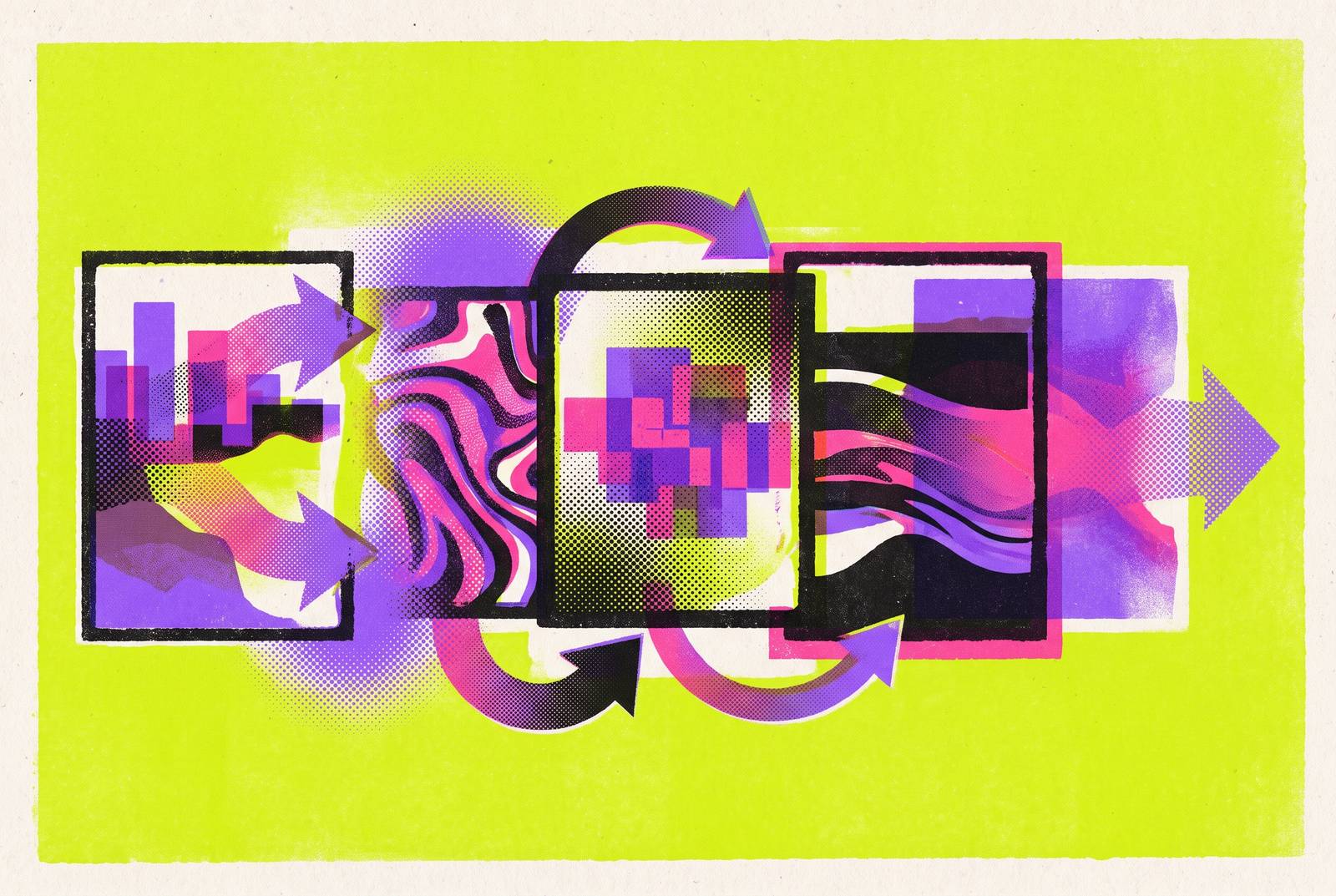
Most AI video models can't generate a clean scene transition because they were never trained to. Research on scene transition awareness found that over 90% of the clips in widely used training sets, including WebVid-10M, Panda-70M, and MiraData, come from single-scene segments. So when a prompt asks for two scenes, the model isn't ignoring the instruction. It just has almost no examples in its training history that look like what you're asking for.
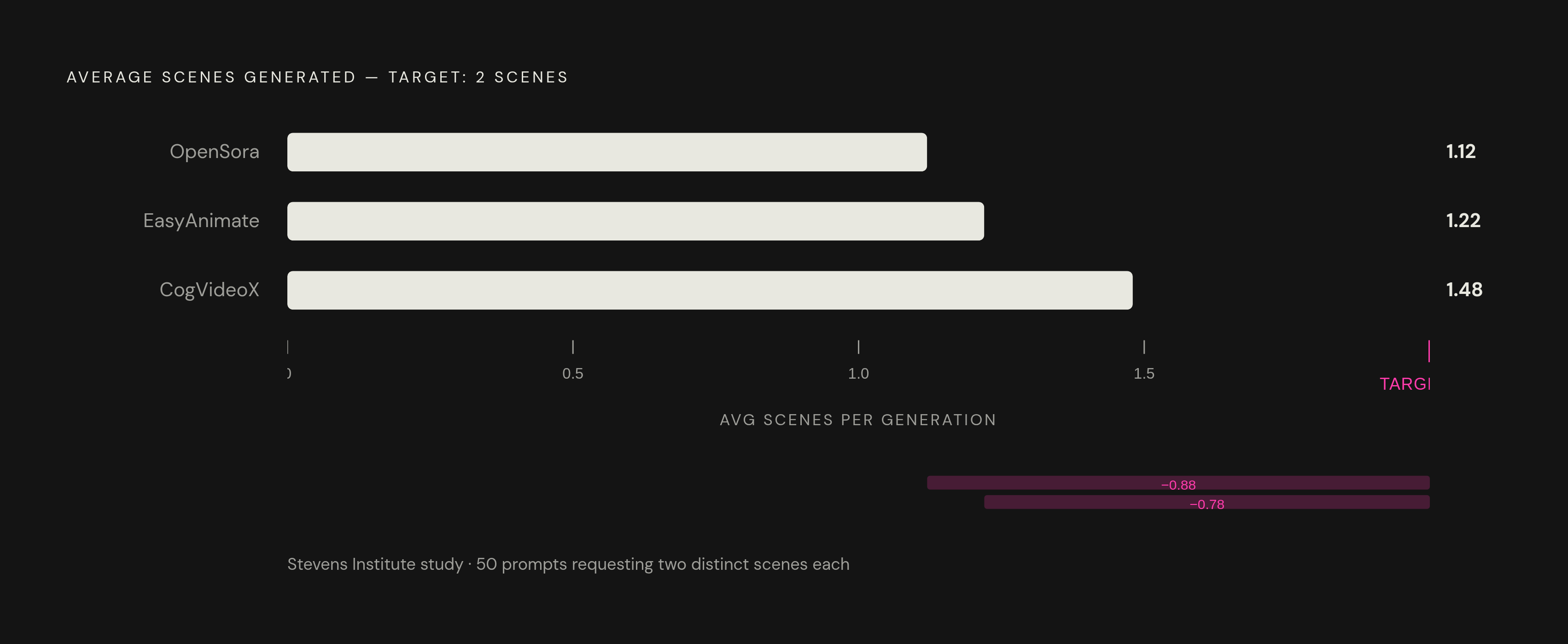
That gap shows up in numbers. The Stevens researchers ran 50 prompts that explicitly called for two distinct scenes and counted what came out the other end. OpenSora averaged 1.12 scenes per generation. EasyAnimate came in at 1.22. CogVideo hit 1.48. Every one of those models, on average, delivered something close to a single continuous scene, even when the prompt spelled out a transition. This isn't a quality failure. It's a recognition failure: the model can generate the content fine, it just doesn't detect that a scene change was requested in the first place. That distinction matters, because it means better prompting is a real lever, not a workaround for something the model simply can't do. The same Stevens work showed that post-training on multi-scene annotated data (their TAV dataset) closed much of the gap, and the thing that moved the needle wasn't richer description. It was explicit structural language in the captions. That's the whole game for prompt writers: give the model the structure it was missing in training.
What "explicit temporal and structural language" actually means in a prompt
Most prompting advice out there focuses on description: lighting, mood, what the subject looks like. That's fine for a single shot, but it does nothing to tell a model where one scene ends and the next begins. Structural language is different. It describes the shape of time in the video, not what's sitting inside the frame.
Three kinds of signal do most of the work. Temporal markers ("then," "next," "following this," "as the scene shifts," "finally") tell the model a sequence is happening. Segmentation language, like numbering shots ("Shot 1:", "Shot 2:") or labeling them ("Opening scene:", "Final scene:"), tells the model these are separate, discrete units rather than one flowing description. Duration cues ("slow sustained movement over four seconds," "quick two-beat action with a hold on the final frame") tell the model how much time budget belongs to each piece.
None of this is a stylistic preference. It mirrors, almost exactly, how the TAV dataset annotated its training captions, with explicit scene segmentation and transition structure written into the text. That's what the models responded to during retraining, and it's why the same kind of language works at inference time in a regular prompt.
For any single scene, the working structure is six components in order: Subject, Action, Camera, Lighting, Environment, Style. For multi-scene work, the discipline is to give each scene its own instance of that structure rather than blending everything into one long paragraph. A prompt describing two scenes at once as one long paragraph tends to produce worse results than separate, cleanly structured scene blocks with a shared anchor line tying them together. Length isn't the fix. Structure is.
One trap worth naming directly: negative prompts. Most current video models handle "no fog" or "without motion blur" poorly, and in practice they sometimes generate the exact thing you told them to avoid. For transition work specifically, describe the transition you want. Don't describe the transition you're trying to avoid.
The three main prompt patterns for scene transitions and when each applies
Three patterns cover almost every transition use case in production right now.
Multi-keyframe sequencing works best for narrative control across connected scenes where each shot serves a different visual purpose but needs to feel like part of one piece. Number and label each shot: "Shot 1: Wide establishing of luxury bathroom. Shot 2: Medium shot of skincare products on marble counter. Shot 3: Extreme close-up of serum texture." Then close with a shared anchor instruction, something like "Maintain consistent lighting throughout." This pattern suits product sequences and explainer videos. Veo 3.1 and Kling handle product and character consistency well here, and Sora 2 holds up for multi-shot narrative consistency across longer clips.
Temporal continuation prompting chains separate generation passes together, each one picking up where the last left off. Instead of repeating an identical prompt, each new generation carries shared anchors forward: "Continuation. Same street now bustling. People walking, cars passing. Energy builds." followed later by "Final scene. Same street at dusk." The discipline here is keeping color grade, location, and time-of-day logic consistent across the whole chain. This is the pattern for longer brand or narrative sequences that no single generation can carry start to finish.
In-clip transition prompting handles smooth visual morphs inside one generation. A match-cut pattern reads like: "a hand swipes across the frame and the scene morphs from a rainy city street into a sunny tropical beach, smooth match cut, vibrant and upbeat, vertical format." A camera-push morph pattern reads: "Seamless transition. Camera pushes into coffee cup surface. Emerge into aerial ocean view. Smooth morph between scenes." Both need a physical action or camera move to anchor the cut. The model needs something concrete to hang the transition on, not just an instruction to "transition smoothly." This pattern fits social hooks and short-form ads where the transition itself is the creative idea.
Picking between the three comes down to three questions: how much can a single generation actually carry, does a product or character need to stay visually locked across shots, and is the transition itself part of the concept or just a connector between ideas.
How to write shared anchors that hold visual consistency across scenes
A clean cut between two scenes still fails if the footage on either side of it doesn't look like it belongs to the same video. That's the anchor problem, and it needs to be handled in the prompt, not fixed later in editing.
Four anchors matter most. Lighting: name the actual source and quality, not a vague adjective. "Overcast soft key from camera left" or "neon practicals with blue shadow fill" gives the model something to hold onto. "Good lighting" gives it nothing. Color grade: pick a specific term, like "cinematic teal and orange grade" or "desaturated documentary look," and repeat it across every scene prompt in the sequence. Time-of-day logic: if scene one is golden hour, scene two should either match it or explicitly move forward, something like "same street at dusk," which reads as intentional progression instead of a jump cut error. Location: shared spatial markers, "same marble counter," "same urban street," give the model a continuity anchor even when the camera distance changes completely between shots.
Camera language functions as an anchor too. A slow dolly in scene one followed by a whip pan in scene two reads as a style break unless the prompt tells the model that shift is deliberate. Seedance 1.5 Pro handles camera-movement instructions (push, pull, pan, dolly, follow) with unusual reliability, and Veo 3.1 and Kling 3.0 both parse cinematic camera language well.
For sequences where a product or character has to look identical across every shot, close-up to wide, Veo 3.1 is the stronger first choice right now. Sora 2 carries strong multi-shot narrative consistency but doesn't have a character reference feature to lock a face or product across generations the way Veo does.
Which models handle multi-scene and transition prompts most reliably right now
No production model on the market was purpose-built for multi-scene generation. The TAV research out of Stevens Institute is post-training work on open-source models, and as of this writing it hasn't made its way into any commercial API. What follows is how the major players handle transition work today, with their tradeoffs.
Sora 2 (OpenAI, released September 30, 2025) has strong physical simulation: liquids, fabric, light refraction, multi-object collisions all render convincingly, which matters for any transition built around a physical morph. Camera language parses reliably too, slow dolly-ins, whip pans, handheld feel. It does not have a character reference feature for locking a face or subject across scenes. It holds up well for multi-shot narrative consistency across longer clips. Pricing runs through the Replicate API at $0.10 per second standard, with Sora 2 Pro at $0.30 to $0.50 per second depending on resolution and requiring OpenAI approval. Standard generation runs about 16 credits per second at 720p, so a 10-second clip costs 160 credits. Sora 2 Plus subscribers get 1,000 monthly credits, roughly six 10-second clips. Pro access requires the $200 monthly ChatGPT Pro plan and includes 10,000 monthly credits. Sora 2 has been discontinued as of 2026.
Veo 3.1 (Google) has strong prompt comprehension for cinematic language, with an edge in lighting and texture rendering. It's the first choice whenever product or character consistency has to hold across scenes, and the strongest option for conversion-focused sequences where a product needs to look identical in close-up, medium, and wide shots.
Kling 3.0 (Kuaishou) matches Veo 3.1 on cinematic lighting and motion handling and offers the best access economics among the top-tier models, which matters for anyone testing transition prompts at volume before committing to a final render. Prompt structure follows a "Subject + Action + Setting + Camera + Style" pattern, and volumetric lighting with rim-light detail prevents the flat look that under-specified prompts tend to produce. Complex scenes occasionally introduce artifacts.
Seedance 1.5 Pro (ByteDance, released December 16, 2025) stands out for instruction-following on camera work specifically: push, pull, pan, dolly, and follow moves all parse reliably. It's a joint audio-video model, generating synchronized audio in the same pass, which helps when a transition prompt needs to line up with narration or music. It's a strong choice for testing camera-movement behavior cheaply before committing to a more expensive generation elsewhere.
Wan 2.6 leads on cinematic, multi-shot narrative work, particularly when the full shot list is planned out in advance. It's a solid choice for brand and narrative sequences that need scene-to-scene coherence over several cuts.
FLUX 3 (Black Forest Labs, early access from July 23, 2026) uses a single architecture, built on what the company calls Self-Flow, to generate images, video up to 20 seconds, synchronized audio, and action predictions all from one system trained jointly on images, video, and audio. It's still in early access, so its transition behavior hasn't been benchmarked against production models yet. The multimodal design is structurally suited to cross-modal sequence work, but that's a design observation, not a track record.
A repeatable segment-and-assemble workflow for multi-scene AI video
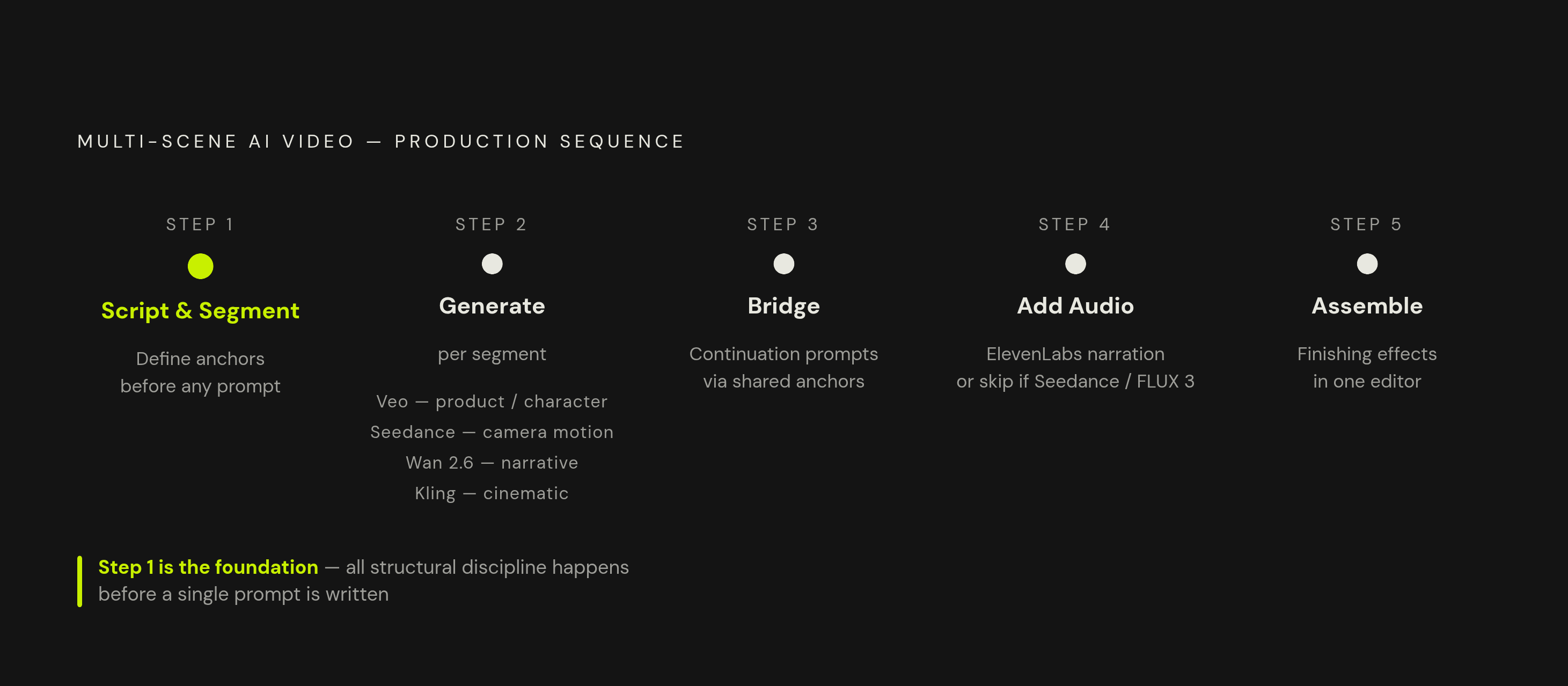
The workflow that actually holds up treats each scene as its own generation unit, then stitches the results together afterward. Fighting the model's single-scene bias is a losing battle. Working with it isn't.
Step 1: Script and segment before writing a single prompt. Break the full concept into short segments sized to what current models handle in a single generation pass. Each segment gets its own structured prompt covering subject, action, camera, lighting, environment, and style, and the shared anchors, lighting, color grade, location, time-of-day logic, get defined before any individual segment prompt gets written.
Step 2: Generate with the model suited to that segment's job. Veo for product or character lock, Seedance for camera-heavy tests, Wan 2.6 for brand and narrative work, Kling for cinematic sequences. When it's unclear which will perform better, generate the same segment concept in two models and keep the winner. Modern generation speeds make that kind of head-to-head comparison practical.
Step 3: Use continuation prompts to bridge segments in time. Each continuation prompt references the anchors set up in Step 1. For in-clip transitions, apply the match-cut or camera-push morph pattern as described earlier in this guide.
Step 4: Add narration or audio as a separate layer, unless the video model already generates synced audio. ElevenLabs for narration is a documented part of many production pipelines, with audio scripted from the same segment breakdown used for the video prompts. Seedance 1.5 Pro skips this step since it generates synchronized audio in the same pass as the video; FLUX 3 is designed similarly.
Step 5: Assemble everything and apply finishing effects in one editor. A platform like VideoGen, which brings Veo, Kling, Sora, Flux, and ElevenLabs into a single interface with a built-in editor, cuts out the tool-hopping that otherwise breaks this workflow apart between Steps 2 and 5. The practical benefit is switching models per segment without leaving the editor, and applying finishing effects to assembled footage without routing everything through format conversions along the way. For teams producing content daily, tool-switching between generation, audio, and editing adds up fast, and at volume it compounds into real hours lost every week.
Common transition prompt failures and how to fix each one
Failure: the model generates one long scene instead of two or more. This almost always comes down to missing segmentation language, the prompt reads as one continuous description rather than a sequence of distinct units. Fix it by numbering scenes explicitly ("Shot 1:", "Shot 2:"), adding temporal markers ("then," "next"), and including a transition mechanism phrase like "as the scene shifts to" or "camera pushes into surface."
Failure: the transition happens, but the two scenes look like they belong to different videos. This is an anchor failure, not a transition failure. The fix isn't more transition language, it's naming the lighting source, color grade, and location explicitly in both scene prompts so the model has something consistent to carry across the cut.
Failure: the model ignores the negative prompt, or worse, generates the thing you told it to avoid. Drop the negative instruction entirely and describe the transition positively instead. If the goal is "no jarring cut," describe the smooth cut you want directly rather than naming the jarring cut you don't.
Failure: the transition reads as technically correct but emotionally flat. Usually this traces back to vague duration cues, or none at all. Naming a specific pace, "quick two-beat action with a hold on the final frame" versus "slow sustained movement over four seconds," gives the model a rhythm to work from instead of defaulting to a generic middle-speed motion that fits nothing in particular.