AI Video Model Limits on Clip Length and Resolution
Hardware physics dictates video generation's duration-resolution tradeoff, not marketing strategy.
AI video model limits on clip length and resolution come from physics, not product strategy. Every model on the market today has to trade duration against resolution against audio quality, because GPU compute runs out long before any creative ambition does. Understanding that trade-off is what separates a workflow that fights the technology from one that works with it.
Why AI video models cap clip length and resolution
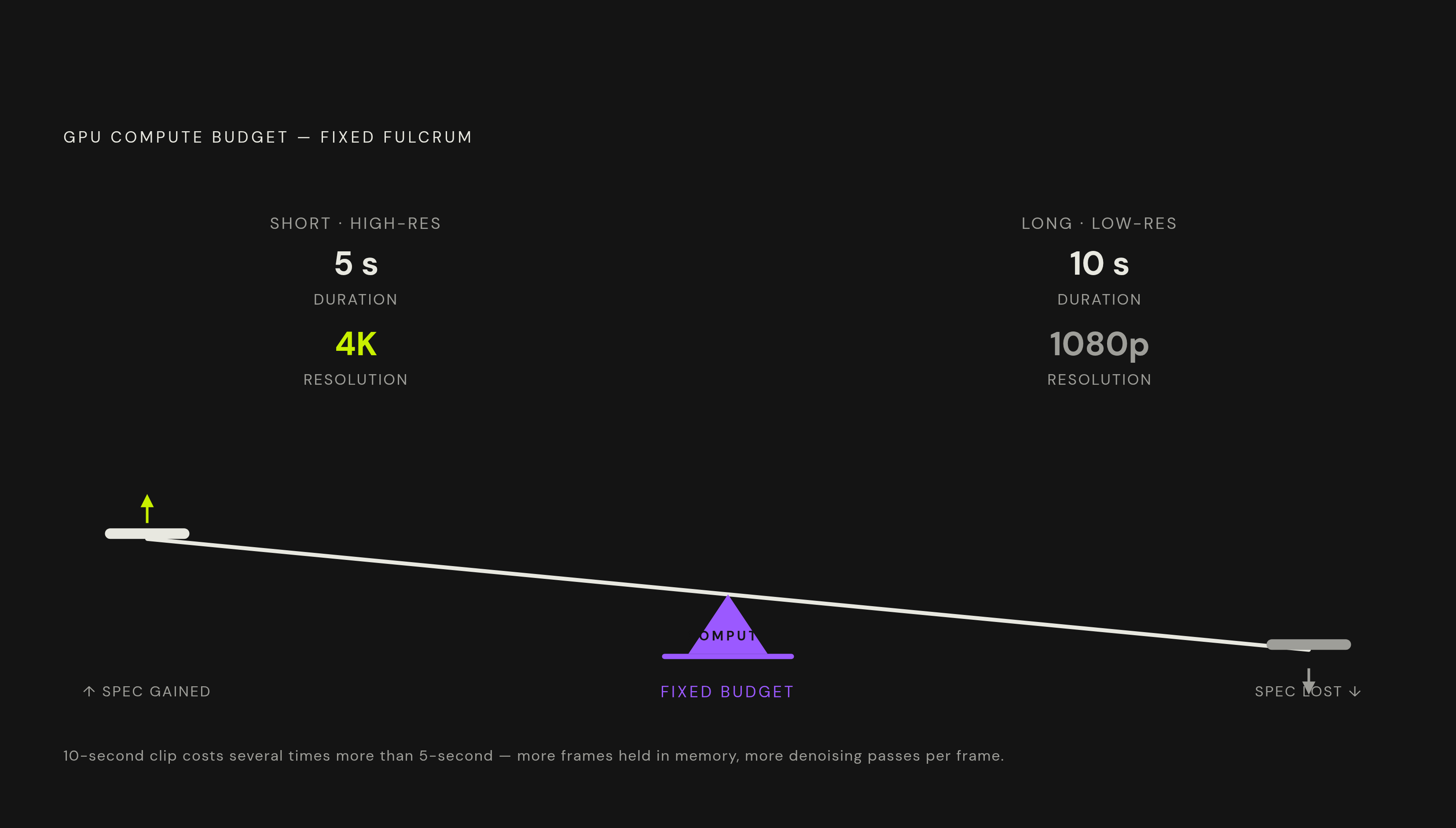
Video generation does not get more expensive in a straight line as clips get longer. It gets expensive fast. Every additional second of footage multiplies the GPU memory and compute a model needs, and that multiplication gets worse as resolution climbs and as the model runs more denoising steps to clean up each frame. A 10-second clip costs several times more than a 5-second clip, because the model has to hold more frames in memory at once and refine each one through multiple passes.
This is the reason duration and resolution behave like two ends of a seesaw. A fixed compute budget can produce a short clip at high resolution, or a longer clip at lower resolution, but not both at the limit of each simultaneously. Pushing resolution up leaves the model less room for length, and pushing length out forces resolution to give ground. None of this is a company holding back features to sell a premium tier later. It is what happens when frame count, pixel count, and denoising steps all compete for the same pool of GPU memory at generation time.
That is why clip length caps across the industry read like infrastructure ceilings, not arbitrary product decisions. A model capped at 8 seconds and another capped at 10 are not expressing different philosophies about creative freedom. They are reporting where their hardware and architecture hit a wall at a given resolution. Keep that duration times resolution times compute relationship in mind. It explains almost everything about the spec sheets that follow.
Duration and resolution across the current model landscape
Google DeepMind's Veo has reached general availability status on Vertex AI, with output at 720p, 1080p, and 4K. The 4K and 1080p tiers (labeled Quality and Fast) carry native audio, and so does the lower-cost Lite tier, which caps out at reduced resolution. Audio is synchronized at 48kHz across text-to-video and image-to-video generation, produced natively at 720p or 1080p and then upscaled when a higher resolution is requested. The Gemini API's preview endpoints for Veo have been shut down, with migration recommended by April 2, 2026, and general-availability endpoints running since March 24, 2026. Clip length depends heavily on which door a creator walks through: the Google AI Pro consumer tier allows clips of meaningfully extended length, while the raw API still produces only a few seconds per generation depending on tier. That gap between the consumer app and the developer API is worth planning around before committing a production pipeline to one or the other.
Kuaishou's Kling 3.0 is part of the current landscape, and anyone building a workflow around it should treat the announcement of Kling 4.0 as a signal that the spec ceiling for this model family is still moving, not settled. Expect the numbers underneath a pipeline you plan today to shift again soon.
OpenAI's Sora 2 is no longer part of the landscape at all. The consumer app closed on April 26, 2026, and the API followed on September 24, 2026. If your production workflow is still built around Sora, you need a replacement model, and that point gets its own discussion later in this piece.
Black Forest Labs' Flux 3 is moving through a staged rollout. Its video mode is in early access, available via API and as private weights to selected partners. An Action mode shipped as open weights on September 23, 2026, and a fully open-weight Flux 3 Dev release is planned for later in 2026. If licensing clarity matters to your team, Flux Schnell runs under an Apache 2.0 license, so its outputs are commercially usable, including on social platforms and for YouTube monetization. That license status matters more to a studio than a hobbyist, but it removes a real source of legal uncertainty for anyone building a business around generated footage.
ByteDance's Seedance 2.5 launched on July 31, 2026, inside the Jimeng and Dreamina apps, with a developer API following on August 7, 2026. MiniMax's Hailuo line continues with the H3 model, and it carries its own audio specification, covered below.
Read this as a reference grid rather than a ranking. Each entry reflects the same trade-off: a model's duration ceiling, its resolution options, and its audio capability all come out of the same fixed compute budget, and every spec above is a different point along that same seesaw.
Where marketing specs and practical output diverge
A published duration limit tells you how long a model can technically run, not how long the output stays usable, since the real ceiling on most generated video is coherence: past roughly 30 seconds, clips tend to drift, with characters shifting appearance, lighting changing without motivation, and camera logic losing consistency, regardless of what the spec sheet allows.
This is a separate failure mode from running out of compute. A model can technically produce a minute or more of footage and still fail to deliver a single coherent scene across that minute. The two problems look similar from a distance, a long clip that falls apart, but they come from different places: one is a hardware ceiling, the other is a drift problem in how the model tracks identity and physics across time.
Every model on the market today shares certain weak points. Readable text inside a frame remains unreliable across the board. Long logical sequences, like a character performing a multi-step task correctly from start to finish, tend to break down. Fine detail consistency across several shots of the same subject is still inconsistent. These are the exact failure points that matter most to a brand trying to protect a product's appearance or a mascot's design across a campaign.
Resolution carries its own practical wrinkle. Native high-resolution output and upscaled output are not the same thing once footage reaches a broadcast context, a large display, or a downstream color grading pass. If footage was generated natively at 1080p and then upscaled to 4K, it behaves differently under those conditions than footage you generated natively at 4K, even if both carry the same label on export.
There is a real argument on the other side of this coherence discussion. Some practitioners treat the 8- or 10-second generation not as a limitation to route around, but as the correct editorial unit from the start, the same way a single camera take has always been the basic building block of film and video production. Under that view, chaining short, consistent clips together is simply how professional video gets made, with or without AI in the pipeline.
That argument holds up, and it points to something important: true multi-minute coherent generation in a single pass, without stitching, remains unsolved at the frontier of this technology. Until a model solves that problem, any claim about extended-duration output deserves a direct question: is this a single-pass generation, or an assembled sequence of extensions stitched to look continuous? The answer changes what a creator can rely on when planning a shoot that needs to hold together for more than half a minute.
How native audio changes video workflow architecture
Audio generated alongside video has moved from a differentiator to a baseline expectation across the leading models in 2026. A workflow that still treats audio as something to add in post-production is now behind where the rest of the field already operates.
The current model lineup makes that baseline concrete. Veo 3.1 generates synchronized 48kHz audio across all three of its tiers. Kling 3.0 supports multilingual lip-sync and sound effects natively. MiniMax H3 generates native stereo audio at 32kHz. Flux 3 generates audio in sync with video out of a single unified multimodal architecture rather than bolting audio generation on as a separate stage.
That shift changes when certain decisions have to get made. Lip movement and sound effects are locked to specific frames the moment a clip is generated, so choices about language, vocal tone, and ambient environment need to happen at the prompt stage, before generation starts, not after the footage comes out. If you wait until editing to decide on dialogue or ambient sound, you are working against a model that already locked those choices in during generation.
This also raises the difficulty of clip chaining. Stitching together clips that were each generated with their own native audio track is harder than stitching silent footage, because audio has to stay continuous across each cut. Where footage once needed only a smooth visual transition, it now needs the soundtrack underneath to feel unbroken too. Audio continuity has to be planned at the same time as the shot list, not patched in afterward.
Prompting for duration, resolution, and audio at generation time
A model left to its own defaults will choose the cheapest interpretation of an unspecified request. That means the most effective prompts in 2026 state duration, resolution, and audio explicitly rather than leaving them open, because an unspecified parameter gets filled in by whatever costs the model least to produce.
Some practitioners argue that chaining short, consistent clips is the correct professional workflow regardless of model limits, treating an 8- or 10-second generation as the natural editorial unit rather than a deficiency to overcome. Six of them carry over directly from image prompting: subject, style, lighting, composition, mood, and technical specification. Four are specific to video: motion, camera, duration, and audio. Treating these as ten separate decisions, rather than a single paragraph of vibes, is what turns a vague request into footage that matches what a creator actually needs.
Duration should be set to match the platform a clip is headed for, not maximized just because a model allows it. TikTok rewards short clips for accounts that are still building an audience, but rewards longer clips once a creator is established. YouTube Shorts perform best under a minute, even though you can now upload much longer to the platform. Instagram Reels favor short clips when the goal is reach, and longer clips when the goal is watch time. Matching duration to the platform's own reward structure gets more value out of the same generation.
Resolution prompting follows the same logic laid out earlier: a model allocates its compute differently depending on the resolution target it's given. Specifying a lower native resolution on a platform where the higher resolution option is really just an upscale saves compute without giving up any quality the native output would have had anyway.
If coherence breaks down past 30 seconds of stacked extensions, as it does with Kling, you are better off planning shorter target durations per clip and deciding where the join points will fall before generation starts, rather than attempting one long single generation and hoping it holds together. That planning step turns the coherence ceiling from a surprise discovered in editing into a constraint designed around from the beginning.
Platforms that bring multiple models into a single interface make these decisions easier to apply consistently. One such platform accepts text and script inputs and connects to models including Veo, Kling, and Flux, so a creator can set duration, resolution, and audio choices once and apply them across models without relearning a new interface for each one.
Clip chaining as the standard professional workflow, not a workaround
Clip length is a hard architectural limit, set by the same compute math covered at the start of this piece. Anything a project needs beyond what a single generation can deliver is a storyboarding and editing problem to solve, not something a cleverer prompt will fix. Treating it as a planning problem from the outset produces noticeably better finished footage than treating every long clip as a failed attempt to beat the model's ceiling.
The short generation is the camera take of this medium. You assemble a finished minute-long deliverable from several of these takes, the same way a finished scene in conventional film production gets assembled from several camera setups rather than shot in one unbroken continuous take.
That discipline has a concrete shape. Plan a project in base units of 6 to 10 seconds. Decide the join points between those units before generation starts, not during editing, so the cut points land on natural breaks in motion or camera position rather than on a moment when the model happened to drift. Keep audio continuity in mind at the same planning stage, since the audio generated natively alongside each clip needs to match or blend smoothly across every cut.
Handled this way, clip chaining is the same structural logic that has always governed professional video production, adapted to a generation process that happens to work in short bursts rather than long continuous rolls.
Sources
- Best AI Video Generators 2026: Veo 3.1, Kling, Sora 2, Seedance & More Compared
- Introducing Veo 3.1 and new creative capabilities in the Gemini API - Google Developers Blog
- Veo 3.1 Lite and a new Veo upscaling capability on Vertex AI | Google Cloud Blog
- Kling VIDEO 3.0 Model Guide | Kling AI
- AI Video Generator 2026: Veo 3.1, Kling 3.0, Sora Exit
- AI Video Models 2026: Sora 2, Veo 3.1, Kling 3.0, Seedance 2.5 and More