Delivering Client Videos Alone Without a Production Team
A seven-stage pipeline turns client briefs into finished videos without a production team.
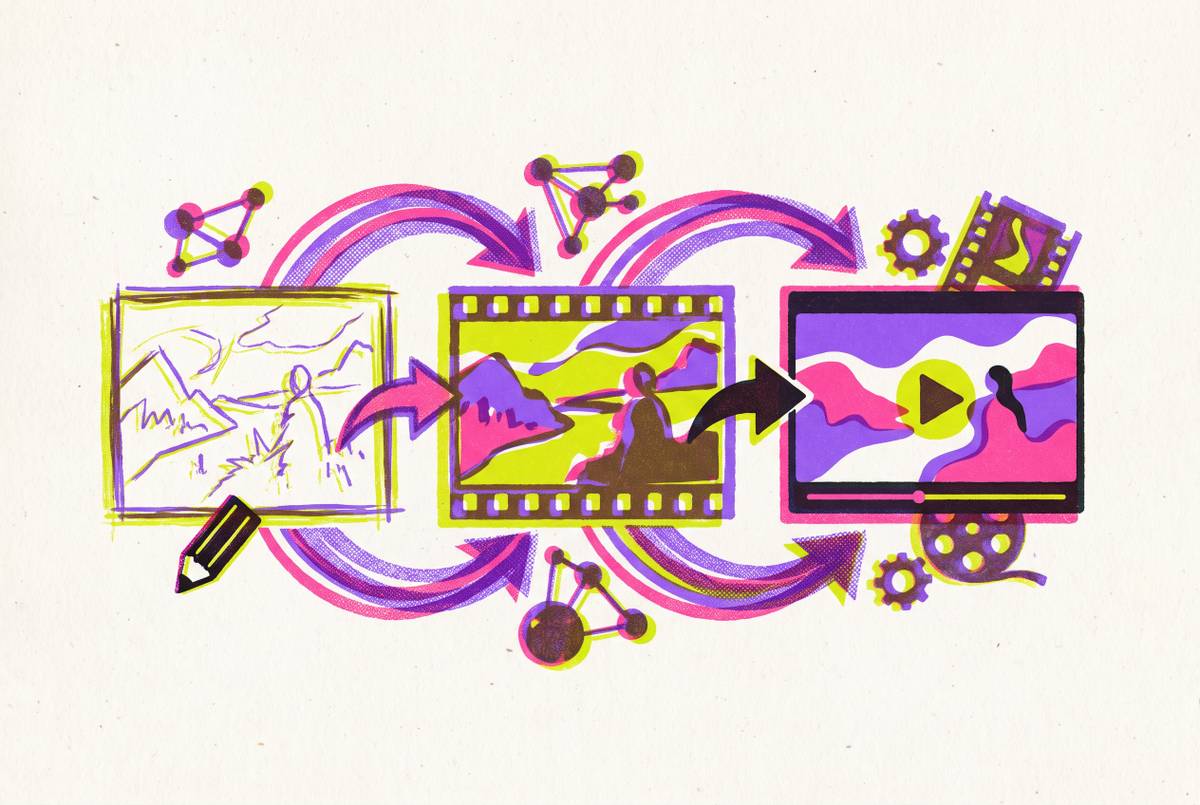
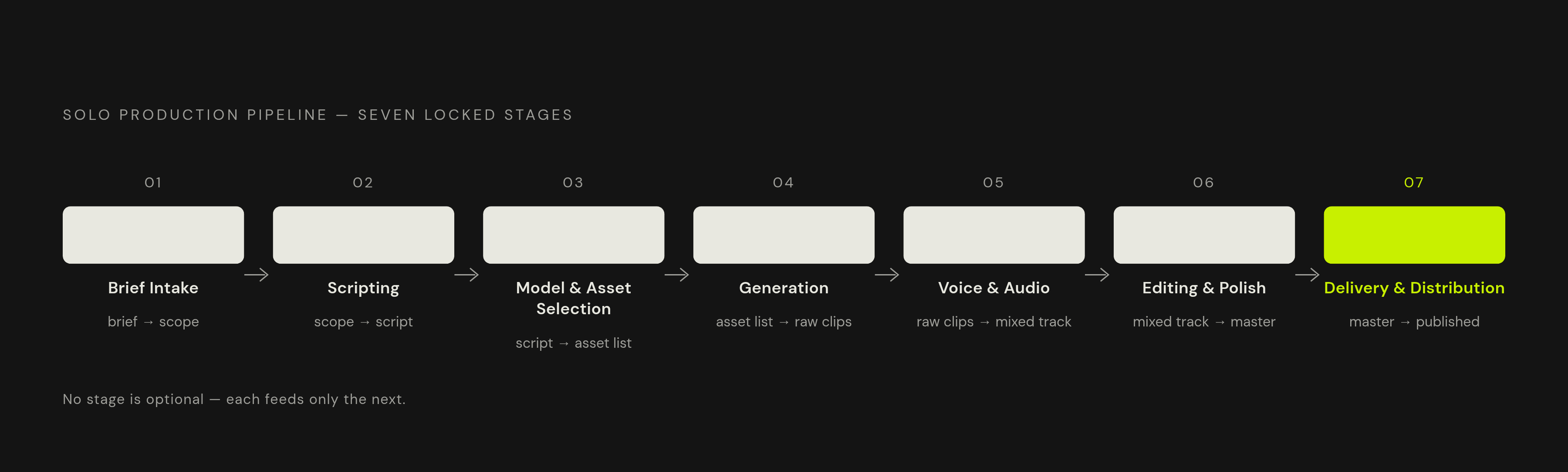
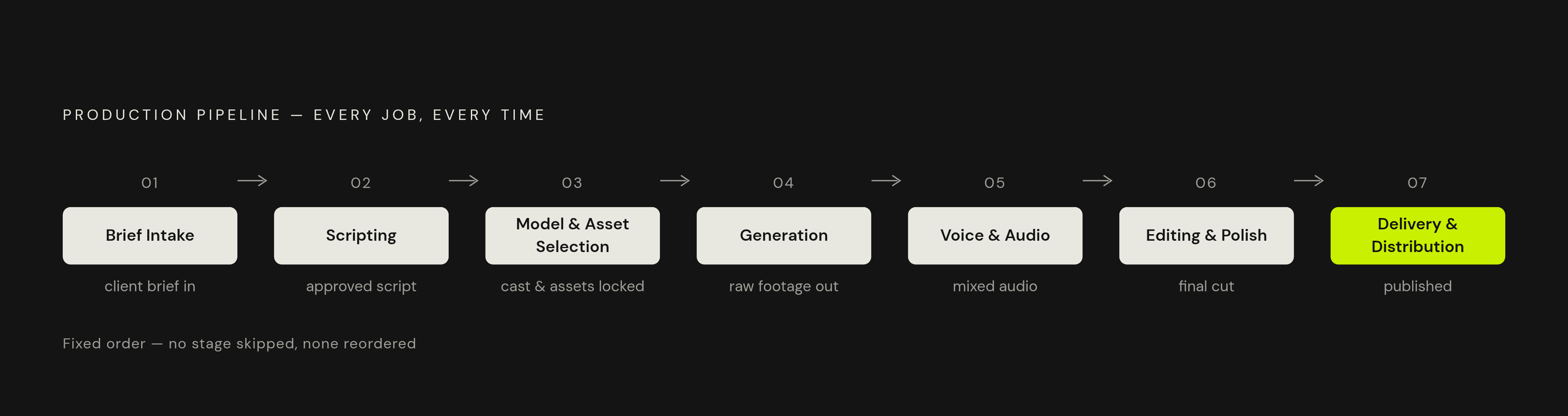
Seven stages make up the pipeline: brief intake, scripting, model and asset selection, generation, voice and audio, editing and polish, then delivery and distribution. Each stage has one input and one output, so nobody reinvents the process every time a new client shows up.
That distinction matters more for client work than for personal projects. A workflow built into a template, or triggered through an automation tool like Zapier, is a workflow with a turnaround time you can put on paper. Some solo operators go further and train a custom AI model on their own past work and a client's brand guidelines, so the look and voice hold steady across every deliverable without redoing the setup each time.
Here's what actually sinks most solo operators: they switch tools mid-project with no plan, they skip a structured brief format, and they treat every job like the first one they've ever done. Lock the stages, pick a default stack, and only deviate when a client brief genuinely demands it. Everything below follows that order.
Turning a client brief into a script and visual plan before opening any tool
The brief is the contract. Objective, audience, format, platform, tone, and any brand restrictions get nailed down before a single tool opens, and a structured intake form is what makes that possible. Even something as plain as a shared Google Doc template cuts revision cycles, the biggest time drain in solo client work.
Once the brief is locked, AI handles the script. Paste the brief into a script-generation prompt with hard constraints: word count, pacing, where the call to action lands. Some AI platforms now run the full chain automatically, going from a prompt or a set of brand assets straight through script, storyboard, and visual sequence. Either way, the output needs two things before generation starts: a word-for-word script, and a shot-by-shot visual plan.
Storyboarding is where the script turns into something production-ready. Map every segment to a shot type, a camera move, and a rough duration; that map becomes the skeleton for every prompt written downstream. Some platforms support storyboard-to-video generation directly, so the brief and storyboard feed straight into production without a manual handoff sitting in between.
Get client approval at the script and storyboard stage, not after the first render. Catching a change here costs a few minutes; catching it after generation costs hours of re-rendering. Nobody should make that trade twice.
Choosing the right AI video model for the type of clip the client needs
Most people pick a model based on which one they used last time. The field moved too fast for habit to substitute for judgment. The field had only a handful of credible AI video models worth using for client work in early 2025; by early 2026 there's a dozen frontier options, and four of the six major ones now generate synchronized audio in the same pass as video, up from zero a year earlier.
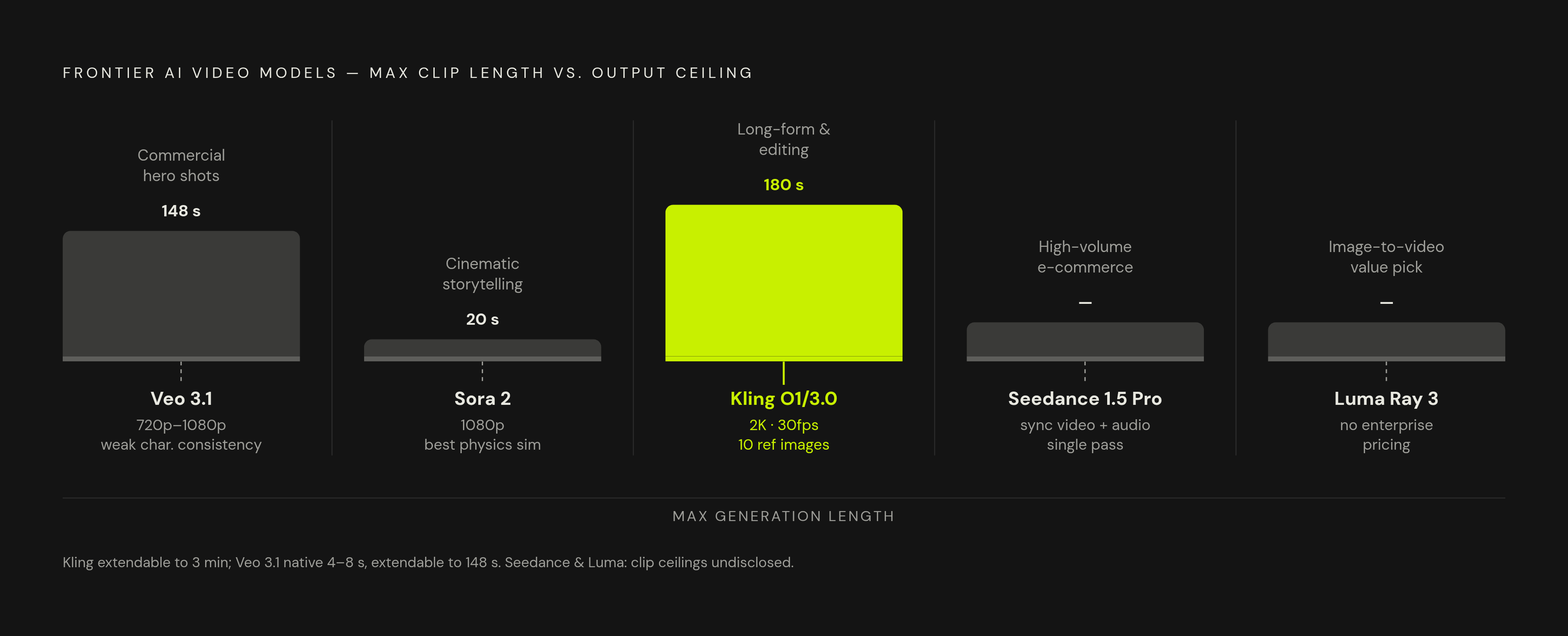
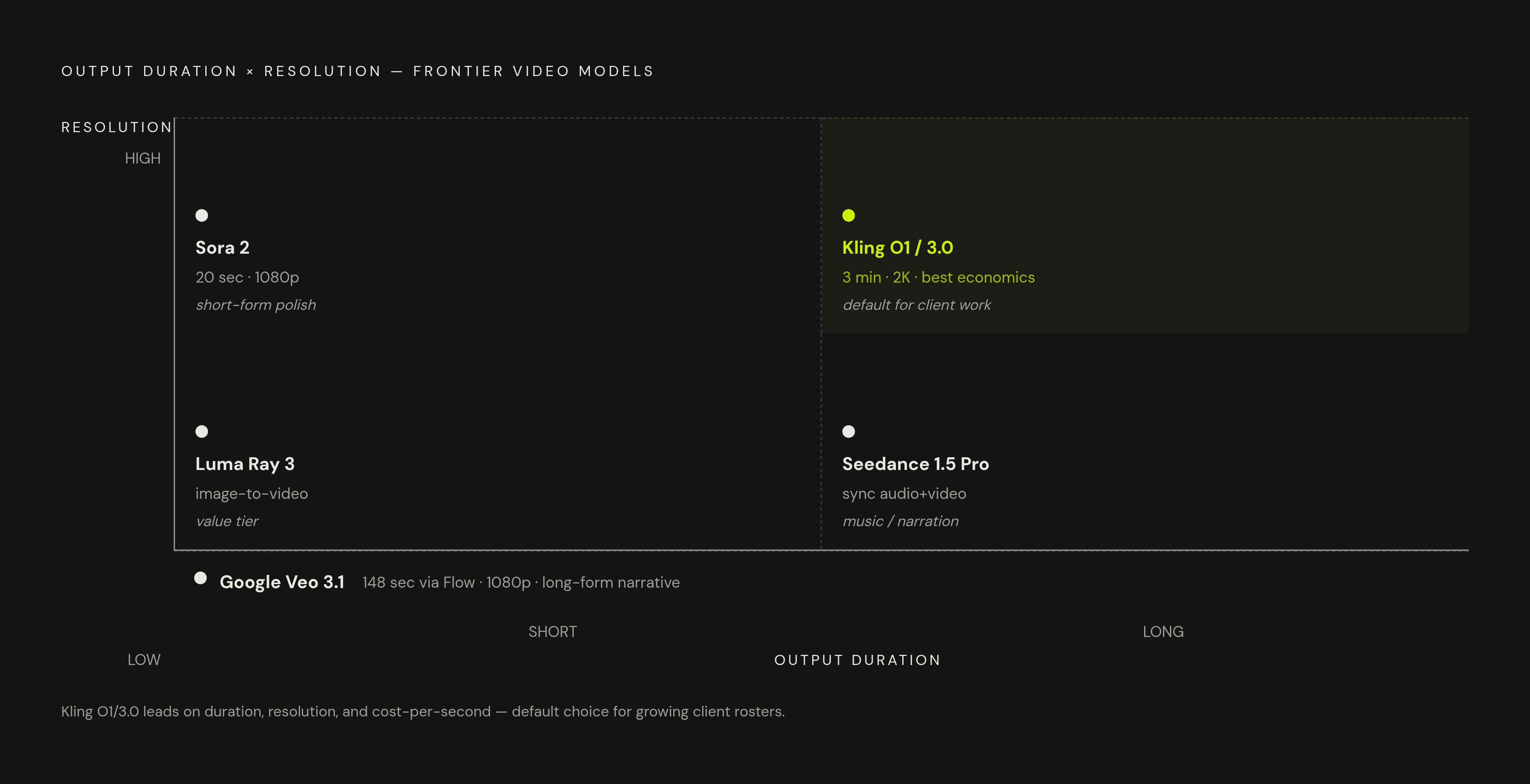
Google Veo 3.1 is built for a commercial hero shot that needs to look like it was shot on a real camera. It handles 720p and 1080p at 24fps, generates natively in 4 to 8 second clips, and extends out to 148 seconds through Flow. Skip it for anything requiring a consistent character across multiple shots, and skip it on tight budgets. Neither is where it earns its keep.
Sora 2 stands apart for cinematic storytelling or brand ads. It's the first model where a real share of generated clips are usable in a finished edit without a disclosure note attached, and its physics simulation, liquid, fabric, light bouncing off a surface, several objects interacting at once, beats every current competitor. It also responds to real camera language: dolly-in, whip pan, handheld feel, which matters for anyone directing shots the way a cinematographer would. The catch is a ceiling of 1080p and 20 seconds, and access runs through ChatGPT Plus or Pro at quota levels that pinch heavy use.
Kling O1 and Kling 3.0 lead the field for longer content, or projects that need editing flexibility. Generations run up to 2 minutes, extendable to 3, and the platform folds generation, editing, transformation, and extension into one tool instead of forcing a switch between platforms. It supports up to 2K at 30fps and takes up to 10 reference images to keep a subject consistent across shots. It also carries the best access economics among the major models, which starts to matter once the client list grows past three or four accounts.
Seedance 1.5 Pro from ByteDance generates synchronized video and audio in a single pass for high-volume e-commerce product clips, so there's no separate dubbing step to manage. It's also unusually precise at following camera instructions: push, pull, pan, dolly, follow.
Luma's Dream Machine (Ray 3) is the value pick for image-to-video work, turning product stills or campaign photography into motion. It respects physics in a way that holds up without enterprise-level pricing attached.
Fast, cheap, experimental tools have a place too, even though they're the weakest at long-form realism. Showing a client two or three rough directions before rendering the final version saves everyone time. Nobody needs a $400 render just to test whether a concept lands.
One habit worth adopting regardless of which model becomes the default: generate the same concept in two candidate models and keep whichever version wins. It's a small extra cost that pays off the moment a client asks why a certain look got chosen. Platforms that combine multiple models inside one interface remove the need to juggle separate subscriptions and logins across every job type.
Writing prompts that produce usable footage on the first or second generation
Longer prompts don't reliably produce better clips; structure does. That's the mistake almost everyone makes starting out: stacking adjectives instead of ordering information. A production-grade prompt has six parts, and they need to show up in this order: subject, action, camera, lighting, environment, style.
Camera language changes more than most solo operators expect. Swap "handheld" for "locked tripod" and the entire emotional register of the clip shifts, even if nothing else in the prompt moves. Here's what a working prompt looks like in practice: "Close-up product shot of a sneaker on a rotating pedestal, soft studio lighting, shallow depth of field, cinematic, slow dolly-in, clean background, 9:16." Seedance 1.5 Pro and Sora 2 both respond most reliably when the camera vocabulary is spelled out rather than implied.
Lighting prompts need to name both the source and the quality of light. "Golden hour backlight" produces a different result than "warm light," even though a person reading both descriptions might guess they land in the same place.
For clients running multiple clips across a campaign, keep a prompt library per client rather than per project. Lock the style and environment language once, then swap out only the subject and action for each new clip. For image-to-video work, the reference image is already doing most of the visual description, so the prompt can focus almost entirely on motion and camera behavior. Whenever a result comes back off, change one variable on the next attempt, not two. Change two things and there's no way to know which one moved the outcome.
Voice, audio, and the finishing work that makes AI footage feel professional
Generation gives raw clips. Polish turns raw clips into something a client pays for, and that's the step people skip when they're rushing, even though it's the step clients notice most.
On voice, synthesis tools like ElevenLabs and PlayHT have become standard for narration that sounds natural and for multilingual dubbing. A practical move is locking in one voice clone per client, so their videos build a recognizable audio identity the same way a consistent color palette builds a visual one. Seedance 1.5 Pro skips this step entirely for high-volume e-commerce work, since it generates synchronized audio in the same pass as the video. Voice synthesis also opens up multilingual delivery as a premium add-on. A Spanish or French version of a video takes very little extra time once the workflow is set up.
On editing, the checklist matters more than the tool. Confirm clip sequencing matches the approved storyboard, check that captions are accurate and styled to the brand, make sure audio levels stay consistent from clip to clip, and apply a color grade if the brief called for one. Some platforms handle clip assembly, captioning, and platform-specific formatting inside the same tool, which keeps the whole job from spilling into a separate editor.
On export, match the platform: 9:16 for TikTok, Reels, and Shorts; 16:9 for YouTube and presentations; 1:1 for LinkedIn's feed. Check the resolution the brief calls for, but treat 1080p as the floor for any client deliverable, not the target.
Handling brand consistency across multiple clips and repeat client engagements
Brand consistency is the hardest problem in AI video for client work, mostly because these models don't remember anything between sessions by default. Every new generation starts cold unless something forces continuity, and that something has to come from the operator, not the tool. Relying on the model to "just know" the brand is the single most common mistake in repeat client work, and it's an avoidable one.
The fix is a brand kit built once per client: a locked color palette, font stack, logo files, an approved voice clone, and a frozen style section pasted into every prompt template. Reference-guided generation helps too, since Kling O1 supports up to 10 reference images per generation, which keeps a product or character looking the same across shots. Some operators go further and store their best approved clips as style anchors, generating new footage against a "make it look like this" reference instead of starting from scratch. Custom models trained on a client's own past content produce the tightest consistency of all, though that setup takes more upfront work than most first projects justify.
For clients coming back for a second or third project, the real deliverable is the client asset folder: the brand kit plus the prompt library plus the reference clips. That folder makes the next project faster than the last one, and it's the actual argument for a retainer. The client is paying for a system that gets faster and more consistent every time it runs.
Revisions need a hard limit written into the contract, not a verbal understanding. Two rounds is the standard. Anything past that should trigger a change order with its own price tag, since a tight brief and an approved storyboard should already stop most revision requests before they start.
Automating delivery and distribution so the workflow scales without adding hours
Once the video is polished, the bottleneck moves to getting it to the right place, in the right format, with the right metadata attached. Done by hand, that step eats up as much time as parts of the edit itself, and it's the part clients never see and never credit.
Automation closes that gap. A change in project status inside a project management tool can trigger video creation automatically, and scripts can pull straight from a shared document without anyone copying and pasting. Finished videos can route to a client's learning platform, social scheduler, or shared drive without a manual handoff, and a Slack message or email can notify the client the moment the file lands.
Social scheduling tools, Buffer at $6 a month is one low-cost option, handle the platform-specific posting, timing, and format variants after that. Set the queue once, and the tool runs it from there.
There's a repurposing angle worth building into every job too. A single two-minute client video can get cut down into several short-form pieces for TikTok, Reels, and Shorts, platforms where LinkedIn alone saw a 310% jump in AI-generated video content in 2025. Keeping a set of short-form templates on hand cuts this repurposing step down by a wide margin.
Put together, a solo operator running this kind of automated pipeline moves more client volume than a small team running the same process by hand, because the leverage sits in the system, not the headcount. That changes how pricing should work: the drop from 13 days to 27 minutes represents a fundamental shift in production economics, so pricing should track the value delivered to the client, not the hours logged against it.
Structuring the solo client video business to make it sustainable
None of this workflow matters if the business wrapped around it can't hold weight. Speed and quality solve the production problem. Pricing, positioning, and how many clients one person can actually serve well at the same time stay wide open, and that's exactly where solo operators tend to overreach: taking on volume the workflow can produce but the operator can't actually manage.
Tool costs stay low relative to what a full production team once billed, which is exactly why the margin argument holds up. A solo operator paying for a handful of model subscriptions and a scheduling tool is still spending a fraction of what a five-person crew cost in salary and overhead, and that gap is the business.
Charge for the outcome the client is buying, not the hours it took to make it. Hold that position even when a client pushes back and asks for an hourly rate; hourly billing punishes the exact efficiency this workflow is built to create. Protect the revision terms in the contract before the first draft goes out, and treat the brand kit and prompt library built for each client as an asset that compounds, not a one-time setup cost. The workflow gets faster every time it runs for the same client, and that compounding is what turns a one-off gig into a retainer worth keeping.