Repeatable AI Video Template System for Brand Accounts
Build repeatable AI video templates so any team member produces on-brand clips without restarting.
What a repeatable AI video template system consists of
Short-form video now eats up more than 82% of consumer internet traffic, and 78% of marketing teams have run at least one AI video campaign. Most of them are still doing it wrong. They generate clips one at a time, from scratch, with nothing connecting one video to the next, so every production restarts the same argument about brand look, tone, and format. The fix is a template system. It's a template system: a set of locked decisions that turns production from a scramble into something any team member can run without relitigating the basics.
A workflow is something you follow once. A template system encodes the decisions themselves, so nobody has to remake them every time a new brief lands. It's four layers, working together: a prompt library, model selection rules, format specs, and a workflow stage map. Skipping any one of them puts you back to guessing.
Locking a decision removes it from the production run. A team member executing the template applies a visual style that's already been settled, not one they're inventing on the spot under deadline pressure.
Think of a restaurant kitchen. A standardized recipe means any trained cook produces the same dish, night after night, regardless of who's on the line. The template system is the recipe, and the AI models are the stove and knives. The recipe doesn't change every night, but the ingredients do: new product, new copy, new campaign message. That's what "reusable" actually means here. The locked elements hold steady. Only the variable inputs move.
Layer one, the prompt library: encoding visual style so it travels with every production
A prompt library is a sorted, tested set of prompts by output type: hero scene, product close-up, lifestyle B-roll, transition, avatar dialogue, platform-specific hook. Each one has already been run and checked, so nobody guesses at prompt phrasing while the clock is running.
A prompt built for brand use encodes more than what's in frame. It specifies shot type (wide establishing, tight product, over-the-shoulder), camera movement (slow push, locked-off, handheld), and angle. It specifies lighting and mood: cinematic, natural, studio, a particular time of day. It uses style adjectives that have actually been tested against the chosen model and confirmed to produce something that looks like the brand. And it states what to leave out: busy backgrounds, certain color ranges, anything that reads like a competitor's palette.
Prompts are model-specific, a detail that trips up most teams building their first library. A prompt tuned for Veo 3.1 will behave differently in Kling 3.0, because each model interprets style, motion, and framing cues in its own way, and ignoring that is how libraries fall apart six months in. The library needs to flag which model each prompt was calibrated for. It also needs a review cycle tied to model release dates, not campaign calendars, because when a model updates, prompts drift out of alignment without warning.
Layer two, model selection: matching the right AI model to each scene type in your template
Multi-model production is the standard now, and treating one model as good enough for everything is the single most common mistake in this whole system. Different models handle different parts of the same video. A good template encodes that split by scene type, rather than leaving it to whoever happens to be running the generation that day.
For hero product shots and character scenes that need real fidelity, Google's Veo 3.1 generates true 4K resolution at 24fps, with native audio in a single pass. It leads on prompt adherence, which makes it the right call for fashion and product commerce, where small details are the entire point.
For human motion, walking, gesturing, action sequences, Kling 3.0 produces the most natural movement of the current model set, and at $0.10 per second it's also the cheapest premium option on the table. It's accessible globally through kling.ai, with documentation in English, Japanese, Korean, and other languages. For structured, multi-shot narrative work, Kling 3.0's "AI Director" feature generates up to six distinct shots in a single pass with synchronized native audio through Kling VIDEO 3.0 Omni, and its "Elements 3.0" feature keeps a character looking consistent across all six.
For fast social content, PixVerse 5.5 handles smooth motion and reliable camera movement, which suits teaser clips and product promos that need to move fast without looking jittery. For brand films that need visual consistency across scenes, Seedance 2.0 handles motion and multi-scene generation from a single reference image, keeping the same character recognizable across different angles and cuts.
Cost varies enough to plan a budget around it. Open-source options like Wan 2.6 run about $0.05 per second at the low end. Most premium models cost between $0.10 and $0.40 per second. Sora 2's API runs $0.75 per second at the top. OpenAI shut down the consumer Sora web and app interfaces on April 26, 2026, so new production templates should not get built on that consumer layer. API access continues through September 24, 2026, which leaves the door open a little longer, but it is not a foundation to build a repeatable system on.
Layer three, format specs: locking platform-specific output rules so nothing ships wrong
Platform specs aren't creative preferences to debate in a brand meeting. The algorithm enforces these as hard constraints no matter what anyone prefers, so a template system has to lock them before generation starts, not patch them afterward.
Aspect ratio comes first: 9:16 native for TikTok, YouTube Shorts, and Instagram Reels. Native vertical gets priority placement, and vertical is increasingly the dominant format for AI-generated video. Duration targets differ by destination: 15 to 35 seconds for YouTube Shorts, 15 to 30 for TikTok, 15 to 45 for Instagram Reels. But chase completion rate, not a number on a spec sheet. The general sweet spot across platforms in 2026 is around 30 to 60 seconds.
Captions need to be burned in, not left to auto-generated text, and they need to clear both accessibility standards and the legibility threshold each platform's algorithm rewards. Watermarks matter just as much: cross-posting a video off TikTok with its visible watermark still attached quietly kills reach everywhere else it lands, so the template needs a clean export path for each destination. Resolution should scale with purpose. Hero ads deserve the highest ceiling the model supports, while fast social content can trade some of that ceiling for speed, using something like Veo 3.1 Fast or PixVerse 5.5. Safe zones round it out: locked rules for text and logo placement that survive cropping and mobile framing no matter where the video ends up.
The hook deserves its own locked field, not an afterthought tacked on at the end. Short-form video under 60 seconds drives 2.5x more engagement than longer cuts, and the first 1.5 seconds decide distribution more than anything else in the video. So the hook script or visual gets approved before generation even starts, full stop.
Once format specs are locked, one core asset turns into several platform variants without a separate production cycle for each one, producing a 30-second Reel with brand colors and text overlays, a 15-second TikTok cut with fast edits, and a 60-second LinkedIn version with more restrained framing. AI generates each variant in minutes once those specs are already decided, not before.
Layer four, the workflow stage map: turning production into a governed, repeatable process
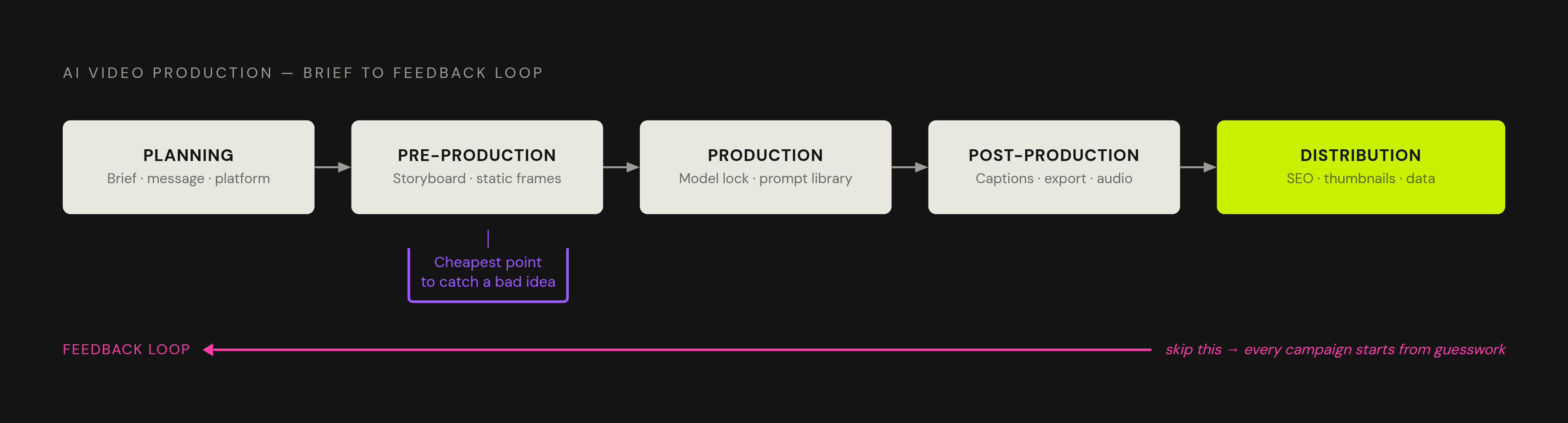
The stage map is what makes the prompt library and format specs usable by someone other than whoever built them. Five stages, and a defined job at each one.
Planning covers brief intake, campaign message, and platform destination, with AI helping pressure-test the concept and pull relevant research. What gets decided here should point straight at which prompt templates get used downstream. Pre-production means building a storyboard as static images before any AI video gets generated at all, which is the cheapest point in the entire process to catch a bad idea. Teams shipping at real volume treat this step as mandatory, not optional: fixing a concept in a storyboard costs a few minutes, and fixing it after generation costs a full re-run.
Production is where the locked model assignments and prompt library get used, but pause here before generating anything new. Less than 5% of most brands' filmed content ever gets used, so auditing the existing library is often the fastest, cheapest source of new video, cheaper than generating anything fresh. Post-production, caption burning, format export, audio cleanup, translation, is the stage marketing teams tend to feel most comfortable handing to AI, and it's where automated workflows pay off most clearly.
Distribution and feedback closes the loop: SEO metadata, titles, thumbnails, and a stage that routes performance data back into the next brief. A workflow that stops at distribution is unfinished. Skipping that last step means every new campaign starts from guesswork instead of from what actually worked last time.
Approval needs its own defined path: draft, brand or legal review, feedback capture, revision, sign-off, published. At scale, that routing runs on automated status and campaign rules, not on someone manually chasing down an approver over a messaging app. For campaigns running across regions, localization should be a named stage too, with AI agents handling translation and routing localized assets through the right regional review channels, tied back to brand guidelines throughout. Before drawing any of this up, find out where handoffs actually stall first. Generation speed is almost never the problem. Approval latency, unclear ownership, or feedback with no structured path back into production appears at the handoff points.
Building the system in practice
Start narrow. One template for one format, say a 30-second product demo built for Instagram Reels, beats a half-finished system stretched across ten formats that nobody can actually run.
Audit one video that already performed well and reverse-engineer what made it work: visual style, shot structure, platform format. That becomes the baseline spec. From there, write and test three to five prompts against the chosen model for that specific format, and track which adjectives and constraints consistently land on-brand results. That's the seed of the prompt library, and it's small on purpose.
Next, separate the variable inputs (offer, hook copy, product) from everything that's locked. The person running production should see only the variable fields. Everything else stays fixed behind the scenes, out of reach. Then run the whole workflow stage map once, start to finish, on a real brief, and watch for every point where a decision still gets made on the fly. Those are the gaps that need locking down before anyone calls the template finished.
Last step, and it's the one teams skip most often: build the feedback loop in before declaring victory. Decide upfront what metric triggers a revision, completion rate, engagement after viewing, click-through, whatever actually fits the campaign goal.
None of this replaces judgment. Brand voice, storytelling instinct, and final sign-off on anything carrying legal or brand risk stay human, and they should. The template system exists to remove busywork and repeated re-decisions. It doesn't get to make the calls that define what a brand actually sounds like.