Quality Control Checklist for AI-Generated Video Before Publishing
Human review before publishing catches AI video errors that models can't fix themselves.
Whether AI video looks professional or looks like slop has nothing to do with which model made it. It comes down to one thing: whether a structured human review happened before the file went live. Both the clean, polished clip and the embarrassing one running on a brand's account right now were made with the same generation tools. What separates them is everything that happens between the moment generation finishes and the moment someone hits publish.
That distinction matters because it puts responsibility in the right place. AI output is probabilistic, so a clip can look finished and still hide a warped hand, a logo that drifts between frames, a claim that doesn't match the product, or an asset nobody had the rights to use. None of that is a flaw in the model that can be fixed by waiting for a better version next year. It's a gap in the process that made the video, and that gap is fixable today, with a checklist.
Automation raises the stakes on that gap rather than closing it. A pipeline that skips review doesn't make one mistake. It makes that mistake at scale, across every video the pipeline touches, because a workflow built to skip quality control will skip it consistently. The upside works the same way: a workflow built around review catches errors consistently too.
One useful way to frame the whole problem: slop is not a technology problem, it is an editorial problem. Excellent work and terrible work can both come out of the same AI tools, the same way excellent photos and terrible photos can both come out of the same camera. The tool doesn't set the ceiling or the floor on quality. The process around the tool does. That's the argument this checklist is built on, and it's why the rest of this piece treats quality control as a series of specific, repeatable gates rather than a vague instinct to "look it over before posting."
Where AI video fails
AI video fails in patterns that repeat across projects, tools, and prompts. Those patterns appear in four areas: visuals, audio, structure, and content. Knowing what each failure looks like turns a checklist into something a reviewer can actually use, instead of a reminder to "check for problems" with no idea what a problem looks like.
On the visual side, the most common tell is morphing: objects, faces, or backgrounds that shift shape, color, or texture between frames. It is most visible in hair, fingers, clothing edges, and reflective surfaces, places where small details change frame to frame and the model has to keep guessing instead of tracking something real. Lighting is another giveaway. Real footage holds a consistent light direction and color temperature because the physical light source in the room doesn't move. AI-generated footage drifts because each frame gets generated somewhat independently, and that independence produces a shift in brightness or color between cuts or even within a single shot. Motion has its own version of this problem: people walk without any real weight transfer, objects float instead of falling, hair moves like a simulation rather than a response to gravity and air. And composition tends to flatten out. Every shot sits center-framed and eye-level, static, with no camera movement or depth variation, because that's the safest output a model can produce.
Audio carries its own set of tells. Robotic voiceover is the most obvious one: narration that lacks natural pacing, emphasis changes, and breath sounds, even when the text-to-speech engine itself is high quality. High-quality synthesis still needs post-processing for timing and emphasis, and skipping that step is audible. Missing ambient sound is just as telling. Real environments are never silent, so voiceover or music sitting over total silence signals artificial production immediately. And music can simply clash with the footage: a track that doesn't match the tempo or emotional weight of what's on screen pulls a viewer out of the video even when they can't say why.
Structural failures are about choices made during editing, not generation. A video that leans entirely on abstract visuals, text overlays, and stock-style footage, avoiding human faces altogether, is usually telling on itself: the creator knows AI faces don't hold up and is hiding that limitation instead of solving it. Shot length is another tell. Professional editing varies shot length on purpose, for rhythm and pacing. AI output defaults to uniform shot length unless someone actively breaks that pattern. And heavy text overlays that explain what's happening on screen are often covering for visuals that don't communicate the message on their own.
Then there's content, which is the category most likely to slip past a visual-only review. A video can look completely convincing and still contain the wrong product detail: an old logo, last year's pricing, a feature that's been discontinued. The model has no way to know the source material is stale, so it renders the mistake just as cleanly as it renders everything else. Captions generated automatically can introduce product names or claims that were never part of the brief. And when AI-generated clips sit next to real footage, the contrast can become obvious; a viewer may not be able to name why the video feels inconsistent, but they'll feel it.
Quality control should start before the model generates a single frame
Many AI video failures that look like generation problems are actually brief problems wearing a generation problem's clothes. If the source information, reference assets, or shot logic going in are wrong, no amount of review after the fact can fully repair what comes out.
Start with source material. Outdated screenshots, last year's pricing, an old logo, a feature the company discontinued six months ago: feed any of that in, and the model doesn't flag it as wrong. It renders a more convincing version of the mistake. The fix isn't a better review pass after generation. The fix is catching stale material before it ever becomes a prompt.
Finish the sentence "After watching, the viewer should understand or feel ___" before writing a single prompt. If the answer to that sentence contains three different outcomes, the brief is unfocused, and the video will be too. Picking one primary job for the video to do keeps the prompt focused around that job.
Alongside that, define the invariants before generation starts: character identity, product shape, wardrobe, logo position, direction of travel, room layout. Put all of it in one compact block ahead of the shot instructions, so the model has a clear, fixed reference instead of having to infer consistency on its own. Reference assets need their own audit too: confirm product versions match, confirm pricing and features are current, confirm the team actually owns or has permission to use each file. Assign each reference asset a specific role, identity, environment, composition, motion, lighting, or audio timing, so the model knows what to preserve, what to borrow, and what to ignore. And keep the shot list to the minimum number needed to do the job; every extra shot is another chance for identity drift or pacing problems to creep into the final cut. Decide on audio treatment, voiceover, music, ambient sound, or silence, before generation starts, not after the footage already exists.
None of this takes long. A ten-minute pre-generation pass, checking invariants, assets, and the single intended outcome, saves far more time than rewriting prompts after three generations come back wrong for reasons nobody can quite name.
Gate 1: Visual integrity: checking motion, artifacts, and lighting before anything else
Visual integrity is the first gate because it's the first thing a viewer judges, often within the first few seconds. It's also where the most trust gets lost the fastest if something looks off.
The review itself needs two separate passes, and they're not interchangeable. The first pass is a single uninterrupted viewing of the whole video, no pausing. This catches how the video actually feels to watch, the overall experience a real viewer will have. The second pass is slower and more targeted: watch again, this time looking specifically for motion problems, artifacts, and lighting inconsistencies. The first pass catches the viewer's experience. The second catches the technical issues that experience is built on.
For motion, look for movement that breaks across a frame boundary incorrectly. A person walks naturally for two seconds, then the shoulder shifts in a way a human shoulder can't. A product rotates cleanly, then changes shape for a few frames before correcting itself. Camera movement needs its own check too: if the prompt asked for something cinematic, confirm the result actually reads as intentional camera work rather than a floating, disconnected drift. For creator content, small background motion issues might be acceptable if the subject and message stay clear. For brand or client work, any shape change in the product, face, logo, or main action is a hard stop, not a judgment call.
The artifact scan goes detail by detail: faces, hands, logos, packaging, reflections, shadows, and any text generated inside the frame. AI models still struggle with small repeated details, so the cleanest-looking clip can hide a broken label or an impossible finger position sitting just outside where a casual viewing would notice. Hands in particular remain a known weak point across generation models, so every hand shot deserves a direct look before anything ships. When a marker turns up, there are four real options: fix it directly, mask it with an overlay graphic, regenerate just that clip, or document the decision to accept it as-is and why.
Lighting gets its own check too. Confirm light direction, intensity, and color temperature hold steady between cuts and within a single shot. When AI clips get mixed with real footage, color matching the AI footage to the real footage in post-production is faster and more reliable than hoping a regenerated clip happens to match better.
Composition closes out this gate. Flag any run of shots that are uniformly center-framed, eye-level, and static, because that flatness is itself a detectable AI marker, not a neutral choice. Confirm camera movement instructions were followed as a single clear move with a defined start and end point, rather than several moves stacked on top of each other producing a camera path that doesn't make physical sense.
Multimodal AI tools that can watch footage and return a structured QA report are worth folding into this gate. They can catch on-screen typos, flag sections that drag, spot repeated content, and surface technical glitches, turning what would be a slow manual frame-scan into a faster, more systematic pass that still needs a human to make the final call.
Gate 2: Audio quality and sync: the review most teams skip and audiences notice
Audio gets reviewed by feel more often than by any defined check, and that gap is where problems slip through. A team might watch a video three times and never specifically listen for anything, while the audience experiences the audio immediately and judges it the moment something feels wrong.
Voiceover is the first thing to check, and the standard is specific: pronunciation, pacing, breath cuts, and whether the tone actually fits the brand. Flat delivery without emotional range is a primary tell of AI-generated audio, and it occurs even when the underlying text-to-speech engine is high quality, because quality synthesis without pacing and emphasis adjustment still sounds mechanical. There's a second check here too, around rights: flag any moment where a generated voice could be mistaken for a real, identifiable person who hasn't approved the use. That's a trust problem and a rights problem at the same time, and it needs to get caught before publishing, not after.
Captions and sync need a direct check against the audio, together, not separately. A caption that lands too early can give away the hook before it lands. A caption that lands late makes even a short video feel sloppy. A caption drifting half a second out of sync is invisible during a casual creative review and immediately obvious to a viewer, and fixing it after upload costs far more time than catching it before export. Beyond timing, check whether the video actually works without sound: if the key information only exists in speech, ask whether captions are missing, inaccurate, or disappearing before a viewer can read them.
Ambient sound deserves its own check. Confirm the video carries room tone or environmental audio where the scene calls for it. Real environments are never fully silent, so a video running voiceover and music over total silence signals artificial production the moment a viewer notices, even if they can't name what's missing.
Music fit is the last piece. Check whether the beat actually supports the cuts or works against them, since a track can be fully licensed and still wrong for the edit. And confirm the music license is documented in the project folder before export, not tracked down after the video is already live.
The clearest close to this gate is the silent viewing test: watch the entire video with the sound off. If the content doesn't hold up without audio, that's the signal captions are missing, inaccurate, or need rework. This matters most for social video, where viewers routinely encounter a clip before they ever turn sound on, so silent clarity is the first impression.
Gate 3: Brand and content accuracy: catching what looks right but isn't
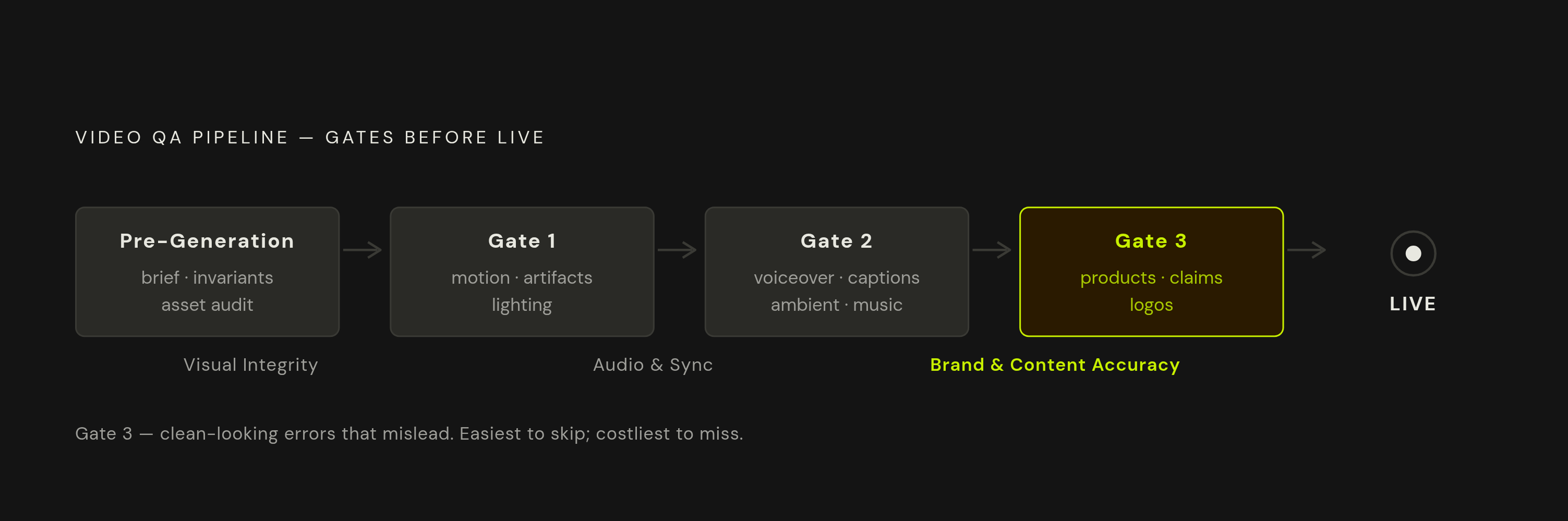
A video can pass every visual and audio check and still be wrong. Looking convincing and being accurate are two different standards, and a wrong product detail, an outdated claim, or an inconsistent brand element can sail through visual review while actively misleading whoever watches it.
This gate means checking packaging details, proportions, logos, materials, and any visual claim that could shape a customer's expectations. A generated scene can suggest a feature, a texture, a result, a size, or a use case that the real product simply doesn't deliver, and none of that will show up as a visual glitch. It will look clean and still be false.
In ecommerce specifically, a product video is usually doing several jobs at once: showing the product, setting expectations, building desire, and reducing uncertainty before someone decides to buy. A single inaccurate visual claim can still pull in attention while quietly weakening conversion quality and customer satisfaction down the line, because the viewer who buys based on a false claim is the viewer most likely to return the product or leave a bad review. That's the real cost of skipping this gate: not a viewer who notices an artifact and scrolls past, but a customer who trusted the video, acted on it, and got something different from what they were shown.
Sources
- Simple Visual Artifact Detection in Sora-Generated Videos
- Artifact-Aware Evaluation for High-Quality Video Generation
- A Survey of AI-Generated Video Evaluation
- GeneVA: A Dataset of Human Annotations for Generative Text to Video Artifacts
- Artifact-Bench: Evaluating MLLMs on Detecting and Assessing the Artifacts of AI-Generated Videos
- BrokenVideos: A Benchmark Dataset for Fine-Grained Artifact Localization in AI-Generated Videos
- How to implement an AI content review workflow