Repurposing Long-Form Video Into Short-Form Clips With AI
AI finds the moments worth sharing so your team can stop searching old footage for them.

Long-form video costs teams more than the hours spent shooting and editing it. The real cost sits in every clip-worthy moment that never gets cut, because nobody's job is to go back and find it. Fix that with a system where AI does the finding and a human does the deciding, and the archive stops being a graveyard.
Long-form video as a liability without a repurposing system
A 60-minute interview might contain four sharp opinions, two data points worth quoting, and one genuinely funny exchange. Every one of those moments could stand alone as a 30-second clip. Almost none of them ever do, and the reason has nothing to do with effort. It's structural. Most teams have nobody whose job is to go back through old footage and cut what's already there.
Tutorials, livestreams, product demos, panel discussions: each one is a container stuffed with standalone moments that were never meant to be watched start to finish by everyone who'd benefit from them. Someone searching "how to fix X" doesn't want a 47-minute tutorial. They want the 90 seconds where the fix actually happens, and if that 90 seconds never gets cut out, it might as well not exist.
The actual workflow at most teams looks like this: someone remembers there was a good moment in last month's webinar, scrubs the timeline by hand, cuts it, and posts it if they remember to. That's a favor the content gets whenever someone happens to remember, dependent on whoever has 40 free minutes that week. That's a favor the content gets whenever someone happens to have 40 free minutes that week, and favors don't scale and don't repeat.
A real system runs the same way every time, regardless of who's around to run it. Source video goes in, candidate clips come out, formatted for wherever they're headed. No memory required, no negotiating for someone's bandwidth. That gap, between content that compounds and content that quietly rots on a hard drive, is the whole game.
What each platform rewards in short-form video in 2026
Short-form video has consolidated around three real engines: YouTube Shorts, TikTok, and Instagram Reels. Each one rewards a different behavior, and cutting the same footage the same way for all three is the single most common mistake teams make. It's also the most expensive one, since it leaves reach on the table on at least two platforms out of three.
YouTube Shorts moves roughly 200 billion daily views and reaches about 2 billion monthly users. What no other platform offers is the funnel back into long-form: a Short can pull a viewer straight into the full podcast episode or webinar it came from, turning a 45-second clip into a subscriber for the hour-long original. That loop exists nowhere else at this scale. It's reason enough to keep cutting Shorts even when the view counts look modest next to TikTok's.
TikTok's algorithm rewards shareability over passive engagement, so a clip built to be quoted or sent to a friend tends to outperform one built merely to be liked. TikTok Shop is the platform's real edge now, having crossed $15 billion in US sales in 2025, which makes TikTok the strongest social commerce engine of the three by a wide margin. Optimize a TikTok clip for likes and the algorithm quietly punishes it. Optimize for shareability instead.
Instagram Reels runs on a different signal again. It pushes content based on reach and profile follows, and it rewards polish over rawness. A clip pulled straight out of a webinar recording with no finishing pass tends to underperform something shot or edited with Reels specifically in mind. Same source footage, three different jobs, three different cuts.
AI's process for reading a long video to find its best moments
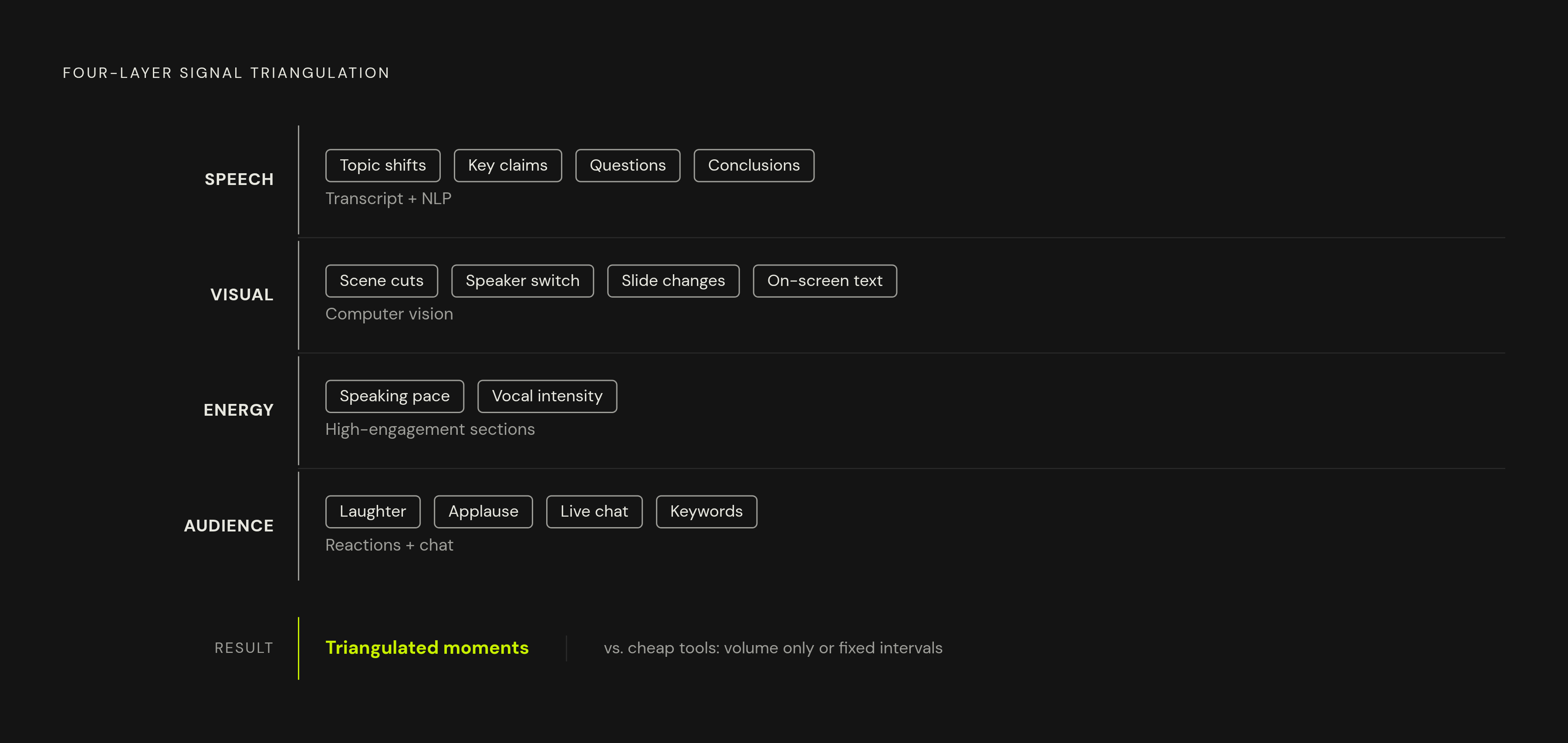
Cheaper tools still rely on blunt heuristics, slicing video into fixed intervals and surfacing segments by a single simple signal like volume. That approach is why their output needs so much manual cleanup afterward. Good repurposing tools work differently: they read footage across several layers of signal at once, and they run all of those layers together instead of picking one and calling it done.
The first layer is speech. The system transcribes the audio, then runs natural language processing over the transcript to catch topic changes, key claims, questions and their answers, and the moment a speaker lands on a conclusion. Most of the actual moment-finding happens right here, since spoken language carries the clearest signal of where something important just got said.
The second layer is visual: computer vision tracking scene changes, catching when the speaker switches (useful in panel or interview formats), reading on-screen text or graphics, picking up a slide change or a gesture landing on a point.
A third layer reads energy instead of words. Speeding up or getting more animated in a section signals that it is usually the part someone cares most about, so speaking pace and vocal intensity help pinpoint that section. Audience reactions stack on top as a fourth signal: laughter, applause, a chat reacting live, flagged keywords. Triangulating from four directions at once is what separates a tool that finds real moments from one that just finds loud ones.
The AI repurposing tool landscape: what each major option does
The tools below sit on top of finished video and pull clips out of it. That's a different job entirely from the generative video models covered next, which build new footage from nothing.
Choppity starts at $20 a month, and its standout feature is custom AI criteria. Instead of a generic virality score, a user tells the system what to look for before it runs: "find contrarian takes," or "pull the strongest hooks." The editor is transcript-native, so trims happen by highlighting text instead of dragging a timeline, which speeds up the review pass considerably. It handles source video up to 120 minutes, includes animated captions and multi-speaker face tracking, and posts natively to TikTok, Instagram, YouTube, and LinkedIn, with scheduling built into the same tab. Built for podcasters, interviewers, and course creators who want a full content operation.
OpusClip starts at $15 a month and leans on big data, checking content against current social and marketing trends across major platforms. Its newer model, ClipAnything, reads visual, audio, and sentiment cues together, so it can pull clips from talking-head videos, vlogs, sports footage, or TV clips even where there's little to no dialogue to transcribe. Built for hands-off volume, with virality scoring doing most of the decision-making instead of a human reviewing every cut.
Neither tool wins in the abstract. Choppity hands over control of the criteria. OpusClip hands over speed and scale. If the bottleneck on a team is judgment, take Choppity. If the bottleneck is hours in the day, take OpusClip. Buying both because "more options" sounds safe is how teams end up paying twice for the same clip, and that's the wrong call more often than not.
Repurposing needs and the generative AI model layer
Repurposing hits a wall sometimes. Source footage can be low-resolution, badly lit, or visually static for the whole runtime, and no amount of clever cutting fixes a shot that already looks bad. Sometimes a clip needs an intro or outro that never existed in the original recording. Footage that was never shot in the first place cannot be fixed by cutting.
That's the gap generative AI video models close. By 2026, the leading models generate clips with synchronized audio built in, hold a consistent character across multiple shots instead of drifting, and output natively in 1080p or 4K. Several of the leading models on the market now generate that synced audio natively, cutting out the separate audio post-production pass that used to be mandatory on every project.
Google's Veo 3.1 ships with native synced audio, and its Lite tier runs around $0.05 per second of generated video, among the cheapest credible options on the market. It's delivered through Google Cloud, with IAM access controls and SynthID watermarking for provenance, but it runs under Pre-GA terms with no formal SLA attached, so treat it as a tool for drafts and concepts rather than mission-critical production. For procurement-minded teams sketching out marketing concepts, that Google Cloud packaging still makes it an easier internal sell than most alternatives on the market right now.
Building the repurposing workflow step by step
Stop thinking "edit a clip." Start thinking "run a production pipeline." Same source video every time, but the output is systematic instead of occasional, which is the only way it survives someone going on vacation or getting slammed with other work.
Audit the source material before uploading anything. Not everything repurposes at the same rate, and pretending otherwise wastes a tool's time and a team's. Tutorials, interviews, product demos, and explainers cut cleanly, since they're already built around discrete points. Heavily scripted content with dense b-roll and tight editing resists clean clipping, because pulling a section out breaks the visual flow the original depended on.
Check the analytics before picking moments by hand. YouTube retention data shows where viewers kept watching and where they dropped off. Comment timestamps show what people reacted to strongly enough to type something. Moments people rewatched signal what resonated most strongly. The audience has already said what worked, often down to the exact second, so guessing when that data already exists is a wasted step, and honestly a little lazy.
Audio quality is a hard gate here, not a nice-to-have. Transcription accuracy and moment-detection both degrade fast when the source audio is muddy or inconsistent. Fix the audio before anything gets uploaded to a repurposing tool, never after.
Recency doesn't equal relevance. A webinar recorded six months ago can hold insights just as useful today as the day it was recorded. Mining only the last two weeks of content is a mistake when a much bigger archive sits there completely untouched, full of moments nobody's found yet.