Script-to-Social Video Automation for Weekly Content
Automate your weekly social videos from script to post in two hours instead of five.

A complete script-to-social pipeline
Weekly social video either runs on a system or it runs on willpower, and willpower runs out. A repeatable pipeline, from raw script to scheduled post, is what turns a five-hour Sunday scramble into a two-hour Tuesday task. AI adoption in video creation jumped from 18% to 41% of professionals in a single year, but most of that growth happened because people bolted new tools onto old habits instead of rebuilding the process itself. Adding a faster model to a broken workflow just gets you to the wrong answer quicker.
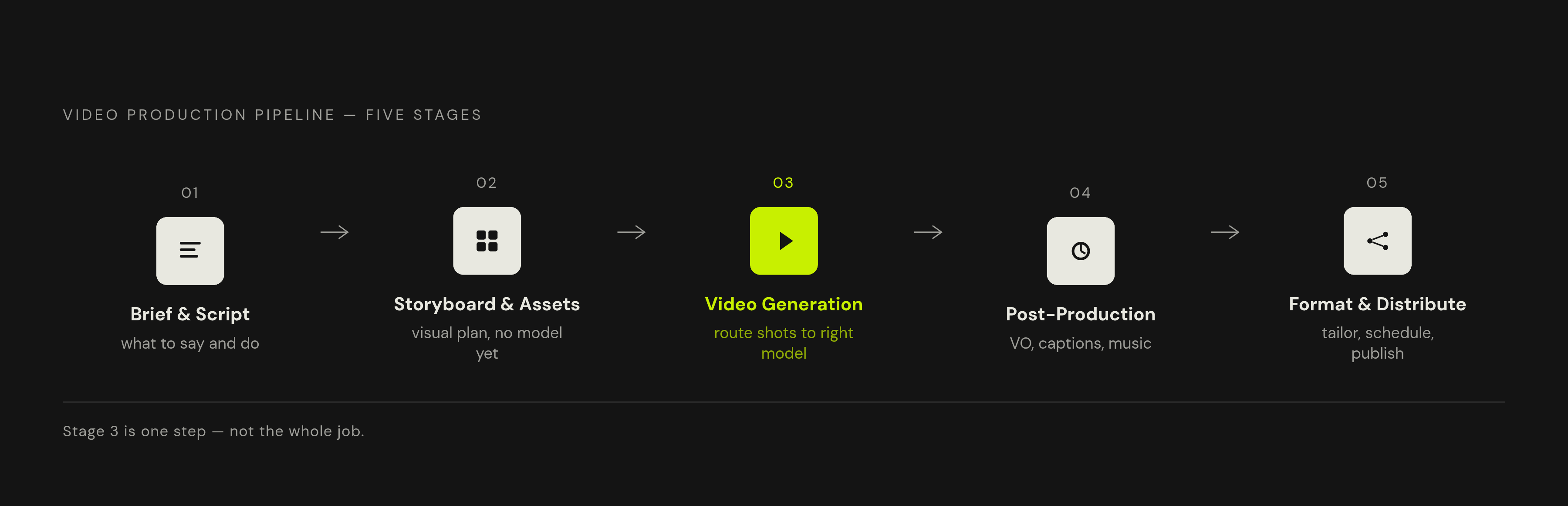
The pipeline breaks down into five stages. The brief and script make up Stage 1: what the video needs to say and do. Stage 2 is storyboarding and asset generation, the visual plan built before anyone touches a video model. Stage 3 is the actual generation: picking models, producing footage. Stage 4 is post-production, covering voiceover, captions, music, and edits. Stage 5 is format, schedule, and distribution, tailoring output to each platform and locking a publish rhythm.
AI touches nearly every one of these stages now, but the whole chain still moves at the speed of its slowest human decision, and that decision is almost always the brief. Teams running full AI video workflows report producing five to ten times more content with the same headcount and budget, and that multiplier doesn't come from one clever tool. It comes from the system connecting all five stages so nothing gets rebuilt from zero each week.
Most people get the emphasis backwards here. They treat the generation model, Stage 3, as the whole job, when it's just the middle layer. Skipping the storyboarding before it or the quality check after it causes wasted renders and blown budgets, every time.
Stage 1: Writing a brief and script that AI can execute
Opening a video generation tool before deciding what the video is for is the single most common way to waste a render. Vague input produces vague output, no exceptions.
Four decisions need to happen before any tool gets touched. First, the job: what should someone do after watching? Buy something, sign up, understand one concept. Pick one, not three. Second, the shots: a rough list of beats, three or four lines, beats a page of prose every time, since generation tools work off beats, not paragraphs. Third, the look: cinematic and moody, or bright and flat, handheld or locked-off. This single choice decides which model gets used in Stage 3. Fourth, the format: landscape for YouTube, vertical for Reels and TikTok, decided now because it changes how every shot gets framed later.
Once those four are locked, a text model like ChatGPT or Claude can turn the brief into a full script fast, as long as it's fed brand voice and told to include visual cues, not just dialogue. Locking those four turns writing a script from staring at a blank page for an hour into having a working draft in minutes.
A reusable weekly prompt structure runs five seconds for the hook, ten seconds naming the problem, twenty seconds on the solution, fifteen seconds on features or proof, ten seconds for the call to action. Bracket in visual direction under each section so the script doubles as a shot list.
Stage 2: Storyboarding with AI before touching a video model
Skipping the storyboard is where money actually disappears. Most cost overruns in AI video don't come from expensive models. They come from generating blind and iterating over and over at the most expensive stage of the pipeline. A storyboard costs almost nothing. Generation does not, and that gap is the entire argument for doing this step.
Storyboarding every frame isn't the fix. Generating four to six key frames with an image model is, just the shots that define the visual direction, camera angle, lighting, mood. That's the reference the video model needs, and it saves hours compared to sketching frames by hand or guessing at a prompt cold.
Flux, from Black Forest Labs, remains a go-to for this kind of concept-frame work. Flux.1 Krea Dev was developed with Krea AI, and Adobe folded Flux.1 Kontext Pro into Photoshop's generative fill as a beta in September 2025, putting that same capability inside a tool a lot of teams already have open.
FLUX 3 pushes further: the first major model trained jointly on video, image, and audio from one shared set of weights, generating clips up to 20 seconds with synchronized audio. It's early access by application right now, with open-weight developer versions planned later in 2026. Treat it as something to watch, not something to build a permanent workflow around yet.
Stage 3: Choosing the right video generation model for each shot
Stop trying to pick one model and call it the pipeline. Commit to the brief instead, and route each shot to whichever model does that specific job best. A single 60-second video in 2026 might legitimately pull from three different models before it's done, and treating that as messy instead of normal is the mistake.
The routing logic breaks down by shot type. Cinematic hero shots, the frames carrying the most weight, go to flagship realism models. They cost more render time, but they're the frames viewers remember. Quick B-roll and filler shots go to faster, cheaper models, where burning five takes and picking the best one costs almost nothing. Talking-head and explainer segments do better with AI avatars paired to a cloned or stock voice rather than pure text-to-video, since lip-sync and message clarity hold up more reliably that way.
On the model landscape itself, as of early 2026: Veo 3.1 (Google) leads on cinematic polish and audio quality, with sound synchronization genuinely ahead of the field. Veo 3.1 Lite cut costs significantly for developers who don't need the full flagship version, and it's a strong pick for teams working at the lower end of the flagship's price point.
Kling 3.0 (Kuaishou) handles human motion better than almost anything else on the market: walking, dancing, gesturing, full action sequences. It supports multilingual dialogue with lip sync. It's the most cost-effective option for high-volume output too, though it's built primarily for the Chinese market, with documentation and interface mostly in Chinese.
Seedance 2.0 Fast (ByteDance) is the sensible starting point for most teams. The barrier to trying it is close to zero, and the output already covers the majority of commercial use cases. It's also a cheap way to test a camera angle before committing to an expensive render elsewhere.
Wan 2.6 (Alibaba) leads on multi-shot narrative cohesion when the shots were planned out in advance. That loops right back to why Stage 2 matters.
Luma Dream Machine, running on Ray 3.14, is the value pick for image-to-video work, producing motion that respects physics without enterprise pricing attached.
Sora 2, from OpenAI, is a warning, not an option: the consumer app closed on April 26, 2026, and the API sunsets September 24, 2026. Building a new workflow around it now is a wasted afternoon.
Native audio generation went from rare to standard in about a year. In early 2025, essentially none of the leading models generated synchronized audio on their own. By early 2026, most of the major ones, Veo 3.1, Kling 3.0, and Kling Video O3 among them, generate audio and video together, no separate voiceover pass required.
Stage 4: Post-production (assembling, polishing, and caption-proofing generated footage)
Raw clips out of any generation model still need assembly. Nothing goes straight from model to feed, no matter how clean the render looks on first pass.
Editing tools built around transcript text let editors cut a video by deleting words on a page rather than scrubbing a timeline frame by frame, and they strip silences and filler words automatically. That removes a chunk of manual work that used to eat an afternoon.
Voiceover is where the time savings appear fastest. Tools like ElevenLabs handle text-to-speech and voice cloning well enough that recording a fresh voiceover from scratch every week stops being necessary.
Captions are the baseline. They're the baseline. A large share of people watch social video with the sound off, especially on mobile, so a video without captions is a video much of the audience never actually hears. Tools like ZapCap automate the caption pass with animated styles, support for a wide range of languages, and an API for teams captioning at volume.
Music and sound effects can come from generative tools like Suno and Udio, but the legal ground here is genuinely unsettled: purely AI-generated output can't be registered as copyrighted work, and the legal landscape around what these platforms trained on remains actively contested. That doesn't cancel out the convenience, but a brand should know this before building a whole content calendar on top of it.
Instead of producing every short clip as its own project, take one long recording, a podcast, a webinar, an interview, and run it through a tool like QuickReel to cut it into multiple short-form pieces, captioned and sized for TikTok, YouTube Shorts, and Instagram Reels in one pass.
None of this needs reinventing weekly. A fixed caption style, a small approved list of music tracks, a standard intro and outro, set once and applied every time. Post-production is a review pass rather than a build, since the system already exists and only needs checking.
Stage 5: Formatting for each platform and building the publish schedule
Aspect ratio gets decided at the brief stage, not fixed in editing afterward, because it changes how every shot gets framed during generation. Vertical, 9:16, is becoming the default assumption for social video in 2026, with landscape and square reserved for specific platforms.
TikTok rewards trend awareness and offers the highest ceiling for organic reach, with engagement still climbing. Clips under 60 seconds get an algorithmic boost, and the sweet spot is 15 to 30 seconds. TikTok also functions as a search engine: keywords spoken out loud and placed in on-screen text and captions get indexed, since TikTok reads the audio too.
Instagram Reels now account for a substantial and growing share of time spent on Instagram. It fits lifestyle, fashion, food, and e-commerce content well, with an optimal length around 15 to 45 seconds.
YouTube Shorts works best for discoverability and for extending existing long-form content, favoring educational and how-to material from channels with some established authority. Optimal length runs 15 to 35 seconds, and YouTube offers monetization options for Shorts creators.
LinkedIn serves a B2B audience looking for professional insight, and square or landscape formats outperform vertical here, the opposite pattern from everywhere else.
Facebook Reels is growing fast in 2026 and still sits underused by most creators, which makes it one of the more overlooked distribution channels available right now. Reformatting one video for four platforms used to mean four separate edits. AI workflows now handle that automatically, cutting the reformatting time down to almost nothing.
One rule overrides every length recommendation above: completion rate beats duration. A 45-second video that people actually finish will outperform a 15-second video that loses half its audience by the third second, and that holds across all three major short-form platforms. The hook in the first two seconds decides everything downstream. There's no negotiating that one.
Building the workflow as a reusable system, not a one-time production
None of the five stages above matter individually as much as the fact that they connect. A brief template that gets reused. A storyboard habit that becomes automatic. A short list of models, each mapped to a specific shot type. A post-production preset that never gets rebuilt from scratch. A publish schedule that runs on its own logic instead of getting reinvented every Sunday night.
That's the actual shift happening in 2026. AI got better at video, sure, but the teams pulling ahead are the ones who stopped treating each video as its own project. Locking in format, tone, and model choice once means every week after the first costs roughly the same amount of effort. The tools will keep changing: models will get replaced, new ones will appear, old ones will sunset the way Sora 2 just did. The pipeline built around them is what survives that churn.