AI Image Generation for Video Assets Without Rights Conflicts
Learn which AI platforms offer legal protection for commercial video without costly rights disputes.
AI-generated images are not automatically rights-safe, and treating them as if they were is the single most expensive mistake a production team can make in 2026. The right platform license makes these images legally usable in commercial video, but copyright and commercial license are two separate questions, and you need separate answers for each. This article walks through both, then builds the operational workflow, model selection, prompting practice, and deployment checklist, that lets a team move fast without creating legal exposure.
Why "the AI made it" is not a legal shield
Thaler v. Perlmutter settled the foundational question in the U.S.: a purely AI-generated work, with no human authorship, does not qualify for copyright protection. No human author means no copyright, full stop on the ownership side, though not on the usability side.
The EU arrives at a similar place through a different door. The CJEU's "free and creative choices" test asks whether a human made the meaningful compositional decisions in a given work. The UK stands apart from both. Its Copyright, Designs and Patents Act permits copyright in computer-generated works, so if you distribute into the UK market, you operate under a standard that differs materially from U.S. or EU law.
This cuts both ways for anyone producing commercial video. The same logic protects the producer: generating and using such an image generally does not infringe anyone else's rights, provided the platform that produced it granted a valid license to do so.
That last clause is where the real work lives, and what governs daily production is whether there is a valid commercial license from the platform whose tool produced the image, not whether the image is owned. The license, not copyright, is where the workflow starts, and everything else in this article builds from that starting point.
License tiers and risk across AI image platforms
Commercial licensing terms differ sharply from one platform to the next, and from one tier to the next inside the same platform. Choosing a tool without reading its terms is the most avoidable rights risk anywhere in an AI image workflow, and it is avoidable precisely because the information is sitting in plain text in the platform's own documentation.
Three rough tiers of commercial risk map a production workflow against. At the top sits the indemnified enterprise tier. Adobe Firefly, on its paid plans, trains on Adobe Stock, openly licensed content, and public domain material rather than unverified web scrapes, and Adobe's own FY2024 10-K confirms that certain businesses can obtain intellectual property indemnification for AI-generated content produced through most Firefly-powered workflows under Adobe Firefly for Enterprise. That indemnification is what makes Firefly one of the safest mainstream choices: Adobe is assuming part of the legal liability itself.
A step below that sits the licensed-data tier. These platforms offer a clean, documented rights chain and are built for enterprise use, though they do not extend the kind of personal indemnification Firefly offers on its business tiers.
Before any platform enters a production pipeline, three questions need answers. And check whether the output resembles existing copyrighted material too closely, because courts have rejected "the AI made it" as a defense: an asset that looks like a specific film, ad, or an identifiable artist's work carries exposure no matter which tool generated it.
The practical heuristic comes down to risk tolerance. A team with high legal exposure, client contracts, regulated industries, large ad budgets, reasonably chooses Firefly for its indemnification even when the image quality trails other models. If a team has higher risk tolerance, it reasonably chooses Flux for stronger output and accepts a less documented rights chain in exchange.
New disclosure obligations in 2026 that change what "commercially safe" means
A valid commercial license does not satisfy the disclosure requirements that took effect in 2026. So before any synthetic-image asset reaches a public-facing video, you now need a second layer of workflow decisions, on top of whatever licensing check already happened.
In the U.S., New York's Synthetic Performer Disclosure Law took effect June 9, 2026, and it requires advertisers to conspicuously label AI-generated human likenesses. Digital ad targeting routinely crosses state lines, so this law reaches most national U.S. campaigns, not just New York-based advertisers.
In the EU, transparency obligations under the AI Act apply from August 2, 2026, and require providers of generative AI systems to implement machine-readable marking on synthetic image, audio, video, and text outputs. Separately, deployers of these systems face their own disclosure duties around deepfakes and certain AI-generated content that touches the public interest.
Two practical consequences follow for a video production workflow. Any AI-generated image of a person used as a video asset in a paid ad targeting U.S. audiences needs conspicuous labeling built in at the creative production stage, not bolted on later through a platform setting. If you produce for EU distribution, you need to confirm, before production starts, that your platform or export chain supports machine-readable content credentials.
Rights and disclosure together form the compliance floor. Clearing that floor is what makes the next question, which models to actually generate with, a production decision rather than a legal one.
Which AI image models to use for video assets
No single model wins every job in a commercial video pipeline. Routing each task to the right tool is itself a production skill; if you treat models as interchangeable, you get assets that either look wrong or carry rights risk nobody flagged in time.
Most commercial video work runs on the FLUX family as its still-image layer. A two-step workflow runs through the family cleanly. When materials, lighting, and typography need to hold up under close inspection, FLUX Pro handles that finishing work. That split maps onto video production directly: a Klein output becomes a storyboard frame, and a Pro output becomes the clean base image that an image-to-video model will later animate. Flux Pro is available through cloud APIs, generates in seconds, and requires no expensive subscription for API access, which makes it the primary choice for most commercial jobs. For ecommerce video, Flux 2 Pro excels at photorealistic product rendering with accurate lighting and shadows, so it is the practical default for product-catalog image-to-video work.
Recraft V4 serves a different need: brand-grade design assets. Recraft's own description of the model states it was developed in close collaboration with designers and tuned around design aesthetics and professional expectations, giving it stronger visual judgment across composition, lighting, color relationships, and material realism than models built around general audience preference. Two versions serve two production stages. The standard V4 runs in roughly ten seconds, so it suits iteration and daily work. V4 Pro takes roughly thirty seconds and produces higher resolution output suited to print-ready and large-scale assets that need to survive production review. You get the best fit in video work from brand systems, campaign visuals, and any asset where visual coherence across multiple frames matters, because its anti-stock aesthetic cuts down on outputs that read as generic.
Adobe Firefly earns its place when legal risk outweighs image quality concerns. The trade-off is honest: Firefly produces lower image quality than Flux or Recraft V4, and a team choosing it is making a risk-management decision, not a creative one.
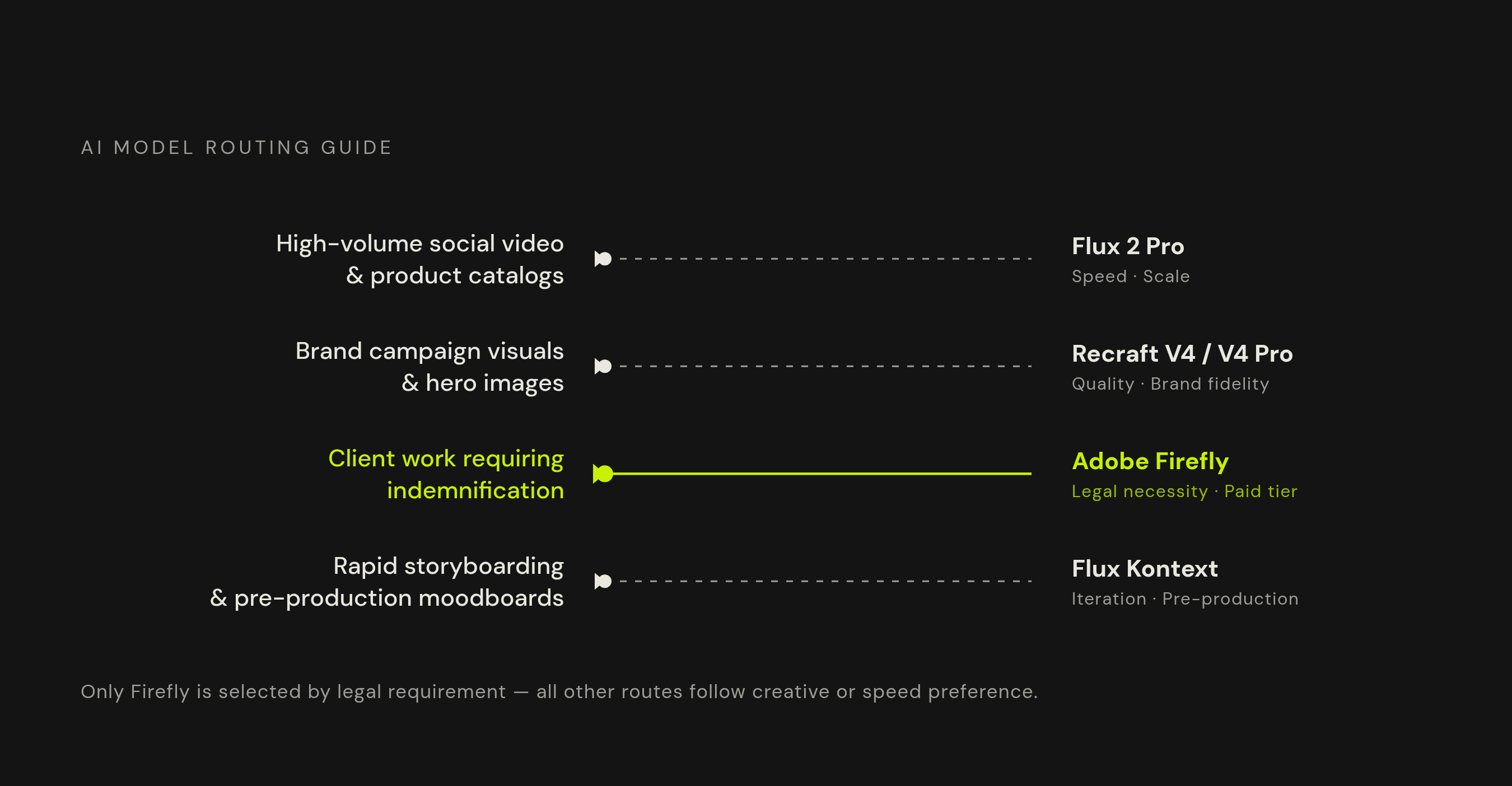
A practical routing guide follows from all of this. If you need high-volume social video assets and product catalogs, you route to Flux 2 Pro for photorealism and consistent lighting. If you need brand campaign visuals and hero images, you route to Recraft V4 or V4 Pro for design-grade composition. Client work where indemnification is a contractual requirement routes to Adobe Firefly on a paid business tier. For rapid storyboarding and pre-production moodboards, you route to Flux Klein, which trades finishing quality for speed.
Building a prompt practice for commercially usable images
A prompt that produces a usable commercial asset follows specific, learnable patterns, unlike one that burns through generation credits. It has nothing to do with technical skill and everything to do with thinking like a creative director briefing a photographer rather than a programmer configuring a system.
Write prompts as briefs, not keyword lists. "Soft window light from camera left" produces a more usable, more professional-looking result than "natural light," because lighting is what separates an asset that reads as professional from one that reads as synthetic.
Prompting discipline is also where you manage rights risk before it ever becomes an output problem. A prompt referencing a specific brand name, a living artist's style, or a recognizable character creates the same trademark and training-data infringement risk discussed earlier, and the mitigation for that risk starts at the prompt, not after the image is generated. DALL-E 3 is built to decline requests made in the style of named living artists, but many other models enforce no such restriction, which puts the responsibility squarely on the person writing the prompt.
A two-pass workflow turns this discipline into a repeatable production step. In pass one, exploration, you use Flux Klein or an equivalent fast model to generate multiple compositions quickly, so you can establish visual language and framing before you spend money on finishing. Pass two, finishing, uses Flux Pro or Recraft V4 Pro to commit to the approved direction and generate at production resolution, with full attention to lighting, materials, and detail.
Keep a record alongside every generation: tool, tier, date, and the exact prompt used. That record is the evidence that demonstrates human creative contribution and license compliance if a rights question comes up later, and for client-facing work it doubles as the deliverable proving the asset came from a commercially licensed tier. Once a production-ready image exists with that record attached, the next step is turning it into motion.
Turning rights-safe static images into video assets using image-to-video models
A rights-safe static image generated through the workflow above is the most reliable starting point for AI video production, because it hands the production pipeline a documented, commercially cleared base frame. That stands in sharp contrast to when you generate video directly from a text prompt into whatever opaque training data sits behind a given model.
Image-to-video is the rights-safer route for a concrete reason: anchoring generation to a licensed, cleared starting image gives the whole chain documented provenance. The model is animating a real commercially licensed asset rather than synthesizing an entire scene from an unverifiable prompt. When the base image came from a platform with a clean commercial license, the rights chain for the resulting video is far easier to document and defend if anyone ever asks.
Model routing for image-to-video follows the job at hand. Kling leads on image-to-video quality at accessible price points, so it fits product video, social-first clips, and high-volume iteration well when the base image is a product shot or ecommerce asset. For teams animating large product catalogs, Imagen 4 Ultra produces exceptionally consistent results across large batches, which matters when hundreds of SKUs need to feel like they belong to the same visual family.
Running Flux for still-image generation, then routing to Kling or Veo for animation, then editing for format and platform, all inside one unified platform, removes the subscription management and file-transfer friction that otherwise breaks a pipeline once it scales past a handful of assets. For teams producing across ads, explainers, and social clips from the same creative brief, a unified workflow is what makes the rights-safe, high-volume production model workable day to day.
A repeatable checklist for deploying AI image assets in commercial video without rights conflicts
Rights-safe AI video production is a decision made at five specific points in every production cycle, and teams that build these checks into their standing process can move at the speed AI generation allows without accumulating rights risk along the way.
The first check is platform tier: confirm the AI image and video tools in active use sit on a paid plan that explicitly covers commercial use, paid ads, and client delivery, since free tiers commonly exclude exactly these use cases. The second is training data: for high-stakes assets, choose a platform with a documented training data rights chain, such as Firefly, or a self-hosted open-weight model under a clean license, such as Flux under Apache or CreativeML terms, and avoid opaque training sources for anything that will run in paid media. The fifth is disclosure: if an asset includes an AI-generated human likeness and will run in U.S. paid media, confirm the labeling meets New York's Synthetic Performer Disclosure Law, and for EU distribution, confirm machine-readable content credentials are in place under the August 2026 AI Act obligations.
Documentation turns this checklist into a permanent record. A production log for every commercial asset, recording the tool used, the tier or plan, the date generated, the exact prompt, and any substantial human edits applied afterward, is the evidence of both license compliance and human creative contribution if a rights question ever surfaces. That last category, substantial human editing, carries its own legal weight: cuts, color grading, compositing, and sound design are what create a protectable copyright layer on top of a raw AI output under both U.S. and EU frameworks, so those contributions are worth logging separately from the generation step itself.
An 80/20 allocation keeps this whole approach sustainable at scale. AI image generation handles the high-volume, lower-risk layer, social posts, ad variants, explainer backgrounds, training video assets, where speed and cost savings do the most work. Original photography or commissioned illustration stays reserved for the assets where exclusivity is a genuine business requirement: a logo, a hero image for a flagship campaign, or any visual the business needs to defend as uniquely its own. Teams that build this workflow now are not just avoiding today's rights risk. They are building a production capability that compounds in value as model quality keeps improving around them.