Text-to-Video Workflow for Explainer Video Production
AI tools slash explainer production time and cost, making multiple versions manageable.
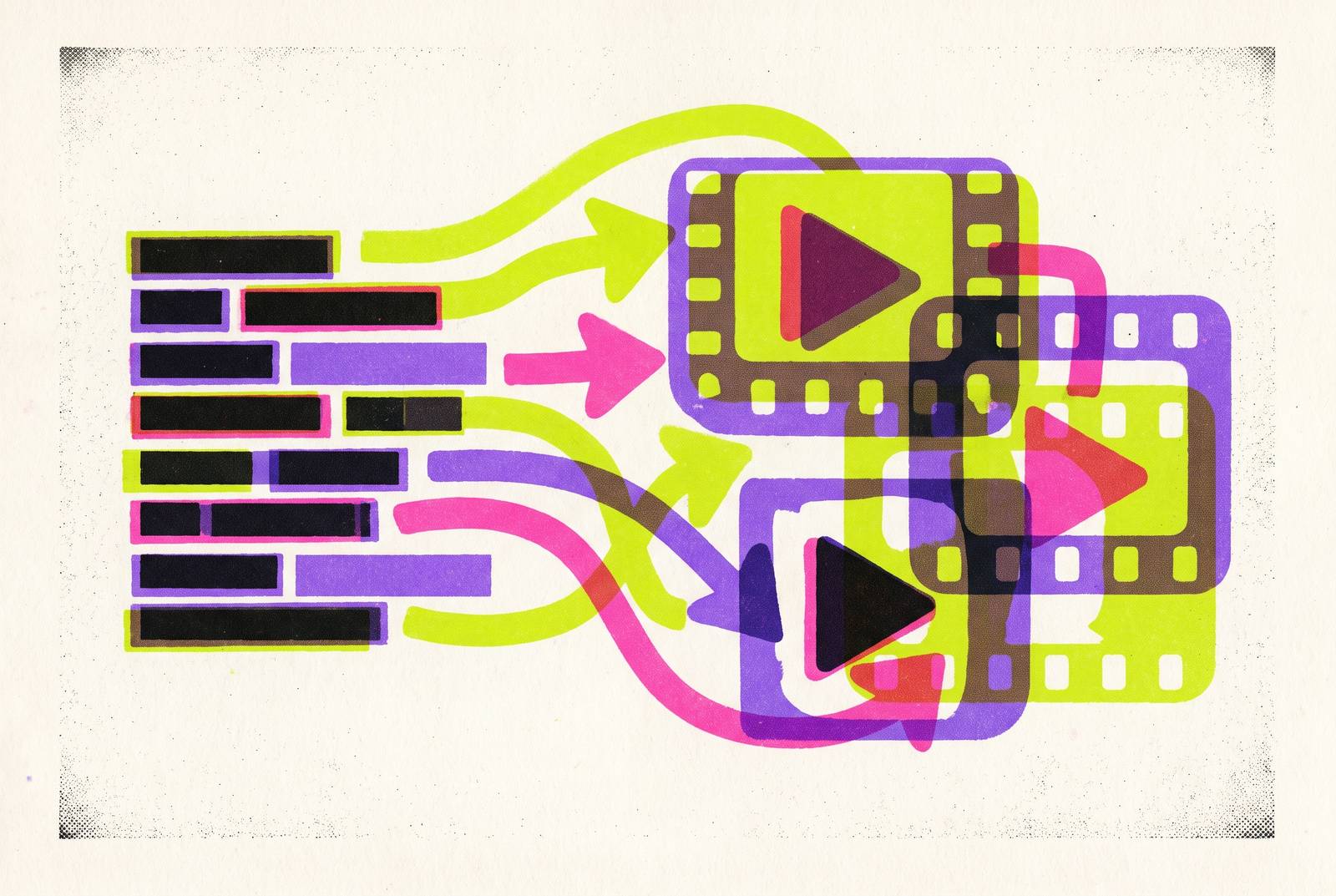
Explainer video demand has blown past what studios and freelance crews can turn around. Marketers now need a version for one professional networking platform, a version for one short-form video platform, a version for the sales deck, and a localized cut for three different markets, often in the same week. A modern text-to-video workflow answers that problem by breaking explainer production into a repeatable sequence: script, scene list, prompts, generation, voiceover, edit. What used to take weeks and cost real money now takes minutes, and the sequence below shows how to run it.
Traditional explainer production runs $1,500 to $10,000 per finished minute once scripting, voiceover, motion graphics, and revision rounds get added up. Turnaround is measured in weeks, not days. Meanwhile the audience keeps growing: DataReportal's Digital 2026 Global Overview Report puts the share of online adults who watched online video in the past 30 days at 94.6%. The bottleneck has always been production capacity, not demand, and AI video generation collapses the timeline so a small team can apply judgment across more variations than a five-person crew could ever manage in the same week. It's been production capacity, and AI video generation collapses the timeline so a small team can apply judgment across more variations than a five-person crew could ever manage in the same week.
What a modern text-to-video explainer workflow looks like end to end
An AI explainer video, in practical terms, is a short video, usually 60 to 120 seconds, that walks through a product, a concept, or a process. It gets built using AI tools for scriptwriting, visual generation, voiceover, and editing, strung together in that order, and skipping the order is where most of these videos go wrong.
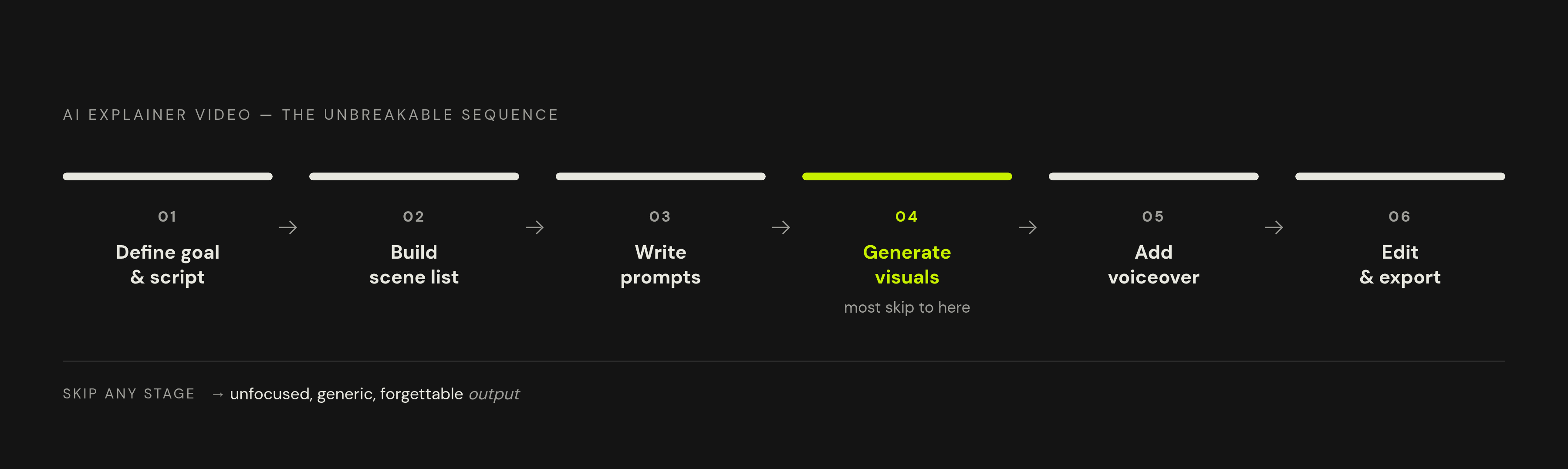
LTX's August 2026 explainer guide describes a sequence that holds steady: define the goal, write the script, build a storyboard, generate the visuals, add voiceover, then edit and export. AI speeds up every stage in that chain, but it doesn't erase the chain itself. Jump straight from idea to generation, skip the script, and the output looks exactly like what it is: unfocused, generic, forgettable. No amount of model quality fixes a video built on a script nobody wrote.
AI-assisted content and AI content look different on screen because they are not the same thing. In the first case, a person guides the idea, the structure, the tone, and the final edit, and the AI tools do the heavy lifting inside that frame. In the second, the tool gets handed too much control and the result feels handed over. Cliprise's AI video stack analysis found that creators doing this work went from averaging 1.2 tools to 3.4 tools, and every handoff between tools adds a chance for versions to drift out of sync, including a color grade that doesn't carry over, a voiceover cut to the wrong length, or a scene rebuilt from a stale draft. Platforms that fold script input, scene generation, voiceover, and editing into one interface, VideoGen among them, cut down on exactly that fragmentation.
Defining your explainer goal and scripting the foundation before any generation begins
Nothing downstream matters if the script is weak. A vague script fed to even the best video model on the market produces vague, unfocused video. That's the one rule that doesn't bend.
For a standard 90-second explainer, aim for roughly 150 words per minute of narration, structured as problem, then solution, then how it works, then benefit, then a call to action. LTX's 2026 explainer guide recommends this shape because it mirrors how people actually process a pitch: what's wrong, what fixes it, how the fix works, why it matters, what to do next.
Before writing a single line, pin down the one job the video has to do. Awareness, conversion, onboarding, and training each pull the tone, length, and visual approach in a different direction. An onboarding video and a conversion ad have no business looking or sounding the same, even when they're covering the same product.
Learning content runs longer, and that's fine. Coursera's course design research points to videos in the 6 to 8 minute range for instructional content, longer than a marketing explainer because the topic actually needs the extra runtime to land. Even at that length, each section should still follow its own mini version of the problem-to-benefit arc rather than sprawling into a lecture.
A few decisions belong at this stage, before any tool gets opened: who's watching and what they already know, what single action the video needs to drive, and how long the finished cut should run given that goal. The tighter the script, the less the AI model has to guess, and guessing is where visual drift and generic output come from.
Turning the script into a scene list and visual brief the AI can act on
A scene list is the explainer's storyboard, built for a machine to act on instead of a camera crew. Each beat in the script maps to a shot: what it shows, where the camera sits, what the environment looks like, how things move. All of that gets nailed down before any generation tool gets touched, and skipping this step to save an afternoon usually costs three afternoons in revisions later.
Two generation modes cover almost everything. Text-to-video works when the visual concept is still loose, still being figured out, and creative flexibility matters more than precision, good for B-roll, establishing shots, conceptual sequences. Image-to-video works when a specific asset, such as a real product photo, an approved brand visual, or a presenter's face, has to show up correctly. The model adds motion on top while holding that visual reference steady.
Most explainers end up mixing both. B-roll and mood-setting shots come from text-to-video; anything that needs a product to look exactly right, or a character to stay recognizable across scenes, goes through image-to-video. Splitting visual development from motion this way lets a team approve a composition, a color palette, or a product render as a still image before a single frame moves, which is far cheaper than catching the same mistake after animation.
A workable scene list tracks the scene number and the script line it covers, the shot type and camera movement, the subject and environment and lighting note, which generation mode applies, and an audio note for where narration, sound effects, or music alone should sit. Flux-ai.io's 2026 model guide states that a cleaner keyframe going in leaves less for a video model to invent, producing steadier resulting motion.
Writing prompts that give AI video models enough structure to follow
Prompt engineering for AI video means structuring text instructions so the model has enough to go on across subject, action, camera, lighting, environment, and style. Loose prompts get loose results, every time.
The prompt structure that holds up in 2026 breaks into four parts, applied to every scene: the subject, described specifically enough (job title, clothing, age range, object type) that the model isn't left guessing, the action, the camera direction, and the lighting and environment. "Medium close-up, slow push-in" gives the model something to execute. "Dynamic" gives it nothing.
Stick to one primary action per prompt. Models handle a single action well, two adequately, and three rarely; stack more than that and the output starts falling apart, limbs blurring, motion stuttering, the whole scene losing coherence. Negative prompting helps too: naming what to exclude, blur, text artifacts, extra limbs, fast cuts, boxes the model's invention in before it wanders.
Product-first explainers should lead the prompt with the product itself, add a camera move that reveals it gradually, and keep the environment clean and on-brand. Once a prompt produces a scene, save it as a template. Swapping only the subject and action for the next scene keeps visual consistency across the whole video without extra work.
Choosing which AI video model to use for each scene type
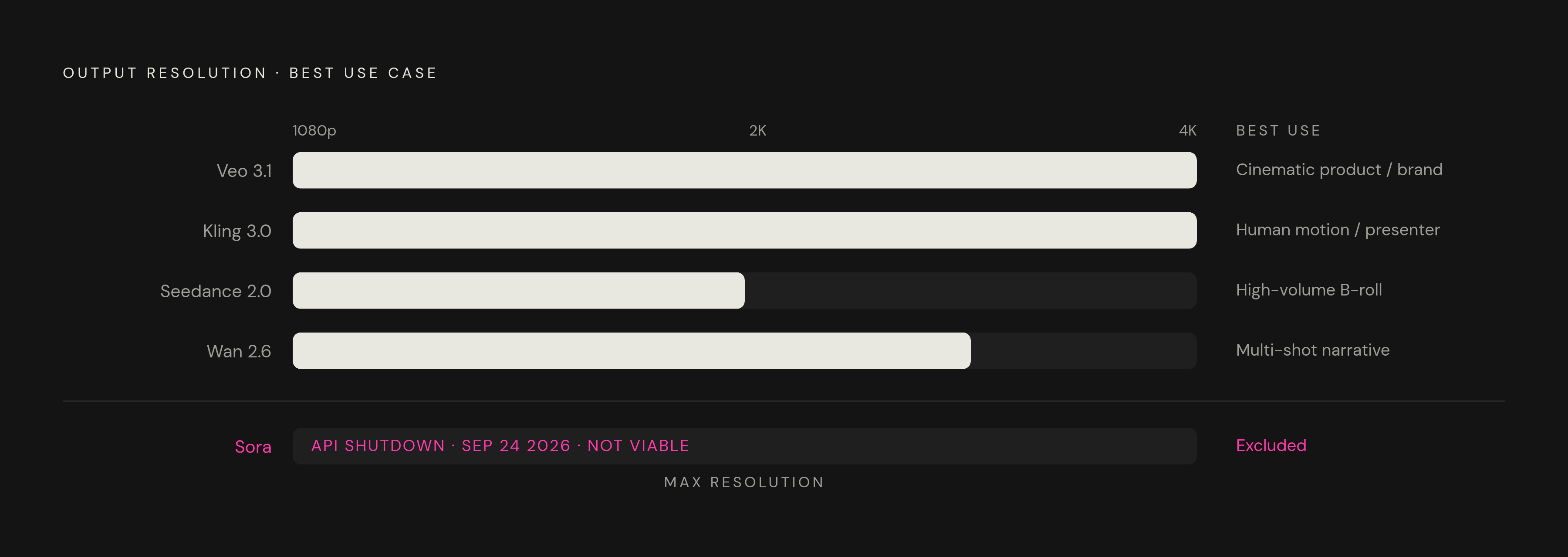
As of mid-2026, four models get compared constantly: Veo 3.1, Kling 3.0, Seedance 2.0, and Sora 2. Veo 3.1 and Kling 3.0 both output up to 4K, while Seedance 2.0 tops out at 1080p on some platforms (720p natively, per its technical paper). Capability ceilings, how audio gets handled, and what each model is built to do well set the models apart, separate from the marketing copy around any of them.
One update matters for anyone building a workflow around this now: OpenAI pulled the Sora web and mobile app on April 26, 2026, with the API set to shut down September 24, 2026. Sora is not a viable pick for a workflow being set up today, no matter how it performed a year ago.
Veo 3.1 (Google) outputs 4K at 60 frames per second with synchronized audio built in, making it the pick for cinematic product shots, polished brand sequences, and anything where the audio has to land in sync. It's available through Google Vids, the Flow platform, the Gemini API, Vertex AI, the Gemini app, YouTube Shorts, and Google AI Studio. Audio quality is strongest in English and major European languages, so test the target language before scaling a localized run rather than assuming it'll hold up.
Kling 3.0 (Kuaishou) caps a single generation at 15 seconds but leads on natural human motion, walking, gesturing, demonstrating, which makes it the right call for presenter-style segments. It's accessible globally through klingai.com in English across 224 countries and regions.
Seedance 2.0 Fast (ByteDance) costs $0.022 per second, which makes it the sensible starting point for most teams, not an afterthought. The barrier to iterating is close to nothing, and the quality holds up for most commercial use, especially high-volume B-roll and fast concept testing, where a lower cost per iteration lets teams generate and discard more versions before settling on one.
Wan 2.6 generates a video in about 20 seconds, the fastest option on the list, and it leads on cinematic multi-shot narrative when the shots are planned out ahead of time.
LTX-2.5 (Lightricks), open-source and released August 2026, generates a 10-second clip in 6.8 seconds on two NVIDIA GB200 GPUs at 720p (API latency runs higher). It handles native multishot generation and outputs 4K at 50 frames per second, a solid option for teams that want local deployment or plan to fine-tune for a specific domain.
Running multiple models side by side, Veo 3.1 for product shots, Kling 3.0 for anything with human motion, Seedance 2.0 for volume B-roll, has become the standard approach rather than the exception. VideoGen brings Veo, Kling, Flux, and ElevenLabs into one interface, which cuts the tool-switching overhead that a multi-model setup would otherwise create.
Generating and selecting keyframe images before animating scenes
A lot of weak AI video traces back to the image stage, not the video stage. That's where teams should be looking first when a scene comes out muddy, not at the video model's settings. The principle holds across model guides: a clean keyframe means the video model has less to invent, and less invention means steadier motion.
For any image-to-video scene, generate the keyframe first with a text-to-image model, look it over and approve the composition, then hand it off to the video model. That order separates the decision of "does this look right" from the decision of "does this move right," so one bad call doesn't compound into the other.
The Flux model family from Black Forest Labs, based in Freiburg, covers most keyframe needs. Flux.2 Flex is built for developers who want to trade off typography accuracy against latency, and it handles text rendering and typography up to 4MP, useful for product mockups, interface shots, anything where on-screen text has to actually read clearly. FLUX 3 goes further, generating up to 20 seconds of video with native synchronized audio in a single pass, covering text-to-video, image-to-video animation, and video continuation, all built on Black Forest Labs' Self-Flow architecture. Flux.1 models have drawn strong user-rated quality marks in independent comparisons.
For explainer work specifically, generate interface mockups, product shots, and process diagrams as still images first, then animate them. Asking a video model to invent a precise technical visual from a blank prompt is asking for trouble: text garbles, interfaces warp, logos drift off-model. Before anything gets animated, line up every keyframe for a given character, product, or environment side by side. Catching drift here, before motion enters the picture, is far cheaper than catching it after.
Adding voiceover and audio so the explainer sounds as good as it looks
Several major models, Kling 3.0, Veo 3.1, and Seedance 2.0 among them, now generate synchronized audio natively as of early 2026. Dialogue, ambient sound, sound effects: all of it happens during generation now, not bolted on afterward in post.
Native audio and dedicated voiceover tools still serve different jobs, and treating them as interchangeable is a mistake. Native audio handles ambient sound and effects fine, but it's less reliable when narration needs exact timing and exact word choice. For scripted explainer narration, a dedicated AI voice tool, ElevenLabs through VideoGen being one option, gives full control over pacing, tone, and language, and supports multiple languages for localized versions.
Timing math matters here, and it's cheap to check. A script running at 150 words per minute gives about 54 seconds of narration for a 135-word script, so run that math before generating voiceover, not after discovering the audio runs long or short against the picture. Keep background music lower in the mix than the voice track; music should support the tone, not compete with narration for attention. Motion should match the audio's energy too: a hyperactive camera fighting a calm, measured voiceover undercuts how much a viewer actually absorbs.
Localization needs its own check, separate from the English version. Veo 3.1's lip-sync drifts more in smaller languages, so test the target language before committing to a model or a voiceover approach for a non-English cut. VideoGen's integration of ElevenLabs inside the same platform skips the export-import cycle that normally happens when video and audio live in separate tools.
Assembling and editing the final explainer from generated scenes
Generated clips are raw footage, nothing more. Selection, ordering, trimming, pacing: none of that gets decided by the generation step. Those calls still belong to a person sitting at a timeline, and no model release changes that.
Lay the narration track down first. It sets the timing that every other element in the edit has to match, since the voice carries the structure the whole video is built around. From there, scenes get slotted against that track, trimmed to fit, and checked against the visual style and pacing decided back at the scene-list stage. The workflow only holds together end to end if each earlier stage, the script's structure, the scene list's shot plan, the prompt's consistency, is still visible in what gets assembled. Skipping a stage leaves a gap that appears in the final cut no matter how good any individual clip looks on its own.